

Here I will explain how you can use C# code to write things to Excel. Certainly, there are several good pre-made plugins available which directly write your output to an Excel file. This is more like learning the old school way of how it was done.
Create a simple Console Application to interop excel dll.
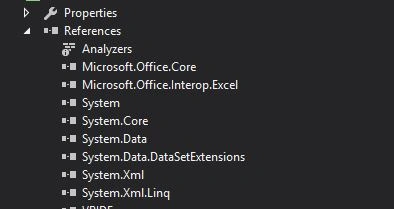
Now, you can paste this code in your class.
- class Program
- {
- static void Main(string[] args)
- {
- Application xlApp = new Application();
- if (xlApp == null)
- {
- //just to check if we get hold of the excel aplication
- return;
- }
- Workbook xlWorkBook;
- Worksheet xlWorkSheet;
- object misValue = System.Reflection.Missing.Value;
- xlWorkBook = xlApp.Workbooks.Add(misValue);
- xlWorkSheet = (Worksheet)xlWorkBook.Worksheets.get_Item(1);
- xlWorkSheet.Cells[1, 1] = "Sheet 1 content";
- //you can basically do what every you want
- xlWorkBook.SaveAs("f:\\csharp-Excel.xls", XlFileFormat.xlWorkbookNormal, misValue, misValue, misValue, misValue, XlSaveAsAccessMode.xlExclusive, misValue, misValue, misValue, misValue, misValue);
- xlWorkBook.Close(true, misValue, misValue);
- xlApp.Quit();
- releaseObject(xlWorkSheet);
- releaseObject(xlWorkBook);
- releaseObject(xlApp);
- }
- //so that we dont leave any memory leaks
- private static void releaseObject(object obj)
- {
- try
- {
- System.Runtime.InteropServices.Marshal.ReleaseComObject(obj);
- obj = null;
- }
- catch (Exception ex)
- {
- obj = null;
- }
- finally
- {
- GC.Collect();
- }
- }
- }
Former memberPosted Nov 19, 2018, 7:17 PM
You can try ZetExcel.com
Asad AliPosted Jul 27, 2016, 4:46 AM
Thanks :)
kalu singh raoPosted Jul 27, 2016, 1:50 AM
Nice share