
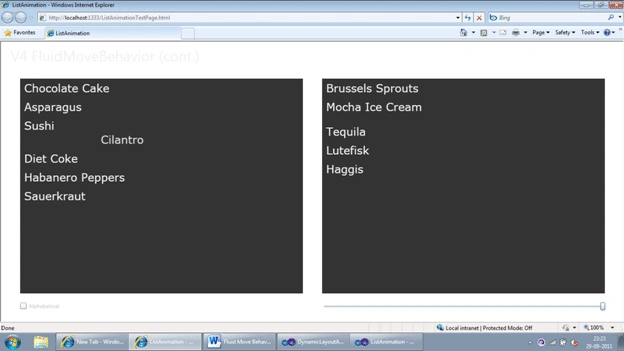
In this article we are going to learn about the List animation in Fluid UI.
Let's start up with a New Silverlight Project.
Let's add a few References.
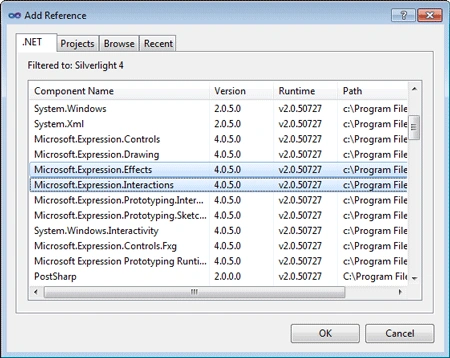
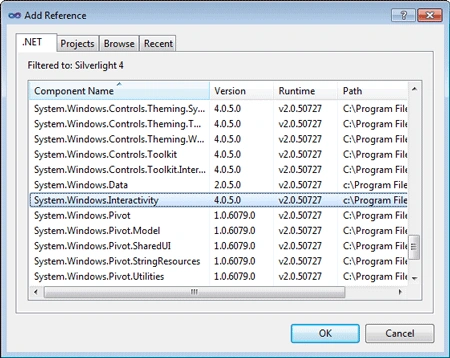
Once we have added the References we can add the data for our List. This will be our DataModel.
Below is the code for the DataModel:
public
class FoodModel
: INotifyPropertyChanged
{
private List<FoodModelItem>
masterList = new
List<FoodModelItem>()
{
new
FoodModelItem() { Name =
"Chocolate Cake", IsLiked =
true, Order = 10 },
new
FoodModelItem() { Name =
"Brussels Sprouts", IsLiked =
false, Order = 11 },
new
FoodModelItem() { Name =
"Mocha Ice Cream", IsLiked =
true, Order = 12 },
new
FoodModelItem() { Name =
"Asparagus", IsLiked =
false, Order = 13 },
new
FoodModelItem() { Name =
"Sushi", IsLiked =
true, Order = 14 },
new
FoodModelItem() { Name =
"Cilantro", IsLiked =
false, Order = 15 },
new
FoodModelItem() { Name =
"Diet Coke", IsLiked =
true, Order = 16 },
new
FoodModelItem() { Name =
"Tequila", IsLiked =
false, Order = 17 },
new
FoodModelItem() { Name =
"Habanero Peppers", IsLiked =
true, Order = 18 },
new
FoodModelItem() { Name =
"Lutefisk", IsLiked =
false, Order = 19 },
new
FoodModelItem() { Name =
"Sauerkraut", IsLiked =
true, Order = 20 },
new
FoodModelItem() { Name =
"Haggis", IsLiked =
false, Order = 21 }
};
private
ObservableCollection<FoodModelItem>
foodsILike = new
ObservableCollection<FoodModelItem>();
private
ObservableCollection<FoodModelItem>
foodsIHate = new
ObservableCollection<FoodModelItem>();
private double
numberOfItems;
public
ObservableCollection<FoodModelItem>
FoodsILike { get {
return this.foodsILike; } }
public
ObservableCollection<FoodModelItem>
FoodsIHate { get {
return this.foodsIHate; } }
public double
MaxNumberOfItems { get {
return this.masterList.Count;
} }
public double
NumberOfItems
{
get {
return this.numberOfItems; }
set { this.numberOfItems
= value; this.OnPropertyChanged("NumberOfItems");
this.UpdateCollections(); }
}
public FoodModel()
{
this.numberOfItems =
this.masterList.Count;
foreach (FoodModelItem
item in this.masterList)
{
item.PropertyChanged += OnItemPropertyChanged;
}
this.UpdateCollections();
}
private void
UpdateCollections()
{
this.UpdateObservableCollection(this.FoodsILike,
true);
this.UpdateObservableCollection(this.FoodsIHate,
false);
}
private void
UpdateObservableCollection(ObservableCollection<FoodModelItem>
collection, bool filter)
{
int index = 0;
int collectionIndex = 0;
foreach (FoodModelItem
item in this.masterList)
{
bool itemIsAvailable =
collectionIndex < this.NumberOfItems;
if (item.IsLiked == filter && itemIsAvailable)
{
if (index >=
collection.Count || collection[index] != item)
{
if (collection.Contains(item))
{
collection.Remove(item);
// don't have it in place twice
}
collection.Insert(index, item);
}
index++;
}
else
{
if (index < collection.Count
&& collection[index] == item)
{
collection.RemoveAt(index);
}
}
collectionIndex++;
}
while (collection.Count > index)
{
collection.RemoveAt(index);
}
}
private void
OnItemPropertyChanged(object sender,
PropertyChangedEventArgs e)
{
this.UpdateCollections();
}
public void
SortOriginal()
{
this.masterList.Sort(new
Comparison<FoodModelItem>(delegate(FoodModelItem
a, FoodModelItem b) {
return (int)(a.Order
- b.Order); }));
this.UpdateCollections();
}
public void
SortAlphabetical()
{
this.masterList.Sort(new
Comparison<FoodModelItem>(delegate(FoodModelItem
a, FoodModelItem b) {
return String.Compare(a.Name,
b.Name); }));
this.UpdateCollections();
}
public event
PropertyChangedEventHandler PropertyChanged;
protected
virtual void OnPropertyChanged(string
propertyName)
{
if (this.PropertyChanged
!= null)
{
this.PropertyChanged(this,
new
PropertyChangedEventArgs(propertyName));
}
}
}
public
class FoodModelItem
: INotifyPropertyChanged
{
private string
name = string.Empty;
public string
Name
{
get {
return this.name; }
set { if
(this.name != value)
{ this.name = value;
this.OnPropertyChanged("Name");
} }
}
private bool
isLiked = false;
public bool
IsLiked
{
get {
return this.isLiked; }
set { if
(this.isLiked != value)
{ this.isLiked = value;
this.OnPropertyChanged("IsLiked");
} }
}
private double
order = 0;
public double
Order
{
get {
return this.order; }
set { if
(this.order != value)
{ this.order = value;
this.OnPropertyChanged("Order");
} }
}
public event
PropertyChangedEventHandler PropertyChanged;
protected
virtual void OnPropertyChanged(string
propertyName)
{
if (this.PropertyChanged
!= null)
{
this.PropertyChanged(this,
new
PropertyChangedEventArgs(propertyName));
}
}
}
The XAML code is given below:
<UserControl
x:Class="ListAnimation.MainPage"
xmlns="http://schemas.microsoft.com/winfx/2006/xaml/presentation"
xmlns:x="http://schemas.microsoft.com/winfx/2006/xaml"
xmlns:d="http://schemas.microsoft.com/expression/blend/2008"
xmlns:mc="http://schemas.openxmlformats.org/markup-compatibility/2006"
xmlns:i="clr-namespace:System.Windows.Interactivity;assembly=System.Windows.Interactivity"
xmlns:il="clr-namespace:Microsoft.Expression.Interactivity.Layout;assembly=Microsoft.Expression.Interactions"
xmlns:System="clr-namespace:System;assembly=mscorlib"
xmlns:ic="clr-namespace:Microsoft.Expression.Interactivity.Core;assembly=Microsoft.Expression.Interactions"
xmlns:ee="http://schemas.microsoft.com/expression/2010/effects"
xmlns:local="clr-namespace:ListAnimation"
mc:Ignorable="d"
d:DesignHeight="300" d:DesignWidth="400">
<UserControl.Resources>
<local:FoodModel
x:Key="FoodModelDataSource"
d:IsDataSource="True"/>
<DataTemplate
x:Key="ItemTemplateLike">
<Grid
Background="#01424242">
<i:Interaction.Triggers>
<i:EventTrigger
EventName="MouseLeftButtonDown">
<ic:ChangePropertyAction
TargetObject="{Binding
Mode=OneWay}"
PropertyName="IsLiked"
Value="False"/>
</i:EventTrigger>
</i:Interaction.Triggers>
<TextBlock
Margin="5,0,0,0"
Text="{Binding
Name}"
FontSize="24"
Foreground="#FFF0F0F0"/>
</Grid>
</DataTemplate>
<DataTemplate
x:Key="ItemTemplateDislike">
<Grid
Background="#01424242">
<i:Interaction.Triggers>
<i:EventTrigger
EventName="MouseLeftButtonDown">
<ic:ChangePropertyAction
TargetObject="{Binding
Mode=OneWay}"
PropertyName="IsLiked"
Value="True"/>
</i:EventTrigger>
</i:Interaction.Triggers>
<TextBlock
Margin="5,0,0,0"
Text="{Binding
Name}"
FontSize="24"
Foreground="#FFF0F0F0"/>
</Grid>
</DataTemplate>
Join the conversation! Your thoughts help the community grow.