
Introduction
Everyone knows that we can choose 10 locations and draw a route among these locations on a Google Map using API V3. This is a Google Maps limitation. But today I will show how to draw an infinite route with more than 10 locations on a Google Map with API V3.
This article will help you to solve the following problems:
- How to draw a route on the fly.
- How to draw an infinite route with more than 10 locations.
See the following image where I have drawn the infinite route with more than 10 locations on it.
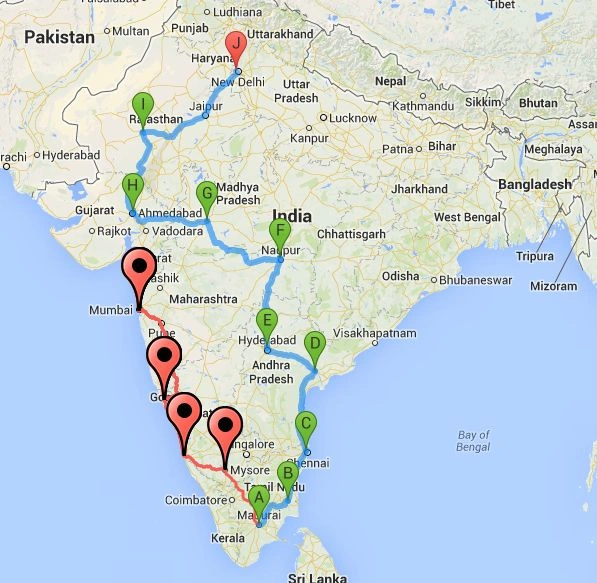 In this picture, the red route has more than 10 points for the route. Here there are 14 locations, an infinite route.
The following is another example:
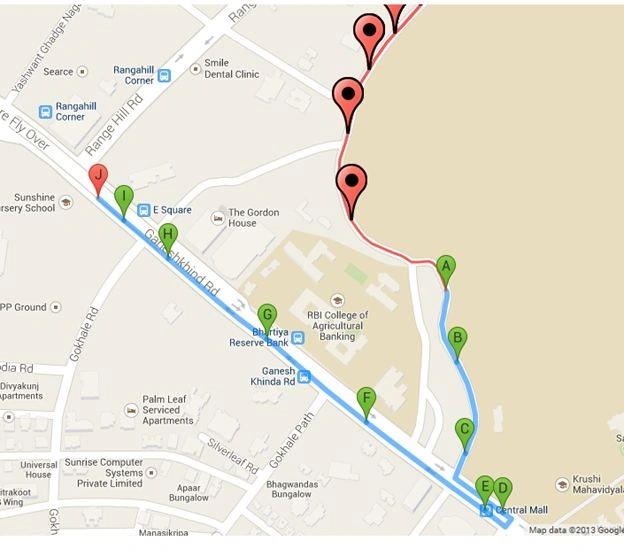
In this picture, the red route has more than 10 points for the route. Here there are 14 locations, an infinite route.
The following is another example:
 JavaScript Code
1. Initialize the map on page load
JavaScript Code
1. Initialize the map on page load
//You can calculate directions (using a variety of methods of transportation) by using the DirectionsService object.
var directionsService = new google.maps.DirectionsService();
//Define a variable with all map points.
var _mapPoints = new Array();
//Define a DirectionsRenderer variable.
var _directionsRenderer = '';
//This will give you the map zoom value.
var zoom_option = 6;
//LegPoints is your route points between two locations.
var LegPoints = new Array();
//Google map object
var map;
//InitializeMap() function is used to initialize google map on page load.
function InitializeMap() {
//DirectionsRenderer() is a used to render the direction
_directionsRenderer = new google.maps.DirectionsRenderer();
- //Set the your own options for map.
- var myOptions = {
- zoom: zoom_option,
- zoomControl: true,
- center: new google.maps.LatLng(21.7679, 78.8718),
- mapTypeId: google.maps.MapTypeId.ROADMAP
- };
- //Define the map.
- map = new google.maps.Map(document.getElementById("dvMap"), myOptions);
- //Set the map for directionsRenderer
- _directionsRenderer.setMap(map);
- //Set different options for DirectionsRenderer mehtods.
- //draggable option will used to drag the route.
- _directionsRenderer.setOptions({
- draggable: true
- });
- //Add the doubel click event to map.
- google.maps.event.addListener(map, "dblclick", function(event) {
- var _currentPoints = event.latLng;
- _mapPoints.push(_currentPoints);
- LegPoints.push('');
- getRoutePointsAndWaypoints(_mapPoints);
- });
- //Add the directions changed event to map.
- google.maps.event.addListener(_directionsRenderer, 'directions_changed', function() {
- var myroute = _directionsRenderer.directions.routes[0];
- CreateRoute(myroute);
- zoom_option = map.getZoom();
- });
- }
- //getRoutePointsAndWaypoints() will help you to pass points and waypoints to drawRoute() function
- function getRoutePointsAndWaypoints(Points) {
- if (Points.length <= 10) {
- drawRoutePointsAndWaypoints(Points);
- }
- else {
- var newPoints = new Array();
- var startPoint = Points.length - 10;
- var Legs = Points.length - 10;
- for (var i = startPoint; i < Points.length; i++) {
- newPoints.push(Points[i]);
- }
- drawRoutePointsAndWaypoints(newPoints);
- drawPreviousRoute(Legs);
- }
- }
- function drawRoutePointsAndWaypoints(Points) {
- //Define a variable for waypoints.
- var _waypoints = new Array();
- if (Points.length > 2) //Waypoints will be come.
- {
- for (var j = 1; j < Points.length - 1; j++) {
- var address = Points[j];
- if (address !== "") {
- _waypoints.push({
- location: address,
- stopover: true //stopover is used to show marker on map for waypoints
- });
- }
- }
- //Call a drawRoute() function
- drawRoute(Points[0], Points[Points.length - 1], _waypoints);
- } else if (Points.length > 1) {
- //Call a drawRoute() function only for start and end locations
- drawRoute(Points[_mapPoints.length - 2], Points[Points.length - 1], _waypoints);
- } else {
- //Call a drawRoute() function only for one point as start and end locations.
- drawRoute(Points[_mapPoints.length - 1], Points[Points.length - 1], _waypoints);
- }
- }
3. Draw the route
- //drawRoute() will help actual draw the route on map.
- function drawRoute(originAddress, destinationAddress, _waypoints) {
- //Define a request variable for route .
- var _request = '';
- //This is for more then two locatins
- if (_waypoints.length > 0) {
- _request = {
- origin: originAddress,
- destination: destinationAddress,
- waypoints: _waypoints, //an array of waypoints
- optimizeWaypoints: true, //set to true if you want google to determine the shortest route or false to use the order specified.
- travelMode: google.maps.DirectionsTravelMode.DRIVING
- };
- } else {
- //This is for one or two locations. Here noway point is used.
- _request = {
- origin: originAddress,
- destination: destinationAddress,
- travelMode: google.maps.DirectionsTravelMode.DRIVING
- };
- }
- //This will take the request and draw the route and return response and status as output
- directionsService.route(_request, function(_response, _status) {
- if (_status == google.maps.DirectionsStatus.OK) {
- _directionsRenderer.setDirections(_response);
- }
- });
- }
Notes:
-
I have used waypoints to draw the routes.
-
In this article, I have made all necessary JavaScript code comments in the "googlemap.js" JavaScript file.
-
So I am not explaining the JavaScript code.
-
Please download the attachment for more details about the code.
-
I have used the Google Map API v3 for this article.
Please comment on this article for better improvement and I hope you enjoy the article.
HIMANSHU HATHIPosted May 29, 2020, 1:01 PM
Hello Mahesh, Can you provide me your email ?
willian sanderPosted Aug 19, 2019, 8:06 PM
valeu obrigado.
alexeiv urreaPosted Oct 31, 2018, 11:09 AM
Good try, but a lot of information is missing to be able to do the implementation, you should leave a complete example
Ahmet ŞahinPosted Jul 13, 2018, 7:30 AM
Where are the mapPoints in this code. If you are not giving all necessary codes. REMOVE THIS IDIOT JUNKS from this site.
Anand ChincholiPosted Aug 18, 2017, 3:40 AM
How to store click place latitude and langitude database
Piyush ParetaPosted Jul 26, 2017, 4:14 AM
Hi.. its a silly question but how can use or run your source code....
Arslan YounasPosted May 22, 2017, 1:00 AM
I want to draw Multiple lines between two points in google map(Asp.net) i.e (if there are many turns between two points, then a single line draw before turn and another line draw after turn ) Can you help me. Please give me solution at [email protected]
shwe yeePosted Apr 5, 2017, 11:42 PM
Can use more than 25 way points?
Fabiano SantosPosted Mar 25, 2017, 11:45 AM
I'm from Brazil and I trying to implement multiple routes for the field technicians, but I can see only one at a time. Can you give me a help in my code?
AnkushPosted Jan 11, 2017, 11:36 PM
I did not see any route or marker after run default.aspx...can you please add some dummy data to view the running map.
vasim lookPosted Nov 19, 2016, 6:35 AM
How to add way points in map in your map not view any waypoints
kalu singh raoPosted Jul 7, 2016, 1:44 AM
Nice...
baskarPosted Oct 17, 2015, 5:33 AM
I did not see any route or marker after run default.aspx
Shyamji SaxenaPosted Oct 16, 2015, 2:25 AM
Please help me how to draw infinite route with more than 10 locations on google map in android ? [email protected]
Phạm Mạnh TùngPosted Aug 5, 2015, 3:15 AM
Hi Mahesh Alle! I need draw router list location to database. i need help!
Adrian RevidPosted May 25, 2015, 8:21 AM
Hello, i downloaded your infinyty map and i dont know how to add data to array from sql database
saqib murtazaPosted May 8, 2015, 9:35 AM
is there any way to plot more than 10 markers ? in ur code extra markers are connected with A Markers why it is not connected with Last Marker J ?
Siba MaityPosted Apr 11, 2015, 3:32 AM
How to set latitude and longitude in this code
MakamDz FakirDzPosted Sep 12, 2014, 8:02 AM
excuse my lack of experience still cannot get the table it throws undefined error,please help..
MakamDz FakirDzPosted Sep 12, 2014, 6:35 AM
the thing is i wanted is to add pints using polyline then calculate distance , time .. this is useful when you don't have road in the map appreciate if you can help on this
MakamDz FakirDzPosted Sep 12, 2014, 6:31 AM
Tried to call CreateHTMTable(_latlng, _distance) but nothing is showing, and no error please help, thanks
MakamDz FakirDzPosted Sep 12, 2014, 6:22 AM
Thank you so much
MakamDz FakirDzPosted Sep 11, 2014, 11:26 PM
Dear Mahesh, is there a way to combine both of your stuff and have a table as in :http://www.c-sharpcorner.com/UploadFile/8911c4/how-to-draw-routes-and-calculate-route-time-and-distance-on/
pramod gPosted Sep 8, 2014, 11:47 AM
hi mahesh, how to add custome marker icon first 10 markers i dont want see a-j labels . how to remove a-j label names pls as soon as possible give me reply
Mahesh AllePosted Feb 27, 2014, 5:11 AM
Dear Mani, can you ex-plane clearly?
mani maranPosted Feb 27, 2014, 4:48 AM
it would be fine if u add direction and no of kilometer from source and destination
Mahesh AllePosted Feb 2, 2014, 11:49 PM
This event fire when ever you change the direction of the route. Like if you move the location point or if you change the different roue the this event will be fired. see the link https://developers.google.com/maps/documentation/javascript/directions
masood farooqPosted Feb 2, 2014, 6:42 AM
Respected Sir! What is Direction Changed event does? i mean when this event is triggred?
Mahesh AllePosted Jan 31, 2014, 3:50 AM
Dear Sonu, I dot have any idea about multiple paths.
Sonu SinghPosted Jan 31, 2014, 3:21 AM
thanks for ur prev ans....can u guide me on displaying multiple paths between two cities
masood farooqPosted Jan 31, 2014, 2:06 AM
Well, if you minded that i am sorry.. :) Knowledge is for sharing brother. Its not dependent on the forum rules etc. Anyways, Sorry for my Questions, i didn't know about this,,,!!! i will take care next time
Mahesh AllePosted Jan 31, 2014, 1:42 AM
Dear Masood, this is not the site where you can ask your code issues. If you have issue regarding the problem with the my article, you can ask here. For your issue, there are different site where you can ask there. Hope you got this.
masood farooqPosted Jan 31, 2014, 1:36 AM
By Data Type Of LatLng, I mean my Table Column 'LatLng'..... What should be the datatype of this column?
masood farooqPosted Jan 31, 2014, 1:35 AM
okz, and what format does JSON accepts? i mean what should be the data type of LatLng? Text? Because LatLang involves a comma between Lat and Long... ?
Mahesh AllePosted Jan 31, 2014, 1:10 AM
You can search on net for this. Because it will involved some coding.
masood farooqPosted Jan 31, 2014, 12:50 AM
No sorry i didnt get that, Because i am not familiar with JSON. Please if you can guide me how to do that, Suppose i have a column in my database table named 'LatLng' , and i generate a result set by executing query,, then what to do next to parse that result set in JSON format!!!
Mahesh AllePosted Jan 30, 2014, 12:18 AM
Take the points form database and parse this to Json format and store in an array. Use the getRoutePointsAndWaypoints(_mapPoints); fution to draw the route. Hope you got this.
masood farooqPosted Jan 29, 2014, 12:52 PM
ya i have implemented this successfully, thanks to you! Now i have another question. I want to change the scenario a little. I don't want to set the co'ordinates by double click, i want to get the co'ordinates from a databse, I know hoe to read from a database, i just want to know which method is for getting co'ordinates from double click? so that i can change it to database,, thanks!
Mahesh AllePosted Jan 29, 2014, 9:25 AM
Dear Masood, you will find this function in googlemap.js file. The main logic here is to draw only 10 points and save the previous route in array and then draw another more points. So you will get all the points in the array. Hope you will got this.
masood farooqPosted Jan 29, 2014, 8:42 AM
Sir! Where is the implementation of drawPreviousRoute(Legs); function? There is no function in the code,, you are calling this but there is not implementation!
masood farooqPosted Jan 29, 2014, 7:23 AM
its not working,, i have used this code with Dreamweaver ,, it works fine,, but after 10 points, it deletes the first point,, so the points remain 10,, if i click 12th time, it deletes the second one,,,,,,!!! So i am still limited to 10 points, what to do?
Mahesh AllePosted Jan 29, 2014, 1:15 AM
Dear Nedya, I dot have source code in php. Google map API is now free. I have used only java script code for this. So you can use this on your PHP project.
Nedya PrakasaPosted Jan 29, 2014, 12:03 AM
please I need with premium account in Map API Google, coz I have in free just can make 8 directs point
Nedya PrakasaPosted Jan 29, 2014, 12:02 AM
do you have source code in PHP ?
Mahesh AllePosted Jan 27, 2014, 4:44 AM
Dear Sonu, Double click on map to chose your location. When you chose two location then it will draw route.
Sonu SinghPosted Jan 27, 2014, 4:32 AM
i have been able to run this project in visual studio 2010, but only map appears. how to select cities to find route??
Mahesh AllePosted Jan 20, 2014, 3:33 AM
Dear Sonu, this only for dot net specially for asp.net web application. This will not work in eclipse.
Sonu SinghPosted Jan 20, 2014, 3:14 AM
can it be run in eclipse?
Mahesh AllePosted Jan 20, 2014, 12:18 AM
Dear Sonu, run the project in vs 2008.
Sonu SinghPosted Jan 18, 2014, 12:11 PM
i have downloaded map.zip code but don't know how to run. i mean which file in it should be run. Can you help me?
Mahesh AllePosted Jan 8, 2014, 11:44 PM
Dear Kevin, If you want the Google route to plot this, then I dot know. But you can draw a simple line from one to many locations. This is possible in Google.
Kevin Dugan JrPosted Jan 8, 2014, 4:41 PM
What about one location to many locations? Example LocA to LocB, LocA to LocC, LocA to LocD etc all plotted on the same map?
Mahesh AllePosted Nov 14, 2013, 11:53 PM
Thanks Mahesh Chand. I will take care next time.
Mahesh ChandPosted Nov 13, 2013, 7:42 AM
Good article. There is no need to add "How to" in the beginning of an article. It makes the title longer. Suggested Title: Draw an infinite route with multiple locations on Google Maps. I think "Google Maps" is plural.