

Introduction
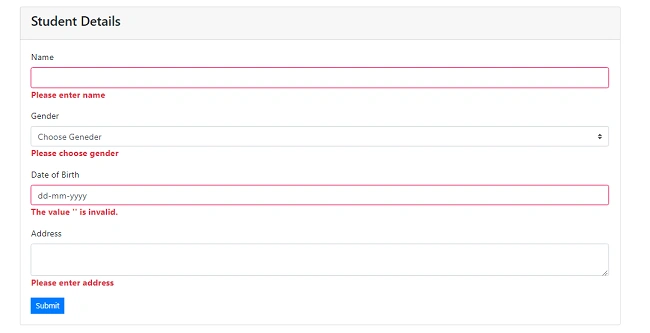
ValidationMessage TagHelper: validation message tag helper targets span element with asp-validation-for attribute which display validation message from modal class validation property.
Validation Summary TagHelper: Validation Summary tag helper target the div element. It has asp-validation-sammary attribute which display model validation summary on browser client.
ValidationMessage: It is an extension method that is a loosely typed method. It displays a validation message if an error exists for the specified field in the ModelStateDictionary object.
ValidationMessageFor: This method will only display an error if you have configured Data Annotations attribute to the specified property in the model class.
ValidationSummary: This ValidationSummary helper method generates an unordered list (ul element) of validation messages that are in the ModelStateDictionary object.
Step 1: Create asp.net MVC core project in visual studio 2019 with MVC (Model-View-Controller) template.
- using System;
- using System.ComponentModel.DataAnnotations;
- namespace ValidationMessageValidationSummaryTagHelper_Demo.Models
- {
- public class Student
- {
- [Key]
- public int Id { get; set; }
- [Required(ErrorMessage = "Please enter name")]
- public string Name { get; set; }
- [Required(ErrorMessage = "Please choose gender")]
- public string Gender { get; set; }
- [Required(ErrorMessage = "Please choose date of birth")]
- [Display(Name = "Date of Birth")]
- [DataType(DataType.Date)]
- public DateTime DateofBirth { get; set; }
- [Required(ErrorMessage = "Please enter address")]
- [StringLength(255)]
- public string Address { get; set; }
- }
- }
Step 3: Open HomeController or add HomeController if you don’t have it. Add the action method Create in controller class.
- using System;
- using System.Collections.Generic;
- using System.Diagnostics;
- using System.Linq;
- using System.Threading.Tasks;
- using Microsoft.AspNetCore.Mvc;
- using Microsoft.Extensions.Logging;
- using ValidationMessageValidationSummaryTagHelper_Demo.Models;
- namespace ValidationMessageValidationSummaryTagHelper_Demo.Controllers
- {
- public class HomeController : Controller
- {
- public IActionResult Index()
- {
- return View();
- }
- public IActionResult Create()
- {
- return View();
- }
- [HttpPost]
- public IActionResult Create(Student student)
- {
- if (ModelState.IsValid)
- {
- }
- return View();
- }
- }
- }
Step 4 Right click on create action method and “Add” create view and write following code.
- @model ValidationMessageValidationSummaryTagHelper_Demo.Models.Student
- @{
- ViewData["Title"] = "Create";
- }
- <div class="card">
- <div class="card-header">
- <h4>Student Details</h4>
- </div>
- <div class="card-body">
- <div asp-validation-summary="All"></div>
- <form asp-action="Create">
- <div class="form-group">
- <label asp-for="Name" class="label-control"></label>
- <input asp-for="Name" class="form-control" />
- <span asp-validation-for="Name" class="text-danger"></span>
- </div>
- <div class="form-group">
- <label asp-for="Gender" class="label-control"></label>
- <select asp-for="Gender" class="custom-select">
- <option value="">Choose Geneder</option>
- <option value="Male">Male</option>
- <option value="Female">Female</option>
- </select>
- <span asp-validation-for="Gender" class="text-danger"></span>
- </div>
- <div class="form-group">
- <label asp-for="DateofBirth" class="label-control"></label>
- <input asp-for="DateofBirth" class="form-control" />
- <span asp-validation-for="DateofBirth" class="text-danger"></span>
- </div>
- <div class="form-group">
- <label asp-for="Address" class="label-control"></label>
- <textarea asp-for="Address" class="form-control"></textarea>
- <span asp-validation-for="Address" class="text-danger"></span>
- </div>
- <div>
- <button type="submit" class="btn btn-sm btn-primary rounded-0">Submit</button>
- </div>
- </form>
- </div>
- </div>
| asp-validation-summary | Validation messages displayed |
| ValidationSummary.All | Property and model level |
| ValidationSummary.ModelOnly | Model |
| ValidationSummary.None | None |
- <div asp-validation-summary="All"></div>
- <div asp-validation-summary="ModelOnly"></div>
- <div asp-validation-summary="None"></div>
Step 5: Add the following CSS in site.css file under wwwroot folder.
- .field-validation-error {
- color: #e80c4d;
- font-weight: bold;
- }
- .field-validation-valid {
- display: none;
- }
- input.input-validation-error {
- border: 1px solid #e80c4d;
- }
- .validation-summary-errors {
- color: #e80c4d;
- font-weight: bold;
- font-size: 1.1em;
- }
- .validation-summary-valid {
- display: none;
- }

Join the conversation! Your thoughts help the community grow.