

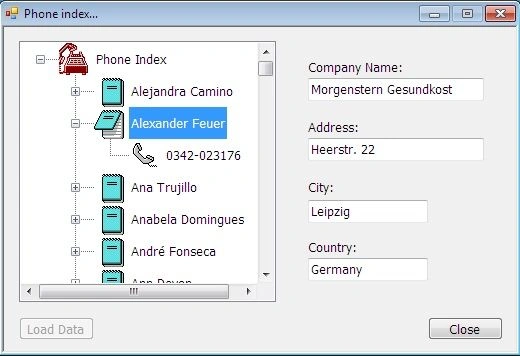
This is a trial to read records from MDB database file using TreeView control. My project is a phone index to display some fields from Customers table in Northwind database file:
CompanyName, ContactName, Address, City, Country and Phone.
My project has one form (frmPhone), this form has following controls:
- TreeView: tvData
- Four TextBoxes:
txtCompany for Company Name, txtAddress for Address, txtCity for City and , txtCountry for Country.
Two Buttons: for load data and exit application.
The Code
There is five procedures:
- private void LoadCustomerData() // for open the database file
- {
- MyDataFile = Application.StartupPath + @"\DataFile\Northwind.mdb";
- string MyCon = @"provider=microsoft.jet.oledb.4.0;Password="""";data source=" + MyDataFile;
- datCon = new OleDbConnection();
- datCon.ConnectionString = MyCon;
- OleDbCommand cmdSelect = new OleDbCommand();
- OleDbDataAdapter datAdp = new OleDbDataAdapter();
- datSet = new DataSet();
- try
- {
- MyTable = "Customers";
- // Select all fields
- string strSql = "SELECT * FROM " + MyTable + " ORDER BY ContactName";
- cmdSelect.CommandText = strSql;
- cmdSelect.CommandType = CommandType.Text;
- datCon.Open(); // open connection
- cmdSelect.Connection = datCon;
- datAdp.SelectCommand = cmdSelect;
- datAdp.Fill(datSet, MyTable); // fill dataset
- datCon.Close();
- // if no records then exit:
- int RecCount = this.BindingContext[datSet, MyTable].Count;
- if (RecCount == 0)
- {
- MessageBox.Show("No records in Customer table file!");
- return;
- }
- }
- catch (Exception ex)
- {
- MessageBox.Show(ex.ToString());
- }
- SetRootNode();
- }
- private void SetRootNode()
- {
- // set root node of TreeView:
- tvData.Nodes.Add("Phone Index");
- tvData.Nodes[0].Tag = "RootDB";
- tvData.Nodes[0].ImageIndex = 0;
- tvData.Nodes[0].SelectedImageIndex = 0;
- //Set Contact Name
- SetContactName();
- //Set Customer Phone
- SetCustPhone();
- }
- private void SetContactName()
- {
- // set ContactName field as node
- itmNumber = datSet.Tables[MyTable].Rows.Count;
- for (int i = 0; i < itmNumber; i++)
- {
- tvData.Nodes[0].Nodes.Add(datSet.Tables[MyTable].Rows[i].ItemArray[2].ToString());
- tvData.Nodes[0].Nodes[i].Tag = "Name";
- tvData.Nodes[0].Nodes[i].ImageIndex = 2;
- tvData.Nodes[0].Nodes[i].SelectedImageIndex = 2;
- }
- }
- private void SetCustPhone()
- // set Phone field as node
- {
- for (int i = 0; i < itmNumber; i++)
- {
- tvData.Nodes[0].Nodes[i].Nodes.Add(datSet.Tables[MyTable].Rows[i].ItemArray[9].ToString());
- tvData.Nodes[0].Nodes[i].Nodes[0].Tag = "Phone";
- tvData.Nodes[0].Nodes[i].Nodes[0].ImageIndex = 4;
- tvData.Nodes[0].Nodes[i].Nodes[0].SelectedImageIndex = 4;
- }
- }
- private void DisplayRecord(string EmployeeName)
- // Show some data about customer:
- {
- try
- {
- // using DataView to find record:
- DataView dv = new DataView(datSet.Tables[MyTable]);
- dv.Sort = "ContactName";
- int i = dv.Find(EmployeeName);
- this.BindingContext[datSet, MyTable].Position = i;
- txtCompany.Text = datSet.Tables[MyTable].Rows[i].ItemArray[1].ToString();
- txtAddress.Text = datSet.Tables[MyTable].Rows[i].ItemArray[4].ToString();
- txtCity.Text = datSet.Tables[MyTable].Rows[i].ItemArray[5].ToString();
- txtCountry.Text = datSet.Tables[MyTable].Rows[i].ItemArray[8].ToString();
- }
- catch (Exception ex)
- {
- MessageBox.Show(ex.ToString());
- }
- }
I hope that this article be useful in case of use TreeView control, so I invite you to go to source file to read the code about TreeView events. If you have any idea about this code, please tell me. Thanks for C# Corner team and thanks for all.
Join the conversation! Your thoughts help the community grow.