

Excel work book plays an important role in many fields, it allows us to maintain large amounts of data. We can also use Excel as a database. In a lot of programming we will use the Excel sheet as a template to import and export data from the database. Excel is one of the simplest forms of databases and it is easy to use.
VBA script is one of the simplest scripts, it’s like other scripting languages. We do not need a separate tool to create the script, we write it in Excel using the developer’s tool.
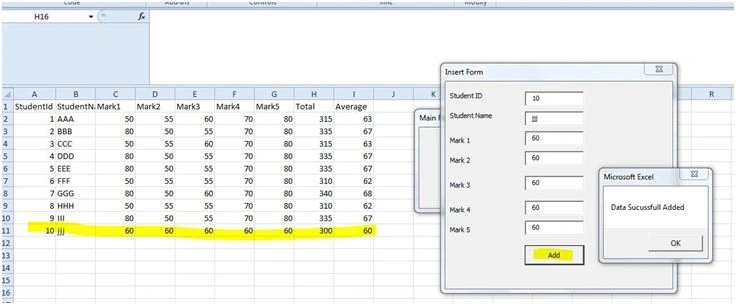
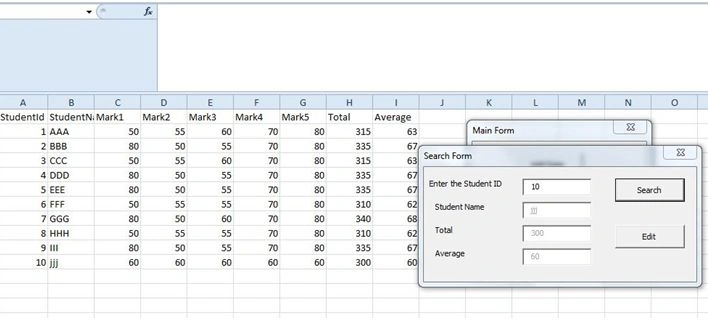
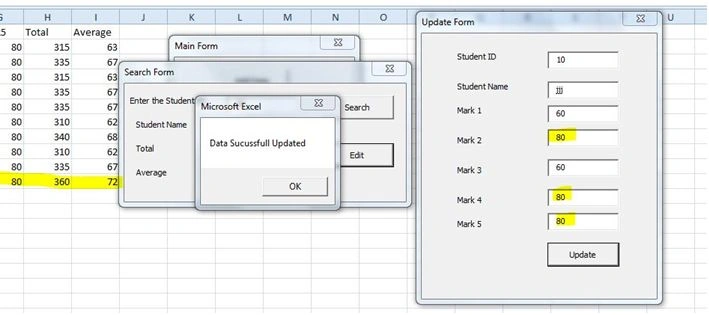
In this article I would like to create the simplest form to insert, view and update operating in the existing Excel sheet.
In Excel, go to developers tools and select Visual Basic. A dialog box will appear. In the dialog box choose the current excel and create a form like the below image
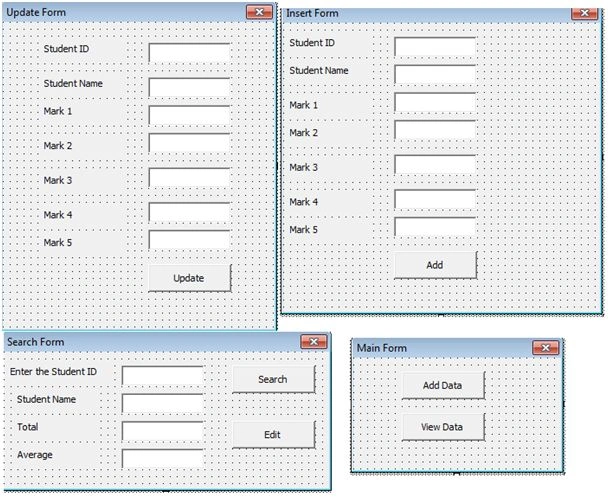
In the image I have created four forms:
Form 1 VBA Code:
- Private Sub CommandButton1_Click()
- UserForm2.Show
- End Sub
- Private Sub CommandButton2_Click()
- UserForm3.Show
- End Sub
Form2 VBA Code:
- Private Sub CommandButton1_Click()
- Dim LastRowsAs Long
- With ActiveSheet
- LastRows = .Cells(.Rows.Count, "A").End(xlUp).Row
- End With
- Cells(LastRows + 1, 1).Value = Me.TextBox1.Text
- Cells(LastRows + 1, 2).Value = Me.TextBox2.Text
- Cells(LastRows + 1, 3).Value = Me.TextBox3.Text
- Cells(LastRows + 1, 4).Value = Me.TextBox4.Text
- Cells(LastRows + 1, 5).Value = Me.TextBox5.Text
- Cells(LastRows + 1, 6).Value = Me.TextBox6.Text
- Cells(LastRows + 1, 7).Value = Me.TextBox7.Text
- Cells(LastRows + 1, 8).Value = Cells(LastRows + 1, 3).Value + Cells(LastRows + 1, 4).Value + Cells(LastRows + 1, 5).Value + Cells(LastRows + 1, 6).Value + Cells(LastRows + 1, 7).Value
- Cells(LastRows + 1, 9).Value = Cells(LastRows + 1, 8).Value / 5
- MsgBox ("Data Sucussfull Added")
- UserForm1.Hide
- End Sub
- With ActiveSheet
- LastRows = .Cells(.Rows.Count, "A").End(xlUp).Row
- End With
After finding the last values of the sheet we will assign the values to the each cell accordingly.
Form 3 VBA Code:
- Private Sub CommandButton1_Click()
- Dim i As Long
- Dim dsrc As Range
- Set dsrc = searchs()
- If Not dsrc Is Nothing Then
- i = dsrc.Row
- Me.Label2.Visible = True
- Me.Label3.Visible = True
- Me.Label4.Visible = True
- Me.TextBox2.Visible = True
- Me.TextBox3.Visible = True
- Me.TextBox4.Visible = True
- Me.TextBox2.Value = Cells(i, 2).Value
- Me.TextBox3.Value = Cells(i, 8).Value
- Me.TextBox4.Value = Cells(i, 9).Value
- Me.CommandButton2.Visible = True
- Else
- MsgBox ("Data not Found!!!")
- Me.TextBox1.Value = ""
- End If
- End Sub
- Function searchs() As Range
- With ActiveSheet.Range("A:A")
- Set searchs = .Find(What:=Me.TextBox1.Value, _
- after:=.Cells(1), _
- LookIn:=xlValues, _
- LookAt:=xlWhole, _
- SearchOrder:=xlByRows, _
- SearchDirection:=xlPrevious)
- End With
- End Function
- Private Sub CommandButton2_Click()
- UserForm4.Show
- End Sub
Mohammed IbrahimPosted Mar 29, 2016, 11:34 AM
thank you Ridhima Banu, if you any querys about VBA mail me @ [email protected]
Ridhima BanuPosted Mar 18, 2016, 9:57 AM
I feel happy about and I love learning more about this topic. keep sharing your information regularly for my future reference. This content creates a new hope and inspiration with in me. Thanks for sharing article like this. The way you have stated everything above is quite awesome. Keep blogging like this. Thanks. Regards, Ridhima <a href="http://www.thinkittraining.in/php-training"> PHP Training in Chennai </a>