

In this blog, we are going to see how to update and delete SharePoint list items using PnP PowerShell. PnP Provisioning is a community-driven platform that enables fast development of components that define your application infrastructure & the contents to some extent. We use CSOM and can work against both SharePoint Online and SharePoint On-Premises.
Prerequisite
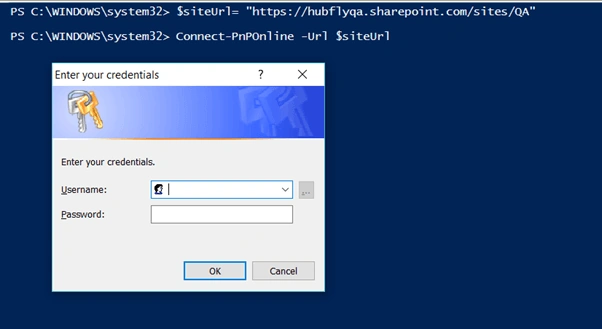
Connect to Site
Connect to SharePoint site using Connect-PnPOnline cmdlet. The required parameters are,
-
Url
The SharePoint site URL (Eg: https://hubflysoft.sharepoint.com/sites/Hubfly)
The following code snippet helps to connect SharePoint sites.
- $siteurl="https://<tenant-name>.sharepoint.com"
- Connect-PnPOnline -Url $siteurl
To Update a SharePoint List Item
The following code snippet helps to update SharePoint List item. The list Item can be updated by “Set-PnPListItem” on the SharePoint site. It applies to SharePoint Server 2013, SharePoint Server 2016, and SharePoint Online.
The required parameters are,
-
Identity
The ID of the list item, or actual list item object -
List
The ID, Title, or Url of the list -
Values
Use the internal names of the fields when specifying field names. -
Single line of text: -Values @{"Title" = "Title New"}
Multiple lines of text: -Values @{"MultiText" = "New text\n\More text"}
-
Rich text: -Values @{"MultiText" = "<strong>New</strong> text"}
-
Choice: -Values @{"Choice" = "Value 1"}
-
Number: -Values @{"Number" = "10"}
The optional parameters are,
-
ContentType
Specify either the name, ID, or an actual Content type -
SystemUpdate
Update the item without creating a new version (Only applicable to SharePoint Online)
The following code snippet helps to update SharePoint List item.
Set-PnPListItem -List HubflyTeam -Identity 3 -Values @{"NameHF" = "Arut"}

To Delete a List Item,
The list items can be deleted by “Remove-PnPListItem” cmdlet on the SharePoint site. It applies to SharePoint Server 2013, SharePoint Server 2016, SharePoint Online.
The required parameters are,
-
Identity
The ID of the list item, or actual ListItem object -
List
The ID, Title, or URL of the list
The optional parameters are,
-
Force
Specifying the Force parameter will skip the confirmation question.
The following code snippet helps to update SharePoint List item.
Remove-PnPListItem -List HubflyTeam -Identity 3

Thus, you have learned how to update and delete list items programmatically SharePoint site. PnP PowerShell is supported by SharePoint Online. The operations mentioned above are tested on SharePoint Online environments. Feel free to fill up the comment box below, if you need any assistance.
Michael NielsenPosted May 23, 2019, 7:28 AM
Hi Ravishankar. Nice Blog. Do yo have any experience in using Set-PnPListItem to update shared property values on a DocumentSet. I am struggeling with an PnP PowerShell for SharePoint Online issue. I need to update the property values on a Document Set shared properties as well as properties in documents (with different content types) inside the Document SetI tried somthing like this: **$docs = Get-PnPListItem -web $subsiteurl -List $TargetListID foreach ($item in $docs){ $spfile = Set-PnPListItem -List $TargetListID -Identity $item.Id -Values @{"xx"="$xx"} $spfile = Set-PnPListItem -List $TargetListID -Identity $item.Id -Values @{"yy"="$yy"} etc** I do Get the List/ibrary items including the Document Set folder, but i am NOT able to Set-PnPListItem values. I get no errors when running the powershell. I would expect that setting properties values on Document Sets should be possible. Am I missing something or is it a missing cmdlet
Praveen KumarPosted Aug 6, 2018, 3:21 AM
HtmlString += '<li class="image">'; htmlString += '<a nowrap class="link_tag" href="'+ results1[i].DownloadURL.Url +'">'; htmlString += results1[i].Title; if(banner=jQuery(results1[i].Banner_Image.Url) === null ? '' : jQuery(results1[i].Banner_Image.Url)) { htmlString +='<img class="baner_image" src="'+banner+'" alt="">'; } Hi ravi, i am fetching the banner url from the list but i dont knew how to give null point exception to this function. can you please help me with this?
Abhishek MishraPosted Jul 31, 2018, 1:51 PM
Good one. Loving to see to powershell automation everywhere