

This blog explains -
- How to use classes and inheritance.
- CRUD operations with listbox using databse.
- How to use split function.
- How to validate the textboxes using javascript.
It also covers the the following System Test question,
- Create a class for the math ( "+","-") operations -- name the class "MathOp".
- Extend the class using inheritance to include ("*","/") name the class "MathOp2".
- Create the following class/function when select a line from the list box, the user should be able to modify the values/operations and save it to the listbox/database Let’s say the user clicked on “1+3=4” , the values 1,3 should be displayed in the input text boxes.
Step 1: At DataBase.
I use the following table to demonstrate the above concepts.
- Create table MathRresults(
- ID int primary key identity(1,1),
- Result varchar(20)
- )
Application
Step 2: Creating the project.
Now create the project using the following.Go to Start, then All Programs and click Microsoft Visual Studio 2010.
Go to File, then click New, Project..., Visual C# , Web. Then select ASP.NET Empty Web Application.
Provide the project a name and specify the location.

Create the connection string in the Web.Config file as in the following code snippet:
- <connectionStrings>
- <add name="conStr"
- connectionString="Password= 1234; User ID=sa; Database=DB_Jai; Data Source=."
- providerName="System.Data.SqlClient"/>
- </connectionStrings>
Next: Right-click on Solution Explorer and add a web form to your project.
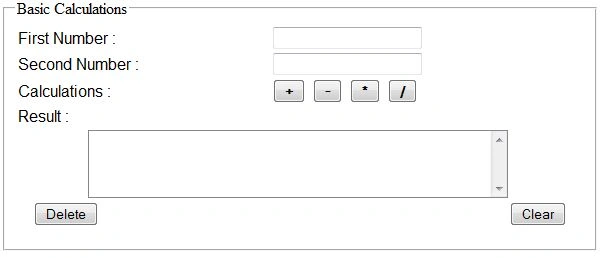
Step 4 : JavaScript Validations.
Use the following code to validate the textboxes.
- < script type = "text/javascript" > function Valid()
- {
- if (document.getElementById('<%=txtFirstNumber.ClientID%>').value.trim() == "") {
- var msg = document.getElementById('<%=lblMsg.ClientID %>');
- msg.innerHTML = "Please enter First Number";
- msg.style.color = "red";
- document.getElementById('<%=txtFirstNumber.ClientID%>').focus();
- return false;
- }
- if (document.getElementById('<%=txtSecondNumber.ClientID%>').value.trim() == "") {
- var msg = document.getElementById('<%=lblMsg.ClientID %>');
- msg.innerHTML = "Please enter Second Number";
- msg.style.color = "red";
- document.getElementById('<%=txtSecondNumber.ClientID%>').focus();
- return false;
- }
- }
- < /script>
CodeBehind
Add the following namespaces:
- using System.Data;
- using System.Data.SqlClient;
- using System.Configuration;
Invoke the ConnectionString from Web.Config as in the following:
- SqlConnection con = new SqlConnection(ConfigurationManager.ConnectionStrings["ConStr"].ConnectionString);
- private Decimal Num1;
- private Decimal Num2;
- string constr = ConfigurationManager.ConnectionStrings["connectionStr"].ConnectionString;
MathOp class Contains two methods that are Add, Subtract.
MathOp2 class Contains two methods that are Mul, Div.
- public class MathOp
- {
- public Decimal Add(Decimal value1, Decimal value2)
- {
- return (value1 + value2);
- }
- public Decimal Subtract(Decimal value1, Decimal value2)
- {
- return (value1 - value2);
- }
- }
- public class MathOp2: MathOp
- {
- public Decimal Mul(Decimal value1, Decimal value2)
- {
- return (value1 * value2);
- }
- public Decimal Div(Decimal value1, Decimal value2)
- {
- return (value1 / value2);
- }
- }
- //Clear () method is used to clear the textbox box values.
- private void Clear()
- {
- txtFirstNumber.Text = string.Empty;
- txtSecondNumber.Text = string.Empty;
- lblResult.Text = string.Empty;
- lblMsg.Text = string.Empty;
- }
- //saveResult() method is used to save the result sets in database.
- private void saveResult()
- {
- SqlConnection con = new SqlConnection(constr);
- SqlCommand cmd = new SqlCommand("insert into MathRresults values('" + lblResult.Text + "')", con);
- SqlDataReader dbr;
- try
- {
- con.Open();
- dbr = cmd.ExecuteReader();
- lblMsg.Text = "Values saved Successfully";
- lblMsg.ForeColor = Color.Green;
- dbr.Read();
-
- }
- catch (Exception ex)
- {
- lblMsg.Text = "Failed to Save because :" + ex;
- lblMsg.ForeColor = Color.Red;
- }
- con.Close();
- BindResultsToListview();
- }
- // UpdateResult() method is used to update the result sets with existing records in database.
- private void UpdateResult()
- {
- int ? id = null;
- foreach(ListItem li in ListBox1.Items)
- {
- if (li.Selected == true)
- {
- id = Convert.ToInt32(ListBox1.SelectedValue);
- }
- }
- SqlConnection con = new SqlConnection(constr);
- SqlCommand cmd = new SqlCommand("Update MathRresults set Result = '" + lblResult.Text + "' Where ID = '" + id + "'", con);
- SqlDataReader dbr;
- try
- {
- con.Open();
- dbr = cmd.ExecuteReader();
- lblMsg.Text = "Values Updated Successfully";
- lblMsg.ForeColor = Color.Green;
- dbr.Read();
- //while (dbr.Read())
- //{
- //}
- }
- catch (Exception ex)
- {
- lblMsg.Text = "Failed to update because:" + ex;
- lblMsg.ForeColor = Color.Red;
- }
- finally
- {
- con.Close();
- BindResultsToListview();
- }
- }
- //BindResultsToListview Method is used to bind the operations to ListBox.
- private void BindResultsToListview()
- {
- Clear();
- SqlConnection con = new SqlConnection(constr);
- string cmd = "Select Id, Result from MathRresults";
- SqlDataAdapter adpt = new SqlDataAdapter(cmd, con);
- DataSet ds = new DataSet();
- adpt.Fill(ds, "MathRresults");
- DataTable myDataTable = ds.Tables[0];
- if (ds.Tables.Count > 0 && ds != null && ds.Tables[0].Rows.Count > 0) {
- ListBox1.DataSource = ds;
- ListBox1.DataValueField = "ID";
- ListBox1.DataTextField = "Result";
- ListBox1.DataBind();
- }
- }
- //DeleteFromListView is used to delete the selected item in ListBox.
- private int DeleteFromListView(int id)
- {
- //Here using statement is automatically close the connections
- using(SqlConnection con = new SqlConnection(constr))
- {
- SqlCommand cmd = new SqlCommand("delete from MathRresults where id = " + id + "", con);
- con.Open();
- cmd.ExecuteNonQuery();
- return 0;
- }
- }
Copy the following code in page_ load.
- if (!Page.IsPostBack)
- {
- BindResultsToListview();
- }
- Clear();
- //txtFirstNumber value to be assigned to Num1 variable.
- Num1 = Convert.ToDecimal(txtFirstNumber.Text);
- //txtSecondNumber value to be assigned to Num2 variable.
- Num2 = Convert.ToDecimal(txtSecondNumber.Text);
Step 9: Addition.
To add or update two values and save the result set in database –
- protected void btnAdd_Click(object sender, EventArgs e)
- {
- MathOp2 m = new MathOp2();
- Decimal additon = m.Add(Num1, Num2);
- lblResult.Text = (Num1 + ("+" + (Num2 + ("=" + additon))));
- lblResult.ForeColor = Color.Green;
- //this is pretty simple
- //if your not selected any item in listbox it's save your result as a new record in database.
- //if your selected any item in listbox it's update your result with existing record in database.
-
- if (ListBox1.SelectedValue == string.Empty)
- {
- saveResult();
- }
- else
- {
- UpdateResult();
- }
- }
To Subract values and save the result set in database –
- protected void btnSubtract_Click(object sender, EventArgs e)
- {
- MathOp2 m = new MathOp2();
- Decimal subtraction = m.Subtract(Num1, Num2);
- lblResult.Text = (Num1 + ("-" + (Num2 + ("=" + subtraction))));
- lblResult.ForeColor = Color.Green;
- if (ListBox1.SelectedValue == string.Empty) saveResult();
- else UpdateResult();
- }
To multipliy two values and save the result set in database -
- protected void btnMultiply_Click(object sender, EventArgs e)
- {
- MathOp2 m = new MathOp2();
- Decimal division = m.Mul(Num1, Num2);
- lblResult.Text = (Num1 + ("*" + (Num2 + ("=" + division))));
- lblResult.ForeColor = Color.Green;
- if (ListBox1.SelectedValue == string.Empty) saveResult();
- else UpdateResult();
- }
For division of two values and save the result set in database -
- protected void btnDivide_Click(object sender, EventArgs e)
- {
- // if txtSecondNumber value is zero, then the result would be infinite.
- // To prevent that make one alert for user that "Divide By Zero is Invalid"
- if (Num2 == 0)
- {
- lblMsg.Text = "Divide By Zero is Invalid";
- lblMsg.ForeColor = Color.Red;
- return;
- }
- MathOp2 m = new MathOp2();
- Decimal division = m.Div(Num1, Num2);
- lblResult.Text = (Num1 + ("/" + (Num2 + ("=" + division))));
- lblResult.ForeColor = Color.Green;
- if (ListBox1.SelectedValue == string.Empty) saveResult();
- else UpdateResult();
- }
To delete the selected item from listbox as well as database –
- protected void btnDelete_Click(object sender, EventArgs e)
- {
- lblResult.Text = string.Empty;
- lblMsg.Text = string.Empty;
- for (int i = 0; i <= ListBox1.Items.Count - 1; i++)
- {
- if (ListBox1.Items[i].Selected != false)
- {
- DeleteFromListView(Convert.ToInt32(ListBox1.Items[i].Value));
- }
- }
- ListBox1.Items.Clear();
- BindResultsToListview();
- lblMsg.Text = "Selected Value deleted successfully";
- }
- // ListBox1_SelectedIndexChanged
- protected void ListBox1_SelectedIndexChanged(object sender, EventArgs e)
- {
- lblMsg.Text = string.Empty;
- if (ListBox1.SelectedValue == string.Empty)
- {
- return;
- }
- int ? id = null;
- string selectedtext = null;
- foreach(ListItem li in ListBox1.Items)
- {
- if (li.Selected == true)
- {
- id = Convert.ToInt32(ListBox1.SelectedValue);
- }
- }
- SqlConnection con = new SqlConnection(constr);
- SqlDataAdapter adpt = new SqlDataAdapter("Select * from MathRresults Where Id = '" + id + "'", con);
- DataSet ds = new DataSet();
- adpt.Fill(ds, "MathRresults");
- DataTable myDataTable = ds.Tables[0];
- if (ds.Tables.Count > 0 && ds != null && ds.Tables[0].Rows.Count > 0)
- {
- selectedtext = ds.Tables[0].Rows[0]["Result"].ToString();
- }
- //Split the item by the operator and the '=' into an array of strings
- string[] parts = selectedtext.Split('+', '-', '*', '/', '=');
- if (parts.Length > 2) {
- //Define a variable for each part
- string part1 = parts[0].Trim();
- string part2 = parts[1].Trim();
- string part3 = parts[2].Trim();
- txtFirstNumber.Text = part1;
- txtSecondNumber.Text = part2;
- lblResult.Text = part3;
- }
- }
Join the conversation! Your thoughts help the community grow.