


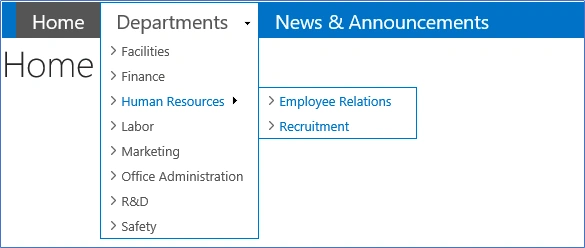
I started building this menu by following the steps in the blog Responsive Top Navigation Menu written by Luis Kerr (It's a really great post ). However, while building the menu to match my requirements, I found a couple of improvements.
The intention of this article is to share the improved version of the CSS (attached) & JS script (script snippet) as another example for responsive top navigation. Here, I’m not trying to explain the steps; please refer to the original blog for a detailed explanation.
Improvements
- Styling for simple Header (no link)
- All styles are defined around anchor <a> tag. So, when a simple header with no link is added to the navigation, styles are not getting applied. I have made some CSS changes to apply the styles for <span> & <li> tag instead of anchor tag alone.
- Styles for selected & hover backgrounds for parent <li> item.
- Replace nav Client ID
- The script in the master page is used to replace annoying IDs with a static ID. It is very strange that ASP menu keeps changing its client ID. So far, I have encountered IDs changing from “#zz09_RootAspMenu” to “#zz13_RootAspMenu”.
- Moreover, the quick launch menu also uses a similar ID format. There is always a chance for the conflict. So, hard coding ID in the script is not a good practice.
Top Navigation

Quick launch

- Here is the script that takes care of finding the client ID under the top navigation div.

- <script type="text/javascript">//<![CDATA[
- // Replace that changing automatic ul ID
- //ex:- zz10_RootAspMenu, zz11_RootAspMenu
- $('[id^=zz][id$=RootAspMenu]', '#DeltaTopNavigation').attr("id", "myTopNav")
- $(function () {
- // Mobile
- $('#myTopNav').before('<div id="menu-trigger">Menu</div>');
- $("#menu-trigger").on("click", function () { $("#myTopNav").slideToggle(); });
- // iPad
- var isiPad = navigator.userAgent.match(/iPad/i) != null;
- if (isiPad) $('#myTopNav ul').addClass('no-transition');
- });
- //]]>
- </script>
A few points to consider,
- Works well with the Managed Navigation as the source.
- Ensure to refer jQuery.
- <script src="https://ajax.googleapis.com/ajax/libs/jquery/3.2.1/jquery.min.js">
- Refer CSS script using CSS registration tag and load it after core15.css.
- <!--SPM:<SharePoint:CssRegistration Name="/sites/dev/SiteAssets/topMenu.css" After="corev15.css" runat="server"/>-->
- Build this on a fresh site for the first time.
PPosted Nov 5, 2020, 9:09 AM
Will this work with SharePoint 2019 on-prem???
nadia azharPosted Apr 23, 2019, 7:05 AM
I am following the steps but div "menu-trigger" is not getting triggered. can you please tell what can be the issue?
Kenny CassandraPosted Jun 9, 2018, 10:31 PM
I already follow those steps from Luis Kerr and it works. but after i copied your css file and follow your steps, it's not working. can you tell me what steps that i missed ?