

Step 1: Create one sharepoint list in our site like below example.
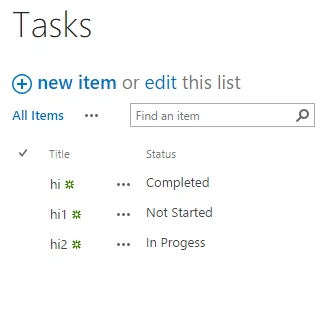
Step 2: Create below code into note pad and save as .xsl.
Step 2: Create below code into note pad and save as .xsl.
- <xsl:stylesheet xmlns:x="http://www.w3.org/2001/XMLSchema" xmlns:d="http://schemas.microsoft.com/sharepoint/dsp" version="1.0" exclude-result-prefixes="xsl msxsl ddwrt" xmlns:ddwrt="http://schemas.microsoft.com/WebParts/v2/DataView/runtime" xmlns:asp="http://schemas.microsoft.com/ASPNET/20" xmlns:__designer="http://schemas.microsoft.com/WebParts/v2/DataView/designer" xmlns:xsl="http://www.w3.org/1999/XSL/Transform" xmlns:msxsl="urn:schemas-microsoft-com:xslt" xmlns:SharePoint="Microsoft.SharePoint.WebControls" xmlns:ddwrt2="urn:frontpage:internal" xmlns:o="urn:schemas-microsoft-com:office:office">
- <xsl:include href="/_layouts/xsl/main.xsl" />
- <xsl:include href="/_layouts/xsl/internal.xsl" />
- <xsl:template name="FieldRef_body.Status" match="FieldRef[@Name='Status']" mode="body">
- <xsl:param name="thisNode" select="." />
- <xsl:choose>
- <xsl:when test="$thisNode/@*[name()=current()/@Name] = 'Completed'"> <img src="/_layouts/images/IMNON.png" alt="Status: {$thisNode/@Status}" /> </xsl:when>
- <xsl:when test="$thisNode/@*[name()=current()/@Name] = 'In Progess'"> <img src="/_layouts/images/IMNIDLE.png" alt="Status: {$thisNode/@Status}" /> </xsl:when>
- <xsl:otherwise> <img src="/_layouts/images/IMNBUSY.png" alt="Status: {$thisNode/@Status}" /> </xsl:otherwise>
- </xsl:choose>
- </xsl:template>
- </xsl:stylesheet>
Step 4: Insert sharepoint list into page and open properties of web part like below screenshot process and add .xsl file into XSL Link Fileds.
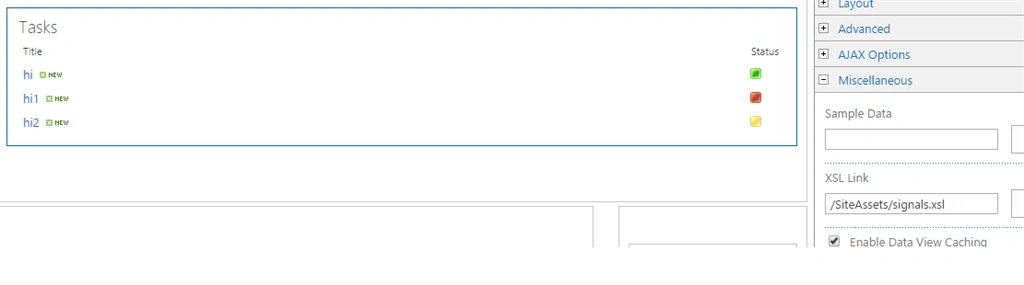
Step 5: Then,Finally we get traffic signal status in our list like above example.
Santhakumar MunuswamyPosted Jan 9, 2016, 3:08 AM
Thanks for nice share
Tejesh BarmaPosted Jan 6, 2016, 12:05 PM
Thank You Destin joy
Destin JoyPosted Jan 6, 2016, 11:56 AM
Good Tejesh:)