
Here in this blog we will see how to first write data from data set into a XML file and then how to read that XML file data into a Dataset.
To elaborate this we will use two grids on the page.
Step1:
Create a web page and put two Button
-
Button to write XML ( named btnImport)
-
Button to read XML ( named btnExport)
and also two grids
-
To show written data (named grdImport)
-
To show Read data ( named grdExport)
Here is the HTML Code (ReadWriteXML.aspx page) for the program
<%@ Page Language="C#" AutoEventWireup="true" CodeFile="ReadWriteXML.aspx.cs" Inherits="Pages_ReadWriteXML" %>
<!DOCTYPE html PUBLIC "-//W3C//DTD XHTML 1.0 Transitional//EN" "http://www.w3.org/TR/xhtml1/DTD/xhtml1-transitional.dtd">
<html xmlns="http://www.w3.org/1999/xhtml">
<head id="Head1" runat="server">
<title></title>
</head>
<body>
<form id="form1" runat="server">
<div>
<table>
<tr>
<td>
<asp:Button ID="btnImport" runat="server" Text="Write XML" OnClick="btnImport_Click" />
</td>
</tr>
<tr>
<td>
</td>
</tr>
<tr>
<td>
<asp:GridView ID="grdImport" runat="server">
</asp:GridView>
</td>
</tr>
<tr>
<td>
</td>
</tr>
<tr>
<td>
<asp:Button ID="btnExport" runat="server" Text="Read XML" OnClick="btnExport_Click" />
</td>
</tr>
<tr>
<td>
</td>
</tr>
<tr>
<td>
<asp:GridView ID="grdExport" runat="server">
</asp:GridView>
</td>
</tr>
</table>
</div>
</form>
</body>
</html>
Code for ReadWriteXML.aspx.cs
using System;
using System.Collections.Generic;
using System.Linq;
using System.Web;
using System.Web.UI;
using System.Web.UI.WebControls;
using System.Data;
using System.Data.SqlClient;
using Database.DAL;
public partial class Pages_ReadWriteXML : System.Web.UI.Page
{
Common objCommon = new Common();
DataSet DS;
protected void Page_Load(object sender, EventArgs e)
{
}
protected void btnImport_Click(object sender, EventArgs e)
{
string FileName = "TEST_XML.xml";
string FilePath = Server.MapPath("~/XML_Files/");
using (SqlCommand cmd = new SqlCommand())
{
cmd.CommandText = "READ_XML_EMP";
DS = DBHelper.SqlExecuteAdapter(cmd);
}
objCommon.Write_XML(DS, FileName, FilePath);
grdImport.DataSource = DS;
grdImport.DataBind();
}
protected void btnExport_Click(object sender, EventArgs e)
{
string FileName = "TEST_XML.xml";
string FilePath = Server.MapPath("~/XML_Files/");
DS = objCommon.Read_XML(FileName, FilePath);
grdExport.DataSource = DS;
grdExport.DataBind();
}
}
DBHelper Class
using System;
using System.Data.SqlClient;
using System.Data;
using System.Security.Cryptography;
using System.IO;
using System.Web;
using System.Web.UI;
namespace Database.DAL
{
/// <summary>
/// Summary description for SqlHelper
/// </summary>
public class DBHelper
{
private DBHelper()
{
//
// TODO: Add constructor logic here
//
}
#region Connection String
//Pick connection string from web.config
/*
which could be:
<connectionStrings>
<add name="Connection" connectionString="Data Source=TESTSQL;Initial Catalog=TESTDB;uid=sa; pwd=TEST123;Connect Timeout=400;pooling='true'; MaxPool Size=100;" providerName="System.Data.SqlClient;"/>
</connectionStrings>
*/
private static string conn = System.Configuration.ConfigurationManager.ConnectionStrings["Connection"].ToString();
#endregion
#region Execute Adapter
public static DataSet SqlExecuteAdapter(SqlCommand cmd)
{
DataSet ds = new DataSet();
cmd.CommandType = CommandType.StoredProcedure;
using (SqlConnection con = new SqlConnection(conn))
{
cmd.Connection = con;
con.Open();
SqlDataAdapter adapt = new SqlDataAdapter(cmd);
adapt.Fill(ds);
con.Close();
}
return ds;
}
#endregion
}
}
Common class
using System;
using System.Data;
using System.Configuration;
using System.Collections;
using System.Web;
using System.Web.Security;
using System.Web.UI;
using System.Web.UI.WebControls;
using System.Web.UI.WebControls.WebParts;
using System.Web.UI.HtmlControls;
using System.Data.SqlClient;
using Database.DAL;
using System.Xml;
using System.Xml.Serialization;
using System.IO;
namespace Database.DAL
{
public class Common
{
public Common()
{
//
// TODO: Add constructor logic here
//
}
#region READ WRITE XML
public void Write_XML(DataSet DS, string FileName, string FilePath)
{
StreamWriter XMLFile = new StreamWriter(FilePath + FileName, false);
DS.WriteXml(XMLFile);
XMLFile.Close();
}
public DataSet Read_XML(string FileName, string FilePath)
{
DataSet DS = new DataSet();
DS.ReadXml(FilePath + FileName);
return DS;
}
#endregion
}
}
DB Structure
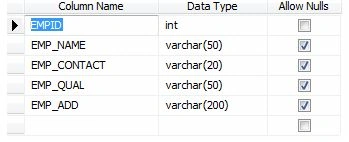
TEST_XML table
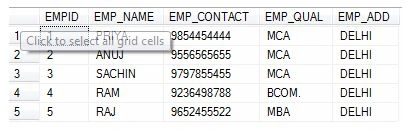
INSERT VALUES IN TABLE LIKE
READ_XML_EMP PROCEDUER
USE [TESTDB]
GO/****** Object: StoredProcedure [dbo].[READ_XML_EMP] Script Date: 07/11/2013 17:11:26 ******/
SET ANSI_NULLS ON
GO
SET QUOTED_IDENTIFIER ON
GO
CREATE PROC [dbo].[READ_XML_EMP]
AS
BEGIN
SELECT * FROM TEST_XML
END
GO
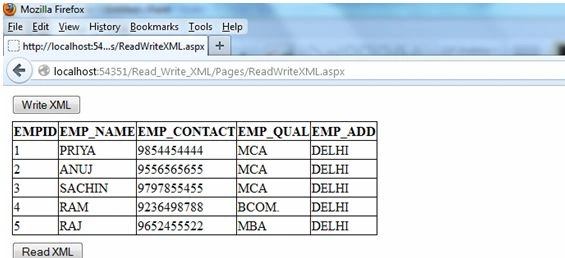
FIRST CLICK ON WRITE XML Button to Write Data INTO XML File
Output will be:
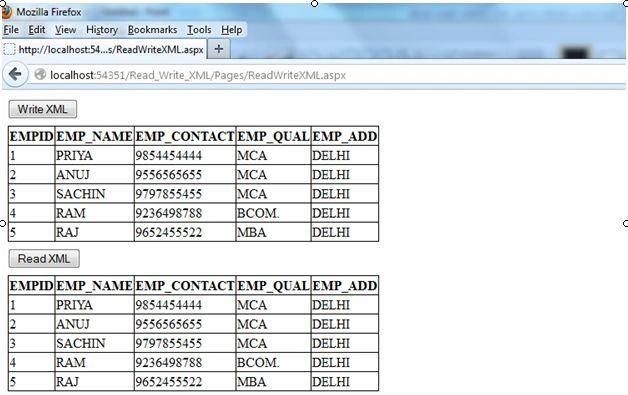
Click on Export button to read data from XML file
Output Will be:
Join the conversation! Your thoughts help the community grow.