

Table structure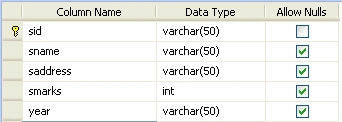
Default.aspx code
<%@
Page Language="VB"
AutoEventWireup="false"
CodeFile="Default.aspx.vb"
Inherits="_Default"
%>
<!DOCTYPE
html PUBLIC
"-//W3C//DTD XHTML 1.0 Transitional//EN"
"http://www.w3.org/TR/xhtml1/DTD/xhtml1-transitional.dtd">
<html
xmlns="http://www.w3.org/1999/xhtml">
<head
runat="server">
<title>Untitled
Page</title>
<link
href="style.css"
rel="stylesheet"
type="text/css"
/>
</head>
<body>
<form
id="form1"
runat="server">
<div>
</div>
<asp:GridView
ID="GridView1"
runat="server">
<HeaderStyle
BackColor="#FFCC66"
/>
<AlternatingRowStyle
BackColor="#FF6666"
/>
</asp:GridView>
<table>
<tr>
<td><a
href="Default.aspx"
id="uu">Refresh
to get random values</a></td>
</tr>
</table>
</form>
</body>
</html>
Default.aspx.vb code
Imports
System.Data.SqlClient
Imports
System.Data
Partial
Class _Default
Inherits System.Web.UI.Page
Dim strConnString
As String =
System.Configuration.ConfigurationManager.ConnectionStrings.Item("ConnectionString").ToString()
Dim con As
New SqlConnection(strConnString)
Dim sqlda As
SqlDataAdapter
Dim com As
SqlCommand
Dim ds As
DataSet
Dim str As
String
Protected
Sub Page_Load(ByVal sender
As Object,
ByVal e As
System.EventArgs) Handles
Me.Load
If Not
IsPostBack Then
bindgrid()
End If
End Sub
Sub bindgrid()
Try
con.Open()
str = "select * from student"
com = New SqlCommand(str,
con)
sqlda = New SqlDataAdapter(com)
ds = New DataSet
sqlda.Fill(ds, "student")
Dim dt As
DataTable = ds.Tables(0)
dt.Columns.Add(New DataColumn("RandomNumber",
GetType(Integer)))
Dim i As
Integer
Dim r1
As New Random()
For i = 0
To dt.Rows.Count - 1
dt.Rows(i)("RandomNumber") = r1.Next(10000)
Next i
Dim dv As
DataView = dt.DefaultView
dv.Sort = "RandomNumber"
GridView1.DataSource = dv
GridView1.DataBind()
con.Close()
Catch ex As
Exception
Response.Write(ex.Message)
End Try
End Sub
End
Class
Output
Join the conversation! Your thoughts help the community grow.