

I have automatically generated an app using PowerApps named TestApp in a custom SharePoint Online list. Here, you will see how to check if the current form is EditForm or NewForm.
Edit the app in PowerApps Studio and navigate to EditScreen1.
Click "Insert" tab and add a label to the screen.
Update the label Text property with If(EditForm1.Mode=FormMode.Edit,"Edit Form", "New Form") in the formula bar.
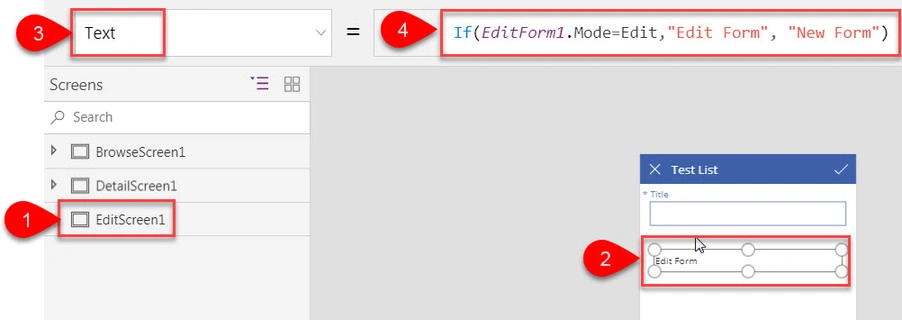
Save and publish the app.
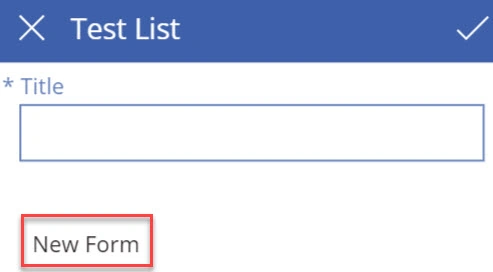
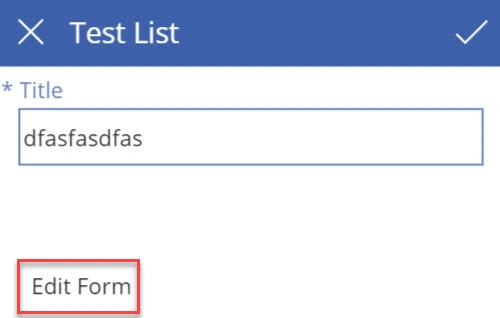
You will see the label text updated based on the current form mode.
You will see the label text updated based on the current form mode.
Reference
https://powerapps.microsoft.com/en-us/tutorials/control-form-detail/
Job kochuPosted Dec 11, 2019, 11:22 PM
If(EditForm1.Mode=New,Department,Department)
Job kochuPosted Dec 11, 2019, 11:22 PM
"I created a simple canvas power app with excel as a data source. for example there are 2 drop downs like employee name and department. i saved the name and department.but when i go to the edit view the dropdown values are not showing the saved values. if this is the case if i have more dropdowns i need to update all the dropdowns and save again."