

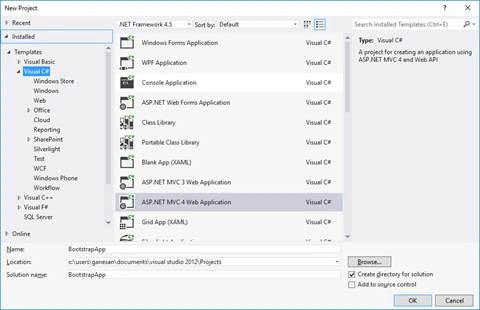
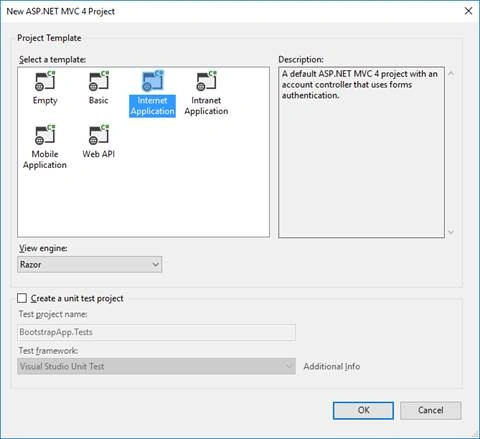
Create a new MVC 4 Application, given below-
Create a table, using the script, given below (if needed,as table will be generated on code first)-
- CREATE TABLE [dbo].[StudentDetails] (
- [Id] INT IDENTITY (1, 1) NOT NULL,
- [StudentName] NVARCHAR (MAX) NULL,
- [Age] INT NULL,
- CONSTRAINT [PK_dbo.StudentDetails] PRIMARY KEY CLUSTERED ([Id] ASC)
- );
- <connectionStrings>
- <add name="DefaultConnection" connectionString="Data Source=(LocalDb)\v11.0;Initial Catalog=aspnet-BootstrapApp-20160910224720;Integrated Security=SSPI;AttachDBFilename=|DataDirectory|\aspnet-BootstrapApp-20160910224720.mdf" providerName="System.Data.SqlClient" />
- </connectionStrings>
- public class StudentDetails
- {
- public int Id { get; set; }
- public string StudentName { get; set; }
- public int? Age { get; set; }
- }
- public class UsersContext : DbContext
- {
- public UsersContext()
- : base("DefaultConnection")
- {
- }
- public DbSet<StudentDetails> studentDbset { get; set; }
- }
- public class StudentController : Controller
- {
- private UsersContext db = new UsersContext();
- //
- // GET: /Student/Student/
- public ActionResult Index()
- {
- return View(db.studentDbset.ToList());
- }
- public ActionResult Index1()
- {
- return View(db.studentDbset.ToList());
- }
- //
- // GET: /Student/Student/Details/5
- public ActionResult Details(int id = 0)
- {
- StudentDetails studentdetails = db.studentDbset.Find(id);
- if (studentdetails == null)
- {
- return HttpNotFound();
- }
- return View(studentdetails);
- }
- //
- // GET: /Student/Student/Create
- [HttpGet]
- public ActionResult Create()
- {
- return View();
- }
- //
- // GET: /Student/Student/Create
- public ActionResult CreateForm()
- {
- return View();
- }
- //
- // POST: /Student/Student/Create
- [HttpPost]
- public ActionResult Create(StudentDetails studentdetails)
- {
- if (ModelState.IsValid)
- {
- db.studentDbset.Add(studentdetails);
- db.SaveChanges();
- return RedirectToAction("Index");
- }
- return View(studentdetails);
- }
- //
- // GET: /Student/Student/Edit/5
- public ActionResult Edit(int id = 0)
- {
- StudentDetails studentdetails = db.studentDbset.Find(id);
- if (studentdetails == null)
- {
- return HttpNotFound();
- }
- return View(studentdetails);
- }
- public ActionResult EditForm(int id = 0)
- {
- StudentDetails studentdetails = db.studentDbset.Find(id);
- if (studentdetails == null)
- {
- return HttpNotFound();
- }
- return View(studentdetails);
- }
- //
- // POST: /Student/Student/Edit/5
- [HttpPost]
- public ActionResult Edit(StudentDetails studentdetails)
- {
- if (ModelState.IsValid)
- {
- db.Entry(studentdetails).State = EntityState.Modified;
- db.SaveChanges();
- return RedirectToAction("Index");
- }
- return View(studentdetails);
- }
- //
- // GET: /Student/Student/Delete/5
- public ActionResult Delete(int id = 0)
- {
- StudentDetails studentdetails = db.studentDbset.Find(id);
- if (studentdetails == null)
- {
- return HttpNotFound();
- }
- return View(studentdetails);
- }
- //
- // POST: /Student/Student/Delete/5
- [HttpPost, ActionName("Delete")]
- public ActionResult DeleteConfirmed(int id)
- {
- StudentDetails studentdetails = db.studentDbset.Find(id);
- db.studentDbset.Remove(studentdetails);
- db.SaveChanges();
- return RedirectToAction("Index");
- }
- protected override void Dispose(bool disposing)
- {
- db.Dispose();
- base.Dispose(disposing);
- }
- }
- <link rel="stylesheet" href="http://maxcdn.bootstrapcdn.com/bootstrap/3.3.7/css/bootstrap.min.css">
- <script src="https://ajax.googleapis.com/ajax/libs/jquery/1.12.4/jquery.min.js"></script>
- <script src="http://maxcdn.bootstrapcdn.com/bootstrap/3.3.7/js/bootstrap.min.js"></script>
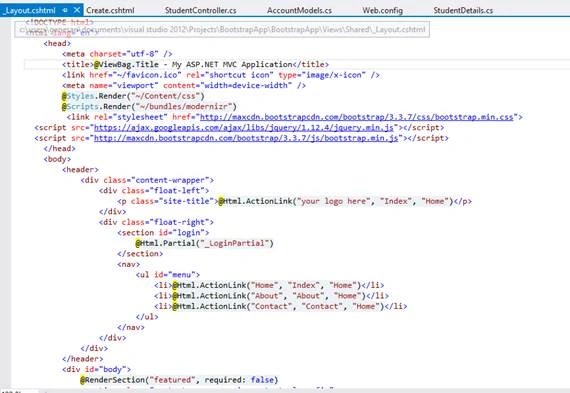
Screen clipping is taken: 11-09-2016 00:01
Add Index.cshtml View in Student Folder and add the snippet, given below-
- @model IEnumerable<BootstrapApp.Models.StudentDetails>
- @{
- ViewBag.Title = "Index";
- }
- <h2>Index</h2>
- <div class="container-fluid">
- <h1>Small Grid</h1>
- <p>The following example will result in a 25%/75% split on small, medium and large devices. On extra small devices, it will stack (100% width).</p>
- <p>Resize the browser window to see the effect.</p>
- <div class="row">
- <div class="col-sm-3">
- <label for="StudentName">Student name</label>
- </div>
- <div class="col-sm-9">
- <label for="Age">Age</label>
- </div>
- </div>
- @foreach (var item in Model) {
- <div class="row">
- <div class="col-sm-3">
- <label for="StudentName">@item.StudentName</label>
- </div>
- <div class="col-sm-3">
- <label for="Age">@item.Age</label>
- </div>
- <div class="col-sm-3">
- <a href="/Student/Edit/@item.Id">Edit</a> |
- <a href="/Student/Details/@item.Id">Details</a> |
- <a href="/Student/Delete/@item.Id">Delete</a>
- </div>
- </div>
- }
- </div>
- <p>
- @Html.ActionLink("Create New", "Create")
- </p>
- @model BootstrapApp.Models.StudentDetails
- @{
- ViewBag.Title = "Edit";
- }
- <h2>Edit</h2>
- <div class="container">
- <h2>Form control: input</h2>
- <form action="/Student/Edit" method="post" novalidate="novalidate">
- <div class="form-group">
- <input id="Id" name="Id" type="hidden" value="@Model.Id">
- </div>
- <div class="form-group">
- <label for="Student Name">Student Name:</label>
- <input type="text" class="form-control" id="StudentName" name="StudentName" value="@Model.StudentName">
- </div>
- <div class="form-group">
- <label for="Age">Age:</label>
- <input class="form-control" id="Age" name="Age" type="number" value="@Model.Age">
- </div>
- <div class="form-group">
- <p>
- <input type="submit" value="Create" />
- </p>
- </div>
- </form>
- </div>
- s
- <div>
- @Html.ActionLink("Back to List", "Index")
- </div>
- @section Scripts {
- @Scripts.Render("~/bundles/jqueryval")
- }
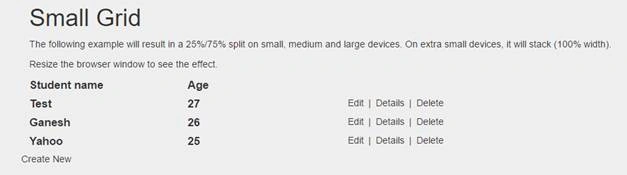
http://localhost:5474/Student
Screen clipping is taken: 11-09-2016 00:04
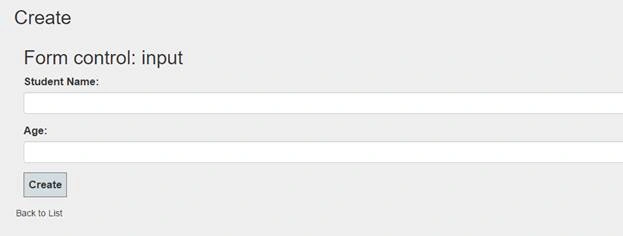
http://localhost:5474/Student/Create
Screen clipping is taken: 11-09-2016 00:04
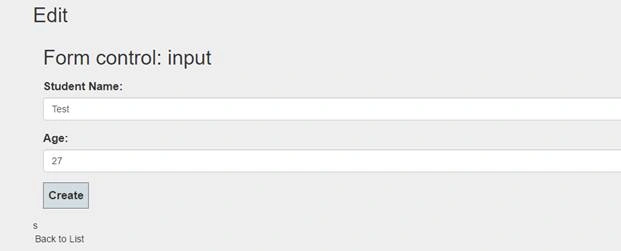
http://localhost:5474/Student/Edit/1
Screen clipping is taken: 11-09-2016 00:05
Click here to download. (DB is attached with the solution).
Humayun Kabir MamunPosted Sep 21, 2016, 12:57 AM
Nice...
Ganesan APosted Sep 19, 2016, 12:56 PM
Thanks Sathish
Satish Kumar VadlavalliPosted Sep 19, 2016, 7:16 AM
Nice explanation, keep up good work