

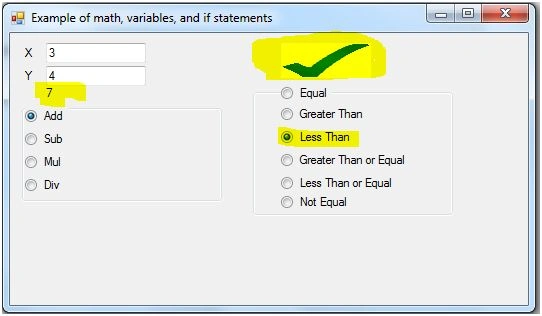
I have shown how you can perform math as well as logical operations together.
So first we will create a new windows application and design the below form.
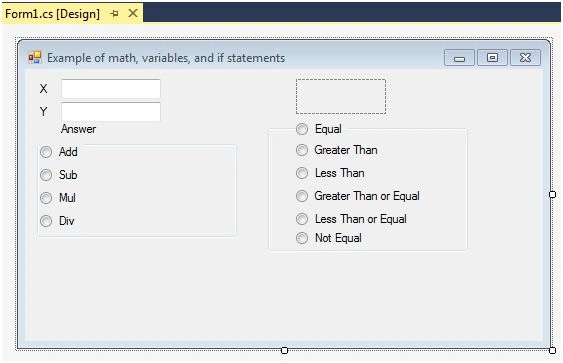
Now use the below code,
- using System;
- using System.Collections.Generic;
- using System.ComponentModel;
- using System.Data;
- using System.Drawing;
- using System.Linq;
- using System.Text;
- using System.Threading.Tasks;
- using System.Windows.Forms;
- namespace Example_of_math_variables_and_if_statements
- {
- public partial class Form1 : Form
- {
- private string x; //This defines the string variable x
- private string y;
- private string random_string;
- private int x_number; //This defines the integer variable x_number
- private int y_number;
- private int random;
- public Form1()
- {
- InitializeComponent(); //This creates the window from the information that was entered in the form designer
- }
- private void radioButton1_CheckedChanged(object sender, EventArgs e)
- {
- x = this.textBox1.Text;
- y = this.textBox2.Text;
- if (x == "") //This sees if x has no value
- {
- x = "0"; //This sets x to 0
- }
- if (y == "") //This sees if x has no value
- {
- y = "0"; //This sets y to 0
- }
- x_number = Convert.ToInt32(x); //This converts the string x to a integer then stores it in x_number
- y_number = Convert.ToInt32(y);
- random = x_number + y_number; //This sets the integer variable random to the value of x_number plus y_number
- random_string = Convert.ToString(random); //This converts the integer random to the string random_string
- this.label3.Text = random_string;
- } //This method is called when the radiobutton (a button that when pressed makes every other radiobutton in its groupbox not pressed) is changed
- private void radioButton2_CheckedChanged(object sender, EventArgs e)
- {
- x = this.textBox1.Text;
- y = this.textBox2.Text;
- if (x == "")
- {
- x = "0";
- }
- if (y == "")
- {
- y = "0";
- }
- x_number = Convert.ToInt32(x);
- y_number = Convert.ToInt32(y);
- random = x_number - y_number;
- random_string = Convert.ToString(random);
- this.label3.Text = random_string;
- }
- private void radioButton4_CheckedChanged(object sender, EventArgs e)
- {
- x = this.textBox1.Text;
- y = this.textBox2.Text;
- if (x == "")
- {
- x = " 0";
- }
- if (y == "")
- {
- y = "0";
- }
- x_number = Convert.ToInt32(x);
- y_number = Convert.ToInt32(y);
- random = x_number * y_number;
- random_string = Convert.ToString(random);
- this.label3.Text = random_string;
- }
- private void radioButton3_CheckedChanged(object sender, EventArgs e)
- {
- x = this.textBox1.Text;
- y = this.textBox2.Text;
- if (x == "")
- {
- x = "0";
- }
- if (y == "")
- {
- y = "0";
- }
- x_number = Convert.ToInt32(x);
- y_number = Convert.ToInt32(y);
- if (y_number == 0) //This is to make sure that we don't divide by 0
- {
- random_string = "Divide by zero error";
- }
- else
- {
- random = x_number / y_number;
- random_string = Convert.ToString(random);
- }
- this.label3.Text = random_string;
- }
- private void radioButton7_CheckedChanged(object sender, EventArgs e)
- {
- x = this.textBox1.Text;
- y = this.textBox2.Text;
- if (x == "")
- {
- x = "0";
- }
- if (y == "")
- {
- y = "0";
- }
- x_number = Convert.ToInt32(x);
- y_number = Convert.ToInt32(y);
- if (x_number == y_number) //This checks if the integer x_number is equal to the integer y_number
- {
- this.pictureBox1.Image = global::Example_of_math_variables_and_if_statements.Properties.Resources.yes; //If it is the picture is set to a check
- }
- else //If they are not then the picture is set as an X
- {
- this.pictureBox1.Image = global::Example_of_math_variables_and_if_statements.Properties.Resources.no;
- }
- }
- private void radioButton8_CheckedChanged(object sender, EventArgs e)
- {
- x = this.textBox1.Text;
- y = this.textBox2.Text;
- if (x == "")
- {
- x = "0";
- }
- if (y == "")
- {
- y = "0";
- }
- x_number = Convert.ToInt32(x);
- y_number = Convert.ToInt32(y);
- if (x_number > y_number) //Check if the integer x_number is greater than integer y_number
- {
- this.pictureBox1.Image = global::Example_of_math_variables_and_if_statements.Properties.Resources.yes;
- }
- else
- {
- this.pictureBox1.Image = global::Example_of_math_variables_and_if_statements.Properties.Resources.no;
- }
- }
- private void radioButton6_CheckedChanged(object sender, EventArgs e)
- {
- x = this.textBox1.Text;
- y = this.textBox2.Text;
- if (x == "")
- {
- x = "0";
- }
- if (y == "")
- {
- y = "0";
- }
- x_number = Convert.ToInt32(x);
- y_number = Convert.ToInt32(y);
- if (x_number < y_number) //Check if the integer x_number is less than integer y_number
- {
- this.pictureBox1.Image = global::Example_of_math_variables_and_if_statements.Properties.Resources.yes;
- }
- else
- {
- this.pictureBox1.Image = global::Example_of_math_variables_and_if_statements.Properties.Resources.no;
- }
- }
- private void radioButton5_CheckedChanged(object sender, EventArgs e)
- {
- x = this.textBox1.Text;
- y = this.textBox2.Text;
- if (x == "")
- {
- x = "0";
- }
- if (y == "")
- {
- y = "0";
- }
- x_number = Convert.ToInt32(x);
- y_number = Convert.ToInt32(y);
- if (x_number >= y_number) //Check if the integer x_number is greater than or equal to integer y_number
- {
- this.pictureBox1.Image = global::Example_of_math_variables_and_if_statements.Properties.Resources.yes;
- }
- else
- {
- this.pictureBox1.Image = global::Example_of_math_variables_and_if_statements.Properties.Resources.no;
- }
- }
- private void radioButton9_CheckedChanged(object sender, EventArgs e)
- {
- x = this.textBox1.Text;
- y = this.textBox2.Text;
- if (x == "")
- {
- x = "0";
- }
- if (y == "")
- {
- y = "0";
- }
- x_number = Convert.ToInt32(x);
- y_number = Convert.ToInt32(y);
- if (x_number <= y_number) //Check if the integer x_number is less than or equal to integer y_number
- {
- this.pictureBox1.Image = global::Example_of_math_variables_and_if_statements.Properties.Resources.yes;
- }
- else
- {
- this.pictureBox1.Image = global::Example_of_math_variables_and_if_statements.Properties.Resources.no;
- }
- }
- private void radioButton10_CheckedChanged(object sender, EventArgs e)
- {
- x = this.textBox1.Text;
- y = this.textBox2.Text;
- if (x == "")
- {
- x = "0";
- }
- if (y == "")
- {
- y = "0";
- }
- x_number = Convert.ToInt32(x);
- y_number = Convert.ToInt32(y);
- if (x_number != y_number) //Check if the integer x_number is not equal to integer y_number
- {
- this.pictureBox1.Image = global::Example_of_math_variables_and_if_statements.Properties.Resources.yes;
- }
- else
- {
- this.pictureBox1.Image = global::Example_of_math_variables_and_if_statements.Properties.Resources.no;
- }
- }
- }
- }
Vinay SinghPosted Jul 5, 2016, 7:24 AM
Thanks
kalu singh raoPosted Jul 1, 2016, 1:47 AM
Nice...