

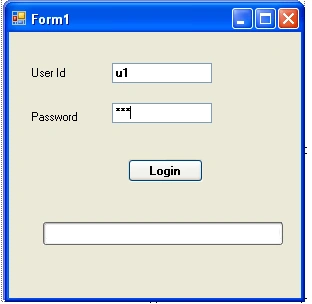
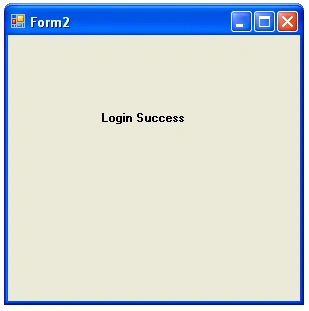
In this article we will know a login page using a progress bar control. When user gives both the credentials (user id & password) values correctly, then a new form will display showing login success.
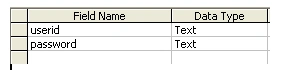
Table structure
Create a database in Ms-access as below.
Program
Add two forms in the application.
using System;
using System.Collections.Generic;
using System.ComponentModel;
using System.Data;
using System.Drawing;
using System.Linq;
using System.Text;
using System.Windows.Forms;
using System.Data.OleDb;
namespace Login_Form_in_Csharp_Using_ProgressBar
{
public partial class Form1 : Form
{
string ConnectionString = System.Configuration.ConfigurationSettings.AppSettings["dsn"];
OleDbCommand com;
OleDbDataAdapter oledbda;
DataSet ds;
string str;
public Form1()
{
InitializeComponent();
}
private void btnlogin_Click(object sender, EventArgs e)
{
if (txtusername.Text == "" || txtpassword.Text == "")
{
MessageBox.Show("Please enter User ID or Password");
txtusername.Text = "";
txtpassword.Text = "";
}
else
{
OleDbConnection con = new OleDbConnection(ConnectionString);
con.Open();
str = "select count(*) from login where userid='" + txtusername.Text.Trim() + "' and password='" + txtpassword.Text.Trim() + "'";
com = new OleDbCommand(str, con);
oledbda = new OleDbDataAdapter(com);
ds = new DataSet();
oledbda.Fill(ds, "login");
long x;
x = Convert.ToInt64(com.ExecuteScalar());
if (x == 1)
{
int y = 0;
progressBar1.Visible = true;
progressBar1.Minimum = 1;
progressBar1.Maximum = 100000;
progressBar1.Value = 1;
progressBar1.Step = 1;
for (y = 1; y <= 100000; y++)
{
progressBar1.PerformStep();
}
Form2 f1 = new Form2();
f1.Show();
this.Hide();
}
else
{
MessageBox.Show("Invalid User ID or Password! Try Again!");
txtusername.Text = "";
txtpassword.Text = "";
}
con.Close();
}
}
}
}
Output
Rajagopal AswinPosted May 13, 2017, 1:36 PM
Thank you very useful for me I need help