

In this post, we will be discussing the difference between call(), apply(), and bind() methods of JavaScript functions with simple examples. As functions are also Objects in JavaScript, these 3 methods are used to control the invocation of the function. call() and apply() were introduced in ECMAScript 3 while bind() was added as part of ECMAScript 5.
Uses
We can use call()/apply() to invoke the function immediately. bind() returns a bound function that, when executed later, will have the correct context ("this") for calling the original function. So bind() can be used when the function needs to be called later in certain events when it's useful.
To get a grasp of "this" in JavaScript, read Understanding "this" in javascript and also Difference between scope and context in javascript.
call() or Function.prototype.call()
Check the code sample below for call(),
- //Demo with javascript .call()
- var obj = {name:"Niladri"};
- var greeting = function(a,b,c){
- return "welcome "+this.name+" to "+a+" "+b+" in "+c;
- };
- console.log(greeting.call(obj,"Newtown","KOLKATA","WB"));
- // returns output as welcome Niladri to Newtown KOLKATA in WB
The rest of the parameters are the arguments to the actual function.
apply() or Function.prototype.apply()
Check the below code sample for apply()
- //Demo with javascript .apply()
- var obj = {name:"Niladri"};
- var greeting = function(a,b,c){
- return "welcome "+this.name+" to "+a+" "+b+" in "+c;
- };
- // array of arguments to the actual function
- var args = ["Newtown","KOLKATA","WB"];
- console.log("Output using .apply() below ")
- console.log(greeting.apply(obj,args));
- /* The output will be
- Output using .apply() below
- welcome Niladri to Newtown KOLKATA in WB */
Similarly to call() method the first parameter in apply() method sets the "this" value which is the object upon which the function is invoked. In this case, it's the "obj" object above. The only difference of apply() with the call() method is that the second parameter of the apply() method accepts the arguments to the actual function as an array.
bind() or Function.prototype.bind()
Check the below code sample for bind()- //Use .bind() javascript
- var obj = {name:"Niladri"};
- var greeting = function(a,b,c){
- return "welcome "+this.name+" to "+a+" "+b+" in "+c;
- };
- //creates a bound function that has same body and parameters
- var bound = greeting.bind(obj);
- console.dir(bound); ///returns a function
- console.log("Output using .bind() below ");
- console.log(bound("Newtown","KOLKATA","WB")); //call the bound function
- /* the output will be
- Output using .bind() below
- welcome Niladri to Newtown KOLKATA in WB */
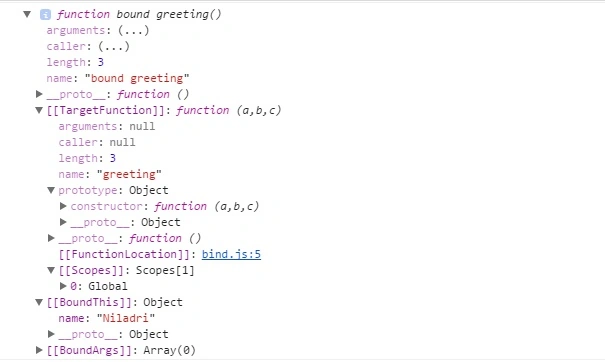
The rest of the parameters following the first parameter in bind() method are passed as arguments that are prepended to the arguments provided to the bound function when invoking the target function.
That's all for now. Thank you for reading and I hope this post will be helpful for beginners who are facing issues regarding the apply(), call(), and bind() methods of JavaScript.
Join the conversation! Your thoughts help the community grow.