

Here, we will learn how to save an image in the database and to retrieve it into MVC 5 Views.
Let's start.
The images stored as Binary data will be fetched as BYTE Array and then, the BYTE Array will be converted to BASE 64 string and then displayed in View in ASP.NET MVC 5.
Use Entity Framework to add table and connection string
Using steps like Data->ADO.NET Entity Data Model and connection string, it will automatically update in web.config and the Table is mapped as a class and the columns as property.
Using steps like Data->ADO.NET Entity Data Model and connection string, it will automatically update in web.config and the Table is mapped as a class and the columns as property.
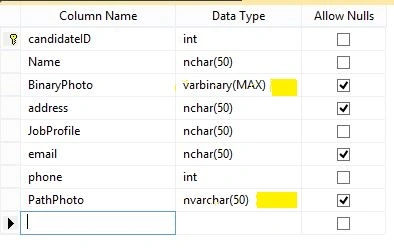
This is the table that is used to store images and details Column BinaryPhoto -Data type Varbinary(max) to store image in database in Byte format and Column PathPhoto – data type nvarchar(50) to store URL/Path of image
In index .cshtml
We are submitting details and using type=”file” for image.
- <h2>Index</h2> @using (Html.BeginForm("Index", "Candidate", FormMethod.Post,new { enctype = "multipart/form-data" })) @* enctype='multipart/form-data is an encoding type that allows files to be sent through a POST. *@ {
- <div class="container">
- <table>
- <tr> </tr>// other details like name, address etc
- <tr>
- <td style="width:80px;height:50px"><label>Binary Image</label><input type="file" name="file1" id="file1" style="width: 100%;" /> <br /></td>
- <td><label>Path Image</label> <input type="file" name="file2" id="file2" style="width: 100%;" /></td>
- </td>
- <td><input type="submit" value="Submit" /></td>
- </tr>
- </table>
- </div> }
In Controller Action Method,
- namespace angularmvcdemo.Controllers {
- public class CandidateController: Controller {
- modeldataEntities db = new modeldataEntities();
- //
- public ActionResult Index() {
- return View();
- }
- [HttpPost]
- public ActionResult Index(CandidateDetail Details, HttpPostedFileBase File1, HttpPostedFileBase File2) {
- // file1 to store image in binary formate and file2 to store path and url
- // we are checking file1 and file2 are null or not according to that different case are there
- if (File1 != null && File1.ContentLength > 0 && File2 != null) {
- Details.BinaryPhoto = new byte[File1.ContentLength]; // file1 to store image in binary formate
- File1.InputStream.Read(Details.BinaryPhoto, 0, File1.ContentLength);
- string ImageName = System.IO.Path.GetFileName(File2.FileName); //file2 to store path and url
- string physicalPath = Server.MapPath("~/img/" + ImageName);
- // save image in folder
- File2.SaveAs(physicalPath);
- // store path in database
- Details.PathPhoto = "img/" + ImageName;
- db.CandidateDetails.Add(Details);
- db.SaveChanges();
- return PartialView("detail");
- }
- if (File1 != null && File1.ContentLength > 0 && File2 == null) {
- Details.BinaryPhoto = new byte[File1.ContentLength]; // file1 to store image in binary formate
- File1.InputStream.Read(Details.BinaryPhoto, 0, File1.ContentLength);
- db.CandidateDetails.Add(Details);
- db.SaveChanges();
- return PartialView("detail");
- }
- if (File1 == null && File2 != null) {
- string ImageName = System.IO.Path.GetFileName(File2.FileName); //file2 to store path and url
- string physicalPath = Server.MapPath("~/img/" + ImageName);
- // save image in folder
- File2.SaveAs(physicalPath);
- Details.PathPhoto = "img/" + ImageName;
- db.CandidateDetails.Add(Details);
- db.SaveChanges();
- return PartialView("detail");
- } else { //if both file1 and file2 are null then we can store others details without any image
- db.CandidateDetails.Add(Details);
- db.SaveChanges();
- return PartialView("detail");
- }
- }
In detail, cshtml // to display image and other details,
- @ {
- angularmvcdemo.modeldataEntities db = new angularmvcdemo.modeldataEntities();
- } < table > < tr > < td colspan = "2"
- style = "width:800px;height:50px" > candidate < /td></tr > @foreach(var detail in db.CandidateDetails) { < tr > < td > binary image
- @if(detail.BinaryPhoto != null) {
- var base64 = Convert.ToBase64String(detail.BinaryPhoto);
- var imgsrc = string.Format("data:image/jpg;base64,{0}", base64); < img src = '@imgsrc'
- style = "max-width:100px;max-height:100px" / >
- }
- else { < img src = "~/img/avatar-default.jpg"
- style = "max-width:100px;max-height:100px" / > @ * this is
- default image in
- case ofnot inserted any image(file1) in index.cshtml * @
- } < /td></tr > < tr > < td > < label > path image < /label>
- @if(@detail.PathPhoto != null) { < img src = "@detail.PathPhoto"
- width = "100"
- height = "100" / >
- }
- else { < img src = "~/img/avatar-default.jpg"
- style = "max-width:100px;max-height:100px" / > @ * this is
- default image in
- case ofnot inserted any image(file2) in index.cshtml * @
- } < /td></tr >
- } < /table>
Output

In the database, it stores like this.

sumit gargPosted Oct 22, 2018, 6:17 AM
I have issue to display image when image name have & sign means image name like (abc & xyz.jpg) please tell me how can we display ..
Emanuel GarciaPosted Aug 7, 2018, 4:52 AM
Great!!! this was what i was looking for. Ty
Hamid KhanPosted Sep 11, 2017, 4:21 AM
That would be good if you upload source code.......
Satyaprakash SamantarayPosted Sep 11, 2017, 12:49 AM
Can u upload ur project?