

While we are working on SharePoint 2013 and Office 365 sites, most of our clients request there home page to not have a left navigation as in they want only the main content on their home page.
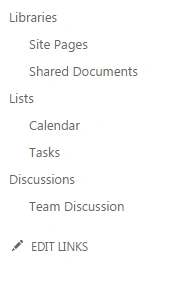
In those cases I don’t want you to take a lot of time and write a code to hide those files. Just do the following steps.
1. Edit the page you want to remove the left navigation.
2. Add a Script Editor web part.
3. Paste the following code.
2. Add a Script Editor web part.
3. Paste the following code.
Code:
- <style type="text/css">
- #sideNavBox
- {
- display:none;
- }
- </style>
4. Your left navigation will be gone.
Keep learning! Cheers !
Keep learning! Cheers !
VENKATESWARULU SPosted Nov 14, 2018, 5:16 AM
One of our users shared with me the following, which we find ilogic:When using Global search to find let's say Case 00123456, SharePoint finds the case. Searching for 123456 also retrieves the case. However, searching for 00123456 does not show results. Is there any possiblities? I would appreciate if anyone could share thoughts.
VENKATESWARULU SPosted Nov 14, 2018, 5:16 AM
Hi singh ,
Nilesh JadavPosted Oct 2, 2015, 4:59 AM
Great Collection sir