

This blog will demonstrate, how to get the data from ASP.Net MVC controller(s) using JQuery Ajax and bind the retrieved values to the textbox. For that, I have created a controller "JQueryAjaxCallController" with the Get action method "AjaxGetCall" and a class "Employee" as below.
Controller
Controller
- using System;
- using System.Collections.Generic;
- using System.Linq;
- using System.Web;
- using System.Web.Mvc;
- namespace JQueryAjaxCallINMVC.Controllers {
- public class JQueryAjaxCallController: Controller {
- //
- // GET: /JQueryAjaxCall/
- public ActionResult Index() {
- return View();
- }
- [HttpGet]
- public JsonResult AjaxGetCall() {
- Employee employee = new Employee {
- Name = "Gnanavel Sekar",
- Designation = "Software Engineer",
- Location = "Chennai"
- };
- return Json(employee, JsonRequestBehavior.AllowGet);
- }
- }
- public class Employee {
- public string Name {
- get;
- set;
- }
- public string Designation {
- get;
- set;
- }
- public string Location {
- get;
- set;
- }
- }
- }
In AjaxGetCall(), I added the dummy record to the employee model to view in browser.
View
Next step is to add a View for the Controller and while adding it you will need to select the Employee class created earlier.
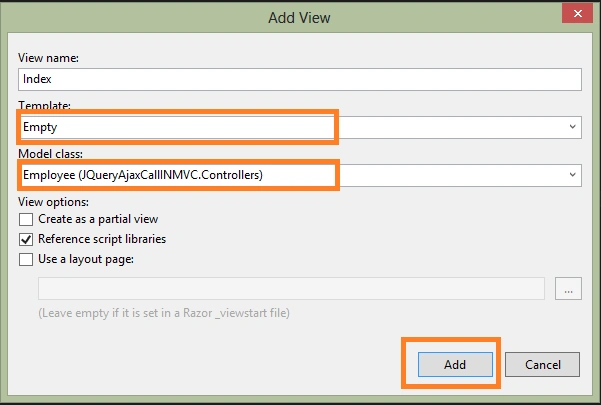
Once you click the Add button, it will create strongly typed view with Employee model. Now we need to create Razor/Html controls to get the user input. Here, I used the HTML controls to bind the retrieved data and we made a jQuery Ajax GET call MVC controller in the below code.
- @model JQueryAjaxCallINMVC.Controllers.Employee
- @ {
- Layout = null;
- } < html > < head > < meta name = "viewport"
- content = "width=device-width" / > < title > Jqurery AJAX Call < /title> < script type = "text/javascript"
- src = "https://code.jquery.com/jquery-1.12.4.js" > < /script> < script type = "text/javascript" > $(function() {
- $("#btnGet").click(function() {
- $.ajax({
- type: "GET",
- url: "/JQueryAjaxCall/AjaxGetCall",
- contentType: "application/json; charset=utf-8",
- dataType: "json",
- success: function(response) {
- if (response != null) {
- $('#EmployeeName').val(response.Name);
- $('#EmployeeDesignation').val(response.Designation);
- $('#EmployeeLocation').val(response.Location);
- } else {
- alert("Something went wrong");
- }
- },
- failure: function(response) {
- alert(response.responseText);
- },
- error: function(response) {
- alert(response.responseText);
- }
- });
- });
- }); < /script> < /head> < body > < div style = "margin-left:20px" > JQuery Ajax GET call wtih ASP.NET MVC controller < /div> < br / > < div title = "GetPortion" > < input type = "button"
- id = "btnGet"
- value = "Get Data" / > < input type = "text"
- id = "EmployeeName"
- placeholder = "Name" / > < input type = "text"
- id = "EmployeeDesignation"
- placeholder = "Designation" / > < input type = "text"
- id = "EmployeeLocation"
- placeholder = "Location" / > < /div> < /body> < /html>
Detailed Description
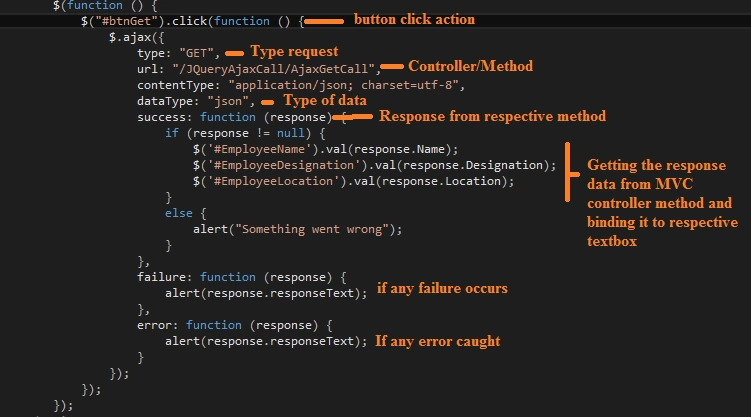
RouteConfig.cs
You need to set your startup controller and view.
- using System;
- using System.Collections.Generic;
- using System.Linq;
- using System.Web;
- using System.Web.Mvc;
- using System.Web.Routing;
- namespace JQueryAjaxCallINMVC {
- public class RouteConfig {
- public static void RegisterRoutes(RouteCollection routes) {
- routes.IgnoreRoute("{resource}.axd/{*pathInfo}");
- routes.MapRoute(name: "Default", url: "{controller}/{action}/{id}", defaults: new {
- controller = "JQueryAjaxCall", action = "Index", id = UrlParameter.Optional
- });
- }
- }
- }
Now run your application

Refer to the attached demo project and I hope it's helpful.
engr.md.raselfaruk JonyPosted Oct 24, 2019, 6:11 AM
Please show this example with database table.
Riza AfandiPosted Jun 11, 2019, 9:58 PM
Excellent bro, then how about to return multiple array json ?
William Fernando Barreto LeonPosted Mar 5, 2019, 4:02 PM
Excellent contribution knight
Mohammad BashaPosted Jan 25, 2019, 8:54 AM
Good Article...Helpful