

This example is used to retrieve the creation date and modified date of a web site using JSOM
Content:
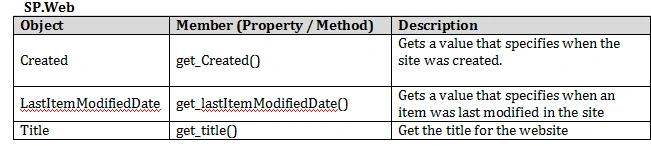
This article explores the web properties with the following code example, which displays the title, creation date and last modified date of a current site. Use the Gift for Developers from SharePoint article to insert the following code to the page.
- <!-- How to get the Created date and Last Modified date of a Site -->
- <!-- HTML Content -->
- <div id="myapp"></div>
- <!-- Script Content -->
- <script type='text/javascript'>
- var oWeb;
- function getwebdetails()
- {
- var clientContext = SP.ClientContext.get_current(); // equivalent to SPContext.Current
- oWeb = clientContext.get_web(); //Gets the current Web Object
- //clientContext.load(oWeb); - Load all properties for a web
- clientContext.load(oWeb,'Title', 'Created', 'LastItemModifiedDate');
- clientContext.executeQueryAsync(onSucceeded,onFailed);
- }
- function onSucceeded()
- {
- var strmsg = "";
- strmsg += "<b>Web Title:</b> " + oWeb.get_title() +"<br/>";
- strmsg += "Created Date: "+ oWeb.get_created()+"<br/>";
- strmsg += "Last Modified Date: "+ oWeb.get_lastItemModifiedDate();
- document.getElementById("myapp").innerHTML = strmsg;
- }
- function onFailed(sender, args)
- {
- try
- {
- console.log('Error: ' + args.get_message());
- }
- catch (err)
- {
- }
- }
- ExecuteOrDelayUntilScriptLoaded(getwebdetails, "sp.js");
- </script>
Santhakumar MunuswamyPosted Sep 26, 2015, 12:41 PM
Nice share