

Introduction
In this post we will discuss how to fetch data from Oracle database using C#. we will OracleDataReader . Before proceeding further I would suggest to go through Connecting To Oracle Database Using C#.
Go through the below code.
Default.aspx
- <%@ Page Language="C#" AutoEventWireup="true" CodeFile="Default2.aspx.cs" Inherits="Default2" %>
- <!DOCTYPE html>
- <html xmlns="http://www.w3.org/1999/xhtml">
- <head runat="server">
- <title>Fetch Data From Oracle DataBase</title>
- </head>
- <body>
- <form id="form1" runat="server">
- <div>
- <asp:GridView ID="grid" runat="server" ></asp:GridView>
- <asp:Button ID="btn_fetch" runat="server" Text="Fetch Data" OnClick="btn_fetch_Click" />
- </div>
- </form>
- </body>
- </html>
Default.aspx.cs
- using System;
- using System.Collections.Generic;
- using System.Linq;
- using System.Web;
- using System.Web.UI;
- using System.Web.UI.WebControls;
- using Oracle.DataAccess.Client;
- using System.Data;
- public partial class Default2 : System.Web.UI.Page
- {
- //creating TNS entries
- string oradb = "Data Source=(DESCRIPTION =" +
- "(ADDRESS = (PROTOCOL = TCP)(HOST = your_host_name)(PORT = 1521))" +
- "(CONNECT_DATA =" +
- "(SERVER = DEDICATED)" +
- "(SERVICE_NAME = XE)));" +
- "User Id=your_user_id;Password=*******;";
- protected void Page_Load(object sender, EventArgs e)
- {
- }
- protected void btn_fetch_Click(object sender, EventArgs e)
- {
- OracleConnection con = new OracleConnection(oradb);
- OracleCommand cmd = new OracleCommand();
- cmd.CommandText="select * from student";
- cmd.Connection = con;
- con.Open();
- OracleDataReader dr = cmd.ExecuteReader();
- if (dr.HasRows)
- {
- Response.Write("<table border='1'>");
- Response.Write("<tr><th>Name</th><th>Roll No</th></tr>");
- while (dr.Read())
- {
- Response.Write("<tr>");
- Response.Write("<td>" + dr["name"].ToString() + "</td>");
- Response.Write("<td>" + dr["roll_no"].ToString() + "</td>");
- Response.Write("</tr>");
- }
- Response.Write("</table>");
- }
- else
- {
- Response.Write("No Data In DataBase");
- }
- con.Close();
- }
- }
Have a look at below code.
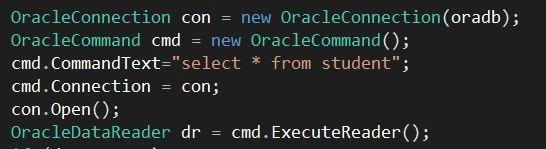
- OracleConnection(): Initializes a new instance of the OracleConnection.
- OracleConnection(oradb): Initializes a new instance of the OracleConnection class with the specified connection string.
- OracleCommand(): Initializes a new instance of the OracleCommand.
- CommandText: Gets or sets the SQL statement or stored procedure to execute against the database. (Overrides DbCommand.CommandText.).
- Connection: Gets or sets the OracleConnection used by this instance of the OracleCommand.
- OracleDataReader: To create an OracleDataReader, you must call the ExecuteReader method of the OracleCommand object, rather than directly using a constructor. Changes made to a resultset by another process or thread while data is being read may be visible to the user of the OracleDataReader.
Output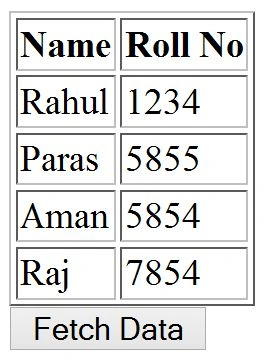
Gowtham RajamanickamPosted Mar 12, 2015, 4:03 AM
good one...