

 In this blog, you will learn about exporting data to Excel and CSV files from Entity Framework using MVC applications.
In this blog, I will show how to export data using LINQ query using Entity Framework. Here is my table.
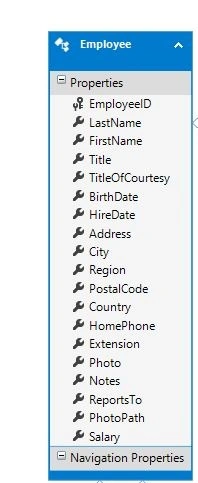
Export data to Excle file
Here is my code to export data in .xls format.
- public void ExportExcel_EmployeeData() {
- var sb = new StringBuilder();
- var data = from s in odb.Employee // Odb is the object of edmx file
- select new {
- // You can choose column name according your need
- s.FirstName,
- s.LastName,
- s.Address,
- s.BirdthDate,
- s.City,
- s.Region,
- s.salary, s.Notes
- };
- var list = data.ToList();
- var grid = new System.Web.UI.WebControls.GridView();
- grid.DataSource = list;
- grid.DataBind();
- Response.ClearContent();
- Response.AddHeader("content-disposition", "attachment; filename=Emp.xls");
- Response.ContentType = "application/vnd.ms-excel";
- StringWriter sw = new StringWriter();
- System.Web.UI.HtmlTextWriter htw = new System.Web.UI.HtmlTextWriter(sw)
- grid.RenderControl(htw);
- Response.Write(sw.ToString());
- Response.End();
- }
Export Data to CSV File
S MPosted Feb 1, 2022, 7:39 AM
How to export data to csv based on selected fields only?
Anurag SharmaPosted May 24, 2018, 7:10 AM
It really helped me. Thank you for that. Keep it up
Suresh KamrushiPosted Apr 6, 2018, 12:45 AM
Simple code here: http://wp.me/p3Osmq-wq
Eduardo JsmPosted Oct 3, 2017, 8:29 PM
Interesting way to exportar data, especially to excel.