

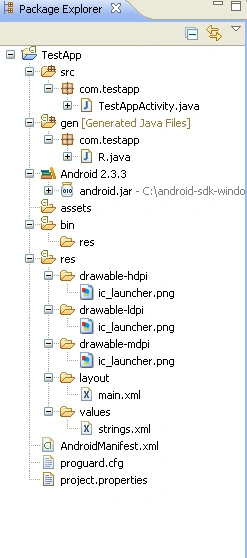
When we create new android project in eclipse editor we found that
there are many directories created for android application
which are known as directory structure
1. src :
The src Directory is first tree branch of root directory
which contain packages and .java files inside package.
2. gen directory :
The gen directory contains folder that are generated for us by the tool set.
like R.java file.
R.java file update automatically by the system whenever we modify the design object or anything.
in straight forward way whatever we add or remove from our project will be update in R.java file.
3. Api libraries :
when we develop new android application Api library is auto created with whole directory but if we want to change
i mean if we want to create our own api library then we have to follow below steps:
A. In the Package Explorer, right-click the dependent project and select Properties.
B. In the Properties window, select the "Android" properties group at left and locate the Library properties at right.
C. Click Add to open the Project Selection dialog.
D. From the list of available library projects, select a project and click OK.
4. android dependency :
Android Dependencies is a virtual folder where Eclipse shows what JAR files the project depends on
Do not delete that folder.
we will destroy your project.
1.Right click on the destroyed project
2.Select "Android Tools > Fix Project Properties" in the drop-down
5. bin :
when we compile any android program generate binary files. these files goes to bin folder/directory.
6. assets :
Sazid MauhammadPosted Feb 7, 2013, 10:24 PM
thnx prince
prince johnPosted Jan 26, 2013, 11:37 AM
hey gud1 bro all in one