

Introduction
SQL is a language for managing data in the database. It's used for inserting, updating, deleting, and querying data. SQL is one of the most common languages used by database developers.
SQL clauses are divided into several types, each with a different role.
- SELECT – Selects the records from the table
- WHERE – Filters out unwanted records that don't meet certain conditions
- GROUP BY – Groups similar rows into groups based on one or more columns.
- HAVING – Filters out groups whose aggregate value is not above or below some specified value.
- ORDER BY – Orders the resultset by one or more columns in ascending order (ASC) or descending order (DESC).
A clause can be used with joins. Let's see this with an example.
Step 1. Create database tables
Open SQL Server and create three tables as below.
Employee Table
CREATE TABLE [dbo].[Employee](
    [EmployeeId] [int] IDENTITY(1,1) NOT NULL,
    [Name] [nvarchar](50) NULL,
    [Gender] [char](10) NULL,
    [Position] [nvarchar](50) NULL,
    [Salary] [int] NULL,
    [Department_Id] [int] NULL,
    [Incentive_Id] [int] NULL,
PRIMARY KEY CLUSTERED
(
    [EmployeeId] ASC
)WITH (PAD_INDEX = OFF, STATISTICS_NORECOMPUTE = OFF, IGNORE_DUP_KEY = OFF, ALLOW_ROW_LOCKS = ON, ALLOW_PAGE_LOCKS = ON) ON [PRIMARY]
) ON [PRIMARY]

GO
Department Table
CREATE TABLE [dbo].[Department](
    [DepartmentId] [int] IDENTITY(1,1) NOT NULL,
    [DepartmentName] [nvarchar](50) NULL,
PRIMARY KEY CLUSTERED
(
    [DepartmentId] ASC
)WITH (PAD_INDEX = OFF, STATISTICS_NORECOMPUTE = OFF, IGNORE_DUP_KEY = OFF, ALLOW_ROW_LOCKS = ON, ALLOW_PAGE_LOCKS = ON) ON [PRIMARY]
) ON [PRIMARY]

GO
Incentive Table
CREATE TABLE [dbo].[Incentive](
    [IncentiveId] [int] IDENTITY(1,1) NOT NULL,
    [IncentiveAmount] [int] NULL,
PRIMARY KEY CLUSTERED
(
    [IncentiveId] ASC
)WITH (PAD_INDEX = OFF, STATISTICS_NORECOMPUTE = OFF, IGNORE_DUP_KEY = OFF, ALLOW_ROW_LOCKS = ON, ALLOW_PAGE_LOCKS = ON) ON [PRIMARY]
) ON [PRIMARY]

GO
Step 2. Add data to tables
Insert the values in tables, like I have done using the following queries.
/*INESRT VALUES IN EMPLOYEE TABLE*/
insert into Employee values('Anisha Agarwal','Female','Sales Excutive',30000,6,3)
insert into Employee values('Manish Agarwal','Male','Accountant',40000,1,6)
insert into Employee values('Fayaz Ansari','Male','UI Developer',50000,3,8)
insert into Employee values('Rahul Sharma','Male','Software Engineer',45000,3,8)
insert into Employee values('Abdul Rahim','Male','HR',30000,3,5)
insert into Employee values('Arvind Kumar','Male','HR',32000,3,5)
insert into Employee values('Priya Jain','Female','Marketing',25000,4,4)
insert into Employee values('Zoya','Female','Sales Excutive',30000,6,3)
insert into Employee values('Monika Agarwal','Female','Marketing',25000,4,4)
insert into Employee values('Suresh Kumar','Male','Assistant',20000,null,4)

/*INESRT VALUES IN DEPARTMENT TABLE*/
insert into Department values('Accountant')
insert into Department values('HR')
insert into Department values('IT')
insert into Department values('Markeing')
insert into Department values('Payroll')
insert into Department values('Sales')

/*INESRT VALUES IN INCENTIVE TABLE*/
insert into Incentive values(1000)
insert into Incentive values(2000)
insert into Incentive values(3000)
insert into Incentive values(4000)
insert into Incentive values(5000)
insert into Incentive values(6000)
insert into Incentive values(7000)
insert into Incentive values(8000)
insert into Incentive values(9000)
insert into Incentive values(10000) 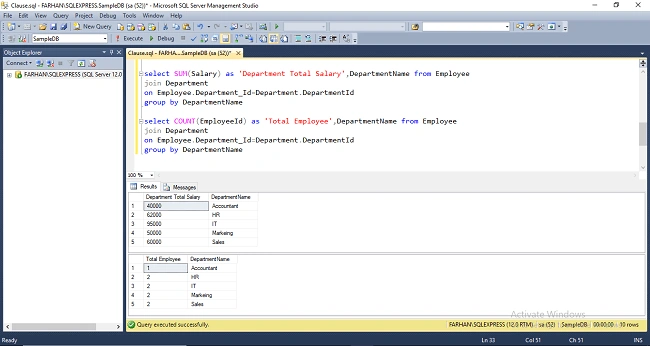


Join the conversation! Your thoughts help the community grow.