
jQuery ClearQueue() Method
ClearQueue() function mainly use for stop all animated function in the queue. ClearQueue() function only work with animate() function.
Syntax
$(selector).clearQueue(queueName) |
Example
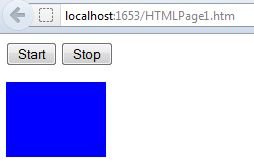
In this example when you will click on start then animation will be start as soon as you click on stop then animation will be stoped.
<html> <head> <script type="text/javascript" src="jquery.js"></script> <script type="text/javascript"> $(document).ready(function () { $("#but1").click(function () { $("#dv").animate({ height: 250 }, "slow"); $("#dv").animate({ width: 250 }, "slow"); $("#dv").queue(function () { $(this).css("background-color", "orange"); $(this).dequeue(); }); $("#dv").animate({ height: 100 }, "slow"); $("#dv").animate({ width: 75 }, "slow"); }); $("#but2").click(function () { $("#dv").clearQueue(); }); }); </script> </head> <body>
<p><button id="but1">Start</button> <button id="but2">Stop</button></p> <div id="dv" style="background:blue;height:75px;width:100px;position:relative"> </div>
</body> </html> |
Output
Join the conversation! Your thoughts help the community grow.