

Introduction
XML stands for Extensible Markup Language file format, which is used to create common information formats and share both the format and the data on the World Wide Web, intranet, etc.
It has the advantages given below.
- Human and machine-readable format.
- It is platform independent.
- Its self-documenting format describes the structure and field names as well as specific values.
- XML is heavily used to store the data and share the data.
- XML data is stored in text format. This makes it easier to expand or upgrade to new operating systems, new applications, or new browsers, without losing data.
- It strictly follows closing node, case-sensitive and node name.

In this article, we will discuss about XML manipulation in C#. We discuss the points given below.
- Add node/XML value to the existing XML.
- Edit/Update XML data.
- Remove the node from XML data.
- Select the node value from XML.
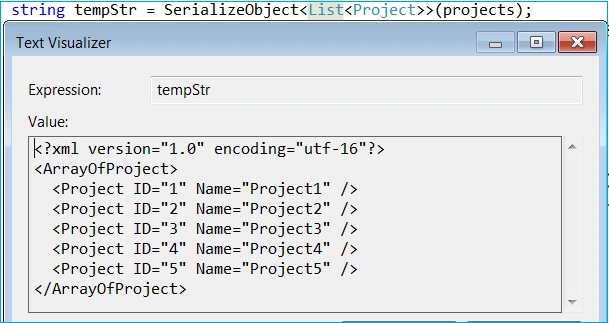
- XML Serialization.
Using code
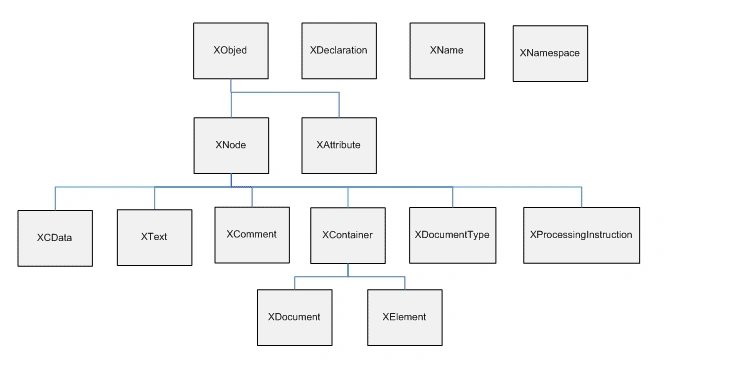
We will use mostly XDocument and XMLDocument class to manipulate XML data. The following is the LINQ to XML(XDocument) class hierarchy, which will help to understand it more.
Add node/XML value to existing XML
Below is the sample XML data, which we will use in our demonstration:
string tempXml = @"<Projects>
<Project ID='1' Name='project1' />
<Project ID='2' Name='project2' />
<Project ID='3' Name='project3' />
<Project ID='4' Name='project4' />
<Project ID='5' Name='project5' />
</Projects>";
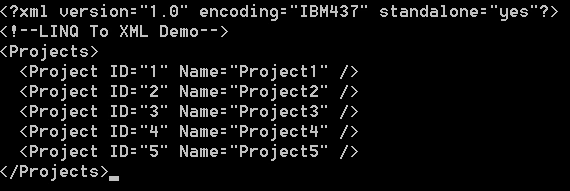
In the demonstration, we define how many different ways, where we can add the node, using XMLDocument and XDocument class. The output is shown in Figure 2.
Using XmlDocument
// Option1: Using InsertAfter()
// Adding Node to XML
XmlDocument doc3 = new XmlDocument();
doc3.LoadXml(tempXml);
XmlNode root1 = doc3.DocumentElement;
//Create a new attrtibute.
XmlElement elem = doc3.CreateElement("Project");
XmlAttribute attr = doc3.CreateAttribute("ID");
attr.Value = "6";
elem.Attributes.Append(attr);
//Create a new attrtibute.
XmlAttribute attr2 = doc3.CreateAttribute("Name");
attr2.Value = "Project6";
elem.Attributes.Append(attr2);
//Add the node to the document.
root1.InsertAfter(elem, root1.LastChild);
doc3.Save(Console.Out);
Console.WriteLine();

// Option2: Using AppendChild()
XmlDocument doc4 = new XmlDocument();
doc4.LoadXml(tempXml);
XmlElement XEle = doc4.CreateElement("Project");
XEle.SetAttribute("Name", "Project6");
XEle.SetAttribute("ID", "6");
doc4.DocumentElement.AppendChild(XEle.Clone());
doc4.Save(Console.Out);
Console.WriteLine();
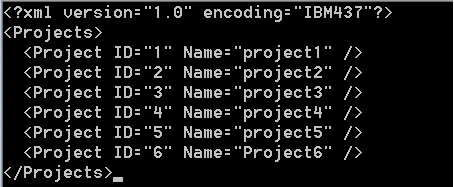
Figure 2 : Output after adding new node
Using XDocument
// Option1: Using AddAfterSelf()
XDocument xdoc = XDocument.Parse(tempXml);
var cust = xdoc.Descendants("Project")
                .First(rec => rec.Attribute("ID").Value == "5");
cust.AddAfterSelf(new XElement("Project", new XAttribute("ID", "6")));
xdoc.Save(Console.Out);
Console.WriteLine();

// Option2: Using Add() method
XDocument doc = XDocument.Parse(tempXml);
XElement root = new XElement("Project");
root.Add(new XAttribute("ID", "6"));
root.Add(new XAttribute("Name", "Project6"));
doc.Element("Projects").Add(root);
doc.Save(Console.Out);
Console.WriteLine();

// // When it contains namespace http://stackoverflow.com/questions/2013165/add-an-element-to-xml-file
string tempXmlNamespace = @"<Projects xmlns='http://schemas.microsoft.com/developer/msbuild/2003'>
                    <Project ID='1' Name='project1' />
                    <Project ID='2' Name='project2' />
                    <Project ID='3' Name='project3' />
                    <Project ID='4' Name='project4' />
                    <Project ID='5' Name='project5' />
                    </Projects>";
XNamespace ns = "http://schemas.microsoft.com/developer/msbuild/2003";
XDocument xDoc = XDocument.Parse(tempXmlNamespace);

var b = xDoc.Descendants(ns + "Project").Last();

b.Parent.Add(
    new XElement(ns + "Project",
        new XAttribute("ID", "6"), new XAttribute("Name", "Project6")
    )
);

xDoc.Save(Console.Out);
Console.WriteLine();
Edit/Update XML data
Sometimes, we need to change/update XML node value. For instance, we have a node for Project, whose ID is 2 and want to update the Project Name attribute. Following code sample implements the same:
Using XDocument
// Option1: Using SetAttributeValue()
XDocument xmlDoc = XDocument.Parse(tempXml);
// Update Element value
var items = from item in xmlDoc.Descendants("Project")
            where item.Attribute("ID").Value == "2"
            select item;

foreach (XElement itemElement in items)
{
    itemElement.SetAttributeValue("Name", "Project2_Update");
}

xmlDoc.Save(Console.Out);
Console.WriteLine();

// Option2: Using Attribute.Value()
var doc = XElement.Parse(tempXml);
var target = doc.Elements("Project")
        .Where(e => e.Attribute("ID").Value == "2")
        .Single();

target.Attribute("Name").Value = "Project2_Update";
doc.Save(Console.Out);
Console.WriteLine();

// Option3: Using ReplaceWith()
XDocument xmlDoc1 = XDocument.Parse(tempXml);
XElement xObj = xmlDoc1.Root.Descendants("Project").FirstOrDefault();
xObj.ReplaceWith(new XElement("Project", new XAttribute("ID", "1"),
    new XAttribute("Name", "Project1_Update")));

xmlDoc1.Save(Console.Out);
Console.WriteLine();
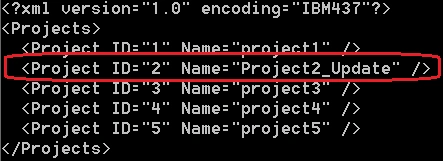
Figure 3: Update XML Node value
Using XmlDocument
int nodeId = 2;
XmlDocument xmlDoc2 = new XmlDocument();
xmlDoc2.LoadXml(tempXml);
//node["Node2"].InnerText = "Value2";
XmlNode node = xmlDoc2.SelectSingleNode("/Projects/Project[@ID=" + nodeId + "]");
node.Attributes["Name"].Value = "Project2_Update";

xmlDoc1.Save(Console.Out);
Console.WriteLine();
Remove node from XML data
To remove the node from existing XML data, we will use XmlDocument and XDocument class.
Using XmlDocument Class
// Option1: Remove using SelectSingleNode()
int nodeId = 1;
XmlDocument xmlDoc = new XmlDocument();
xmlDoc.LoadXml(tempXml);
XmlNode nodeToDelete = xmlDoc.SelectSingleNode("/Projects/Project[@ID=" + nodeId + "]");
if (nodeToDelete != null)
{
    nodeToDelete.ParentNode.RemoveChild(nodeToDelete);
}
//xmlDoc.Save("XMLFileName.xml");
xmlDoc.Save(Console.Out);
Console.WriteLine();

// Option2: Remove XML node using Tag name
XmlDocument doc2 = new XmlDocument();
doc2.Load(@"D:\ConsoleApplication4\MyData.xml");
XmlNodeList nodes = doc2.GetElementsByTagName("Project");
XmlNode node = nodes[0]; // Getting first node
node.ParentNode.RemoveChild(node);
doc2.Save(Console.Out);
Console.WriteLine();

// Option3: Remove one node/child element
XmlDocument doc1 = new XmlDocument();
doc1.LoadXml("<book genre='novel' ISBN='1-2-3'>" +
            "<title>XML Manipulation</title>" +
            "</book>");
XmlNode root = doc1.DocumentElement;
//Remove the title element.
root.RemoveChild(root.FirstChild);
doc1.Save(Console.Out);
Console.WriteLine(); 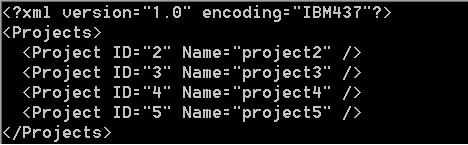

Rafael FigueiraPosted Aug 12, 2021, 9:03 PM
Thank you !! your post really helped my project on my first job. From Brazil!
Mihir Ranjan SahuPosted Apr 24, 2021, 2:46 PM
Please share the source code to [email protected]
MICHAEL PLIAMPosted Mar 23, 2021, 1:26 AM
Makes no sense. Serialization doesn't compile as shown.
kevin moorePosted Aug 15, 2020, 4:03 PM
Thank You! This helped me understand how to properly write a new element using XElement
Lukas ChalupaPosted Jul 20, 2018, 2:29 AM
Hi Manas, great post! What if I need to work with "xsi:nil" attribute and need to handle value types of elements?Typically when working with MS InfoPath<my:BirthDate xsi:nil="true"></my:BirthDate> <my:BirthDate>1976-12-25</my:BirthDate> or <my:Price xsi:nil="true"></my:Price> <my:Price>100000</my:Price>