

1. Introduction
This article explains the techniques, architecture and design strategies in order to address one of the most common scenarios of secure communication in Internet, the
Anonymous client over Certificate WS-Security scenario using the message level security mechanisms.
In this example, we have a service which provides its authentication and the underlying security services (signature, encryption) using X509 digital certificates. The client in that case trusts in the service.
2. WS-Security specifications
Web Services Security (WS-Security) is a family of specifications which addresses the main security services such as message integrity, message confidentiality and authentication. In figure 1, you can see the WS-Security architecture.
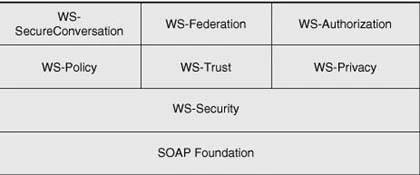
Figure 1. WS-Security architecture.
The WS-Security 1.1 was recently approved as an OASIS standard. You can read the whole specification in OASIS site.
WS-Security is not meant to replace any existing security technologies such as SSL, instead WS-Security leverages and federates existing security infrastructures and provides a unified model for security services. SSL was designed for point-to-point communications, but in one scenario where end-to-end security for the entire message path is required, we need to use WS-Security. SSL was designed for protecting the messages on the wire but it doesn't provide protection on the endpoints. And finally, because Web services integrate multiple systems within different security domains and platforms, thus we need for a mechanism to translate or exchange security information from one domain to another. WS-Security is flexible and fits in different security models. SSL doesn't meet these requirements.
3. Anonymous client over Certificate scenario
In this scenario, the service and the client trust each other, the service authenticates to the client, and the interaction between them is encrypted and signed. In addition, all security must be implemented using a message-based security approach. In figure 2, it is illustrated this scenario.
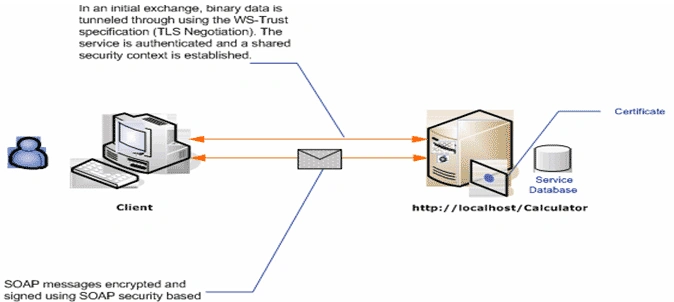
Figure 2. Anonymous client over Certificates.
4. Requirements elements
For this example, we need to generate the private/public key pairs for the service, then create a Certificate Signing Request with the information associated to the service, and then send the Certificate Signing Request to a Certificate Authority and receive an X509 digital certificate of the service signed by a Certificate Authority. We also need the Certificate Authority's certificate and to store the service's private key along with the digital certificate in the Windows Certificate Store.
In other article, I can tell you how you can do all these steps using the command openssl. For now, you can use the CA service shipped in Windows 2003.
4.1 Importing the CA's digital certificate into the server and client machine into the Trusted Root Certification Authorities Certificate store.
Browse to the CA's digital certificate file (Figure 3.)
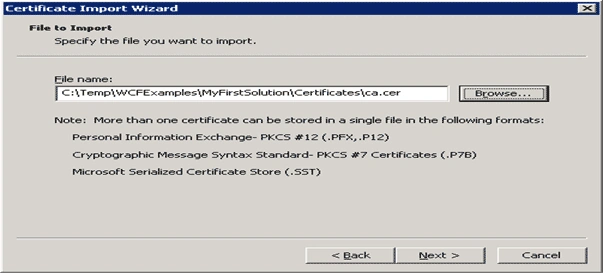
Figure 3.
And then, place the certificate in the Trusted Root Certification Authorities Certificate store. (Figure 4.)
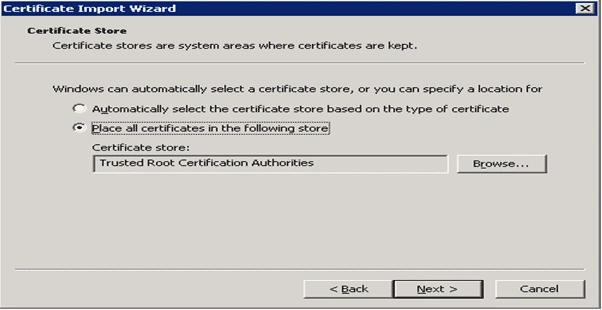
Figure 4.
A Security Warning message tells if you trust in this CA certificate (Figure 5.) Push the Yes button.
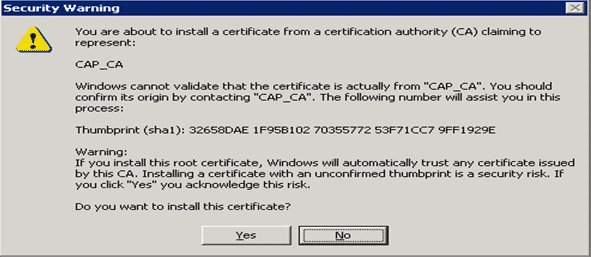
Figure 5.
4.2 Importing the service's private/public key pairs into the Windows Certificate Store in the server machine.
In Figure 6, we browse to the directory where the service.pfx file is located. This file contains the private keys protected with a password, and the public digital certificate signed by the CA.
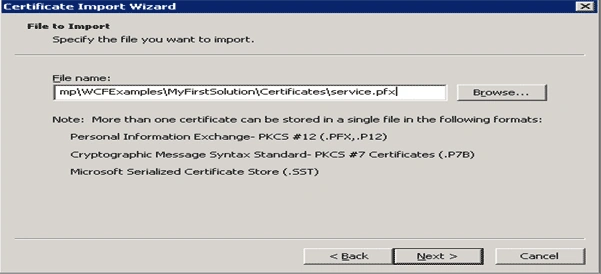
Figure 6.
Next, type the passphrase which protects the private key (Figure 7)
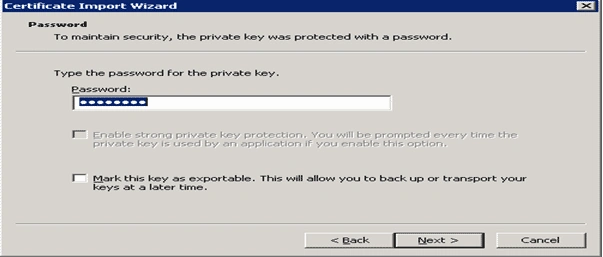
Figure 7.
And then, place the certificate in the Personal Certificate Store (Figure 8)
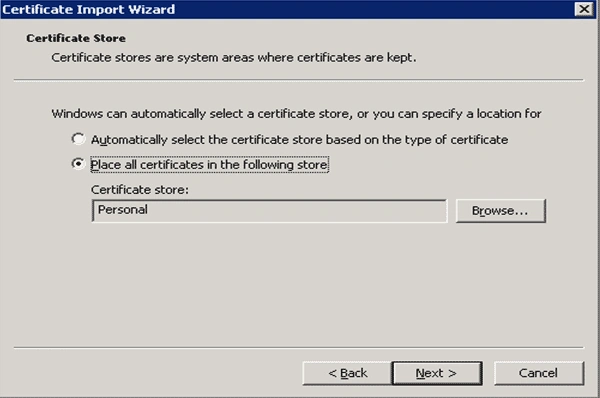
Figure 8.
5. Implementing the Service
Our example comprises two components, the service which exposes simple functionality such as adding two numbers, and a client which consumes the service.
First of all, we must define the contract of the service. This is the interface of the service with the outside. The contract is defined using the annotations ServiceContractAttribute and the OperationContractAttribute attributes. See listing 1.
- namespace WCFServiceLibrary
- {
- [ServiceContract()]
- public interface ICalculate
- {
- [OperationContract]
- int Add(int nParam1, int nParam2);
- }
- }
The realization of this interface is done by the class Calculator. See listing 2.
- namespace WCFServiceLibrary
- {
- public class Calculator : ICalculate
- {
- #region ICalculate Members
- public int Add(int nParam1, int nParam2)
- {
- return nParam1 + nParam2;
- }
- #endregion
- }
- }
And finally, we have the following configuration. See listing 3. The service element which is subelement of services element defines the service behavior that in our case we are providing metadata information by HttpGet method (?wsdl way to access to the service description) and the service is providing a proof of identity through a digital certificate found in the LocalMachine's Personal Certificate Store.
Join the conversation! Your thoughts help the community grow.