

Introduction
Virtualization technology has revolutionized the IT landscape by allowing multiple virtual machines (VMs) to run on a single physical server. This concept not only optimizes resource utilization but also introduces a critical benefit: hardware independence. Understanding hardware independence is essential for anyone looking to leverage virtualization to its fullest potential.
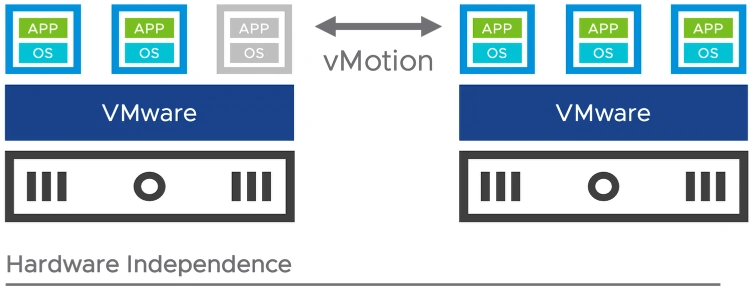
Related Image © VMware
What is Hardware Independence?
Hardware independence in virtualization refers to the decoupling of software from the underlying hardware. This means that virtual machines are not tied to specific physical servers, allowing them to be moved, managed, and maintained without concern for the hardware specifics. This is made possible by the hypervisor, which acts as a layer between the physical hardware and the virtual machines, abstracting the hardware details from the VMs.
The Role of the Hypervisor
The hypervisor, also known as a virtual machine monitor (VMM), is the cornerstone of hardware independence. It creates and manages VMs by providing them with virtualized hardware environments. These environments mimic the characteristics of physical hardware, enabling VMs to operate as if they were running on actual hardware.
Benefits of Hardware Independence
- Flexibility and Agility: Hardware independence allows organizations to be more flexible and agile. Virtual machines can be easily migrated from one physical server to another using tools like VMware vMotion. This capability ensures that workloads can be balanced across servers, maintenance can be performed without downtime, and resources can be optimized efficiently.
- Improved Disaster Recovery: In the event of hardware failure, hardware independence facilitates faster and more reliable disaster recovery. VMs can be quickly moved to another server, minimizing downtime and ensuring business continuity. This capability is critical for maintaining high availability and reducing the impact of hardware-related failures.
- Cost Efficiency: By decoupling software from hardware, organizations can reduce costs associated with hardware upgrades and replacements. Instead of purchasing new servers for every new application, existing hardware can be utilized more effectively. This results in lower capital expenditures and better return on investment.
- Simplified Hardware Upgrades: Upgrading hardware becomes a seamless process with virtualization. VMs can be migrated to new servers with minimal disruption, allowing IT departments to upgrade infrastructure without extensive downtime or complex migrations. This simplifies the process of staying current with the latest hardware advancements.
Use Case VMware vMotion
VMware vMotion is a powerful feature that exemplifies hardware independence. It enables live migration of running VMs from one physical server to another without any downtime. This capability is invaluable for load balancing, maintenance, and disaster recovery.
How vMotion Works?
- Initiation: The migration process begins by initiating a vMotion request from the management console.
- State Transfer: The VM's memory state and system state are transferred from the source host to the destination host.
- Disk State: The disk state remains unchanged as the storage is typically shared across the hosts.
- Switch Over: Once the states are synchronized, the VM is switched over to the destination host.
- Completion: The process is completed with minimal disruption to the VM's operation.
Challenges and Considerations
While hardware independence offers numerous benefits, there are challenges and considerations to keep in mind.
- Compatibility: Ensuring compatibility between the hypervisor and various hardware components is crucial for seamless operation.
- Performance Overheads: Virtualization introduces some performance overhead, which can affect the overall system performance. Efficient resource allocation and management are necessary to mitigate these impacts.
- Security: As VMs are abstracted from the hardware, security measures must be in place to protect the hypervisor and the VMs from potential threats.
Conclusion
Hardware independence is a fundamental aspect of virtualization that provides flexibility, improved disaster recovery, cost efficiency, and simplified hardware upgrades. By decoupling software from hardware, organizations can optimize their IT infrastructure and respond more agilely to changing business needs. Technologies like VMware vMotion illustrate the practical benefits of hardware independence, making virtualization an indispensable tool in modern IT environments.
Join the conversation! Your thoughts help the community grow.