

Introduction
In this article, we will see the example of how to validate HTTPS request in WebAPI2, using AuthorizationFilter. The AuthorizationFilter validation is to enforce the incoming request to be transferred HTTP to HTTPS protocol. This attribute can be achieved by using authorization filter attribute for all the controllers (Global) methods or for a particular API exposed inside the Service.
How to manage request and response in Web API: See the image below -
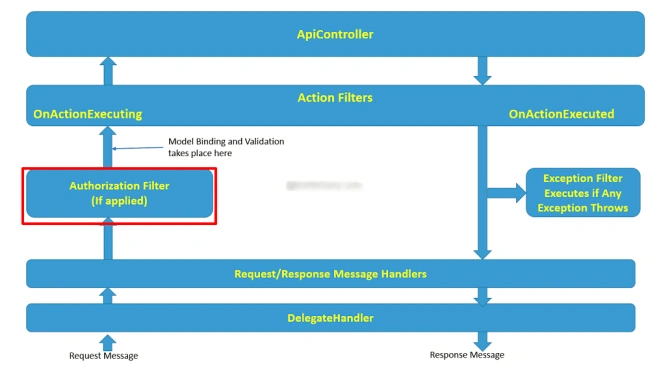
In this image, you can see, if you are using Authorization filter, it will apply according to your logic. In this case, I am going to create a logic to check any HTTP and HTTPS request inside AuthorizationfilterAttribute class. I think this image is helpful to understand the flow of Filter in MVC.
Before going on to the next step, I am just listing some important links to learn related content, which are given below-
In this image, you can see, if you are using Authorization filter, it will apply according to your logic. In this case, I am going to create a logic to check any HTTP and HTTPS request inside AuthorizationfilterAttribute class. I think this image is helpful to understand the flow of Filter in MVC.
Before going on to the next step, I am just listing some important links to learn related content, which are given below-
What is HTTP and HTTPS ?
"The Hypertext Transfer Protocol (HTTP) is an Application convention for dispersed, community, hypermedia data frameworks. HTTP is the establishment of information correspondence for the World Wide Web. Hypertext is an organized content, which utilizes sensible connections (hyperlinks) between the hubs containing content."
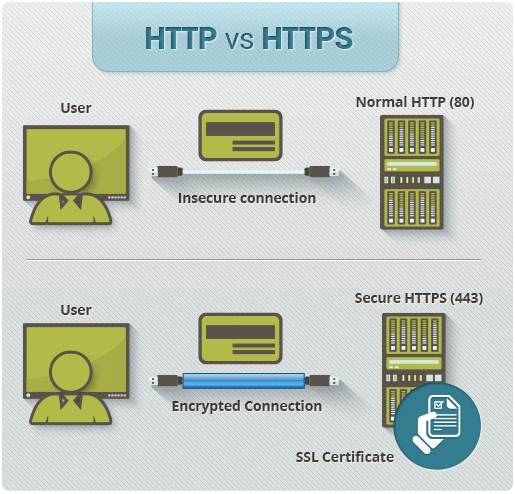
"Hyper Text Transfer Protocol Secure (HTTPS) is the protected variant of HTTP, the convention over which information is sent between your program and the site, that you are associated with. The "S" toward the end of HTTPS stands for 'Secure'. It implies all correspondences between your program and the site are scrambled."
Follow some steps to validate HTTPS request, which are-
Step 1 - Create a MVC WebAPI Application "HTTPSValidation". Inside this, i am not using any third party package or the library.
Step 2 - Create a Class "ValidateRequest" inside "App_start" folder . See the code, given below-
- using System;
- using System.Collections.Generic;
- using System.Linq;
- using System.Net;
- using System.Net.Http;
- using System.Net.Http.Headers;
- using System.Web;
- using System.Web.Http.Controllers;
- using System.Web.Http.Filters;
- namespace HTTPSValidation.App_Start
- {
- public class ValidateRequest:AuthorizationFilterAttribute
- {
- /// <summary>
- /// Validate HTTPS or HTTP request URI
- /// </summary>
- /// <param name="_Context">HttpActionContext value</param>
- public override void OnAuthorization(HttpActionContext _Context)
- {
- //To check request coming from HTTPS or HTTP
- if (_Context != null && _Context.Request != null &&
- !_Context.Request.RequestUri.Scheme.Equals(Uri.UriSchemeHttps))
- {
- var controllerFilters = _Context.ControllerContext.ControllerDescriptor.GetFilters();
- var actionFilters = _Context.ActionDescriptor.GetFilters();
- if ((controllerFilters != null && controllerFilters.Select
- (t => t.GetType() == typeof(ValidateRequest)).Count() > 0) ||
- (actionFilters != null && actionFilters.Select(t =>
- t.GetType() == typeof(ValidateRequest)).Count() > 0))
- {
- _Context.Response = _Context.Request.CreateResponse(HttpStatusCode.Forbidden,
- new HttpResponseMessage { ReasonPhrase = "Needs HTTPS,SSL certificate" },
- new MediaTypeHeaderValue("text/json"));
- }
- }
- else
- {
- base.OnAuthorization(_Context);
- }
- }
- }
- }

Anil KumarPosted Jan 20, 2020, 10:27 AM
I want to show only Reason Phrase for HTTP. How can I stop showing all the version and those things. Thanks In Advance :)
Sridhar SharmaPosted Oct 9, 2016, 9:34 PM
Nice Share.. :)
Vignesh ManiPosted Oct 9, 2016, 6:06 PM
Nice
Prasanna MuraliPosted Oct 9, 2016, 9:43 AM
Nice post