
Introduction
In this article, I will show how to use a Windows Forms application in an ASP.NET Application targets for the Web.
Note: Try to use the Microsoft windows control, avoid third party control. Because we are going to use the same control on web.
Advantages:
- Reduces the coding time and resource needed for web.
- Bring the desktop to your web
Requirement:
Develop a windows application. For developing weather you can use windows controls are third party control that's not a matter.
Process:
1. Open "New Project ", select Visual C# Project and select Windows Application and name the project as 'WindowsTOWeb' and click Open. See Figure 1.
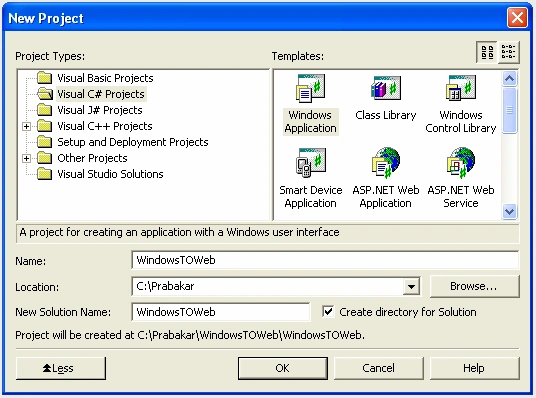
Figure 1.
2. Place some controls on the Forms such as Labels, TextBoxes, and buttons. See Figure 2. I add three labels, three TextBoxes, and two button controls and change their properties accordingly.
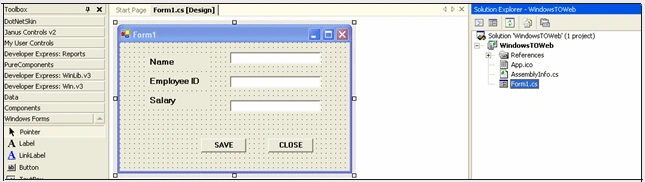
Figure 2.
3. When you run the application, the form will look like Figure 3.
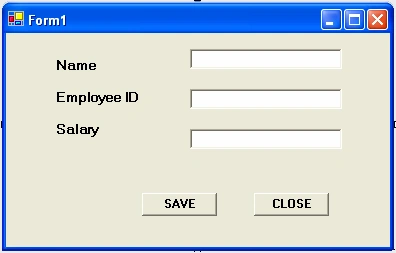
Figure 3.
4. Now we want to convert the windows application in to a usercontrol so then we can use the user control in our Web application. To convert the windows application in to a user control, we need to follow the following steps two steps:
- Convert the
public class Form1 : System.Windows.Forms.Form
TO
public class Form1 : System.Windows.Forms.UserControl
(See Figure 4)
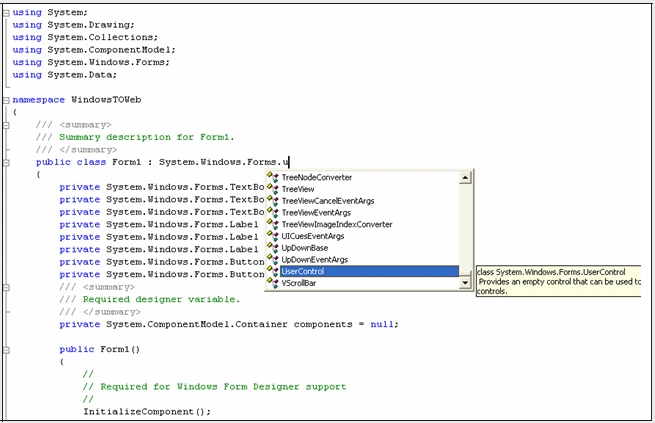
Figure 4. -
Comment the
this.AutoScaleBaseSize = new System.Drawing.Size(5, 13); of the windows.
Now your windows form application is converted to a user control
5. Now click the property of the project and change the "Output Type" from Windows Application to Class Library (See Figure 5)
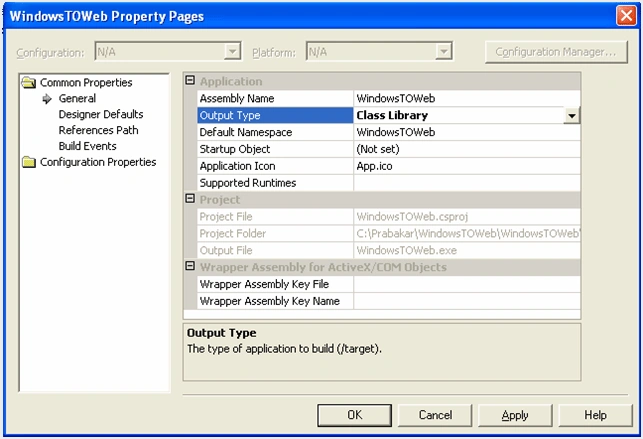
Figure 5.
6. Before compiling the project comments the "thread". See Figure 6.
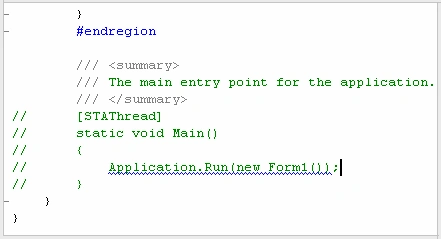
Figure 6.
Now You have successfully created a user control that contains the functionality of our Windows Forms applicatin.
7. Now we are going to add a Web Application to the solution by adding a new ASP.NET Web Application project. I call project WinToWeb. See Figure 7.
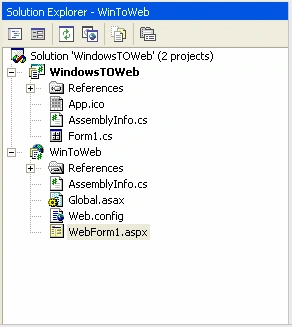
Figure 7.
8. Now create a strong name for your user control by using "sn.exe ", which is in the location
'C:\Program Files\Microsoft Visual Studio .NET 2003\SDK\v1.1\Bin'.
The syntax for creating the string name is
C:\Program Files\Microsoft Visual Studio .NET 2003\SDK\v1.1\Bin\sn -k "C:\Strongname.snk"
now the strong name has been created and it is in the c: in the name of strongname.snk
9. After creating the strong name specify the path of the strong name in "Assemblyinfo.cs " file in the [assembly: AssemblyKeyFile("c:\strongname.snk")] attribute
Now the first way of using the user control in a Web application.
10. Now by using the "regasm.exe" create and place the CLSID of your dll in the registry the exe file which is in the location "C:\WINDOWS\Microsoft.NET\Framework\v1.1.4322\ ".
11. Then by using the Gacutil.exe register your WindowsToWeb .dll the the registry. Then go to the registry and search by the name "WindowsToWeb.dll" and copy the CLSID to the code behind as Specified in the figure. See Figure 8.
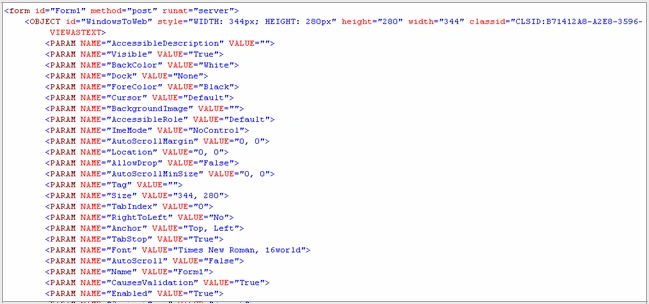
Figure 8.
12. Now you can see the windows control in the web form. See Figure 9.
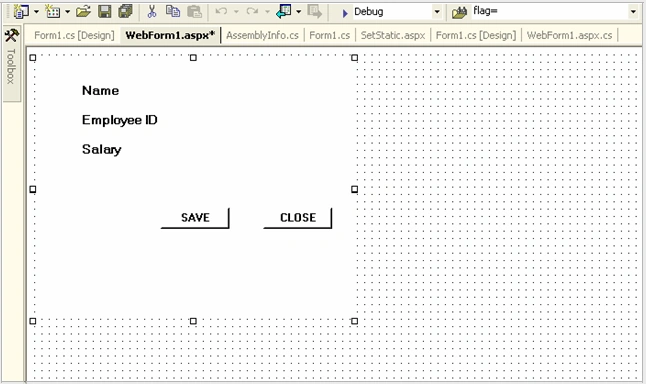
Figure 9.
13. Run your web application. Congratulations. Your Windows Forms functionality is available on the Web now. See Figure 10.
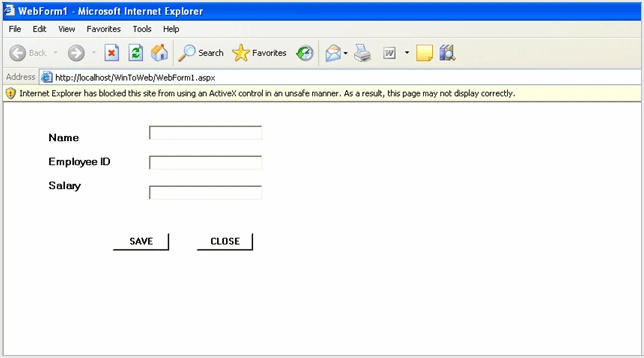
Figure 10.
Conclusion:
This is a sample application, which I have created when I am in position to run the windows application on the Web. By using this you can run only the simple applications.
Tom HainPosted Aug 26, 2019, 3:01 PM
Is it possible to add a dataset (i.e., have a database) If so, what is involved? Thanks!
Tom HainPosted Aug 26, 2019, 2:59 PM
Thanks for this article!
Pax ObiPosted Jun 19, 2018, 6:46 AM
Is the advertisement on top right corner, preventing from bookmarking this page ? or Print this page?
Manjeet SinghPosted Jun 26, 2015, 5:10 AM
When I am adding CLSID on web application then it is showing that control is not installed or could not be displayed , please provide me the soluition.
Harsh GaurPosted Mar 16, 2012, 3:11 PM
Please explain me the below 2 points:- 10. Now by using the "regasm.exe" create and place the CLSID of your dll in the registry the exe file which is in the location "C:\WINDOWS\Microsoft.NET\Framework\v1.1.4322\ ". 11. Then by using the Gacutil.exe register your WindowsToWeb .dll the the registry. Then go to the registry and search by the name "WindowsToWeb.dll" and copy the CLSID to the code behind as Specified in the figure. See Figure 8. Harsh Wardhan Gaur
Amit ManekarPosted Jun 18, 2010, 8:33 AM
Respected Sir, I have one windows application which is developed in VB.Net. Is possible to convert it in the web application as this article. Please mail me on [email protected] Thanks Milind V. Patil 9096400484
tee teekPosted Mar 19, 2010, 4:30 PM
Can you please explain 10 and 11 points,they are a little confusing.
Prakash VarunPosted Aug 22, 2007, 8:53 AM
How to use the click event of save and close button in the web application
Prakash VarunPosted Aug 22, 2007, 8:52 AM
How to use the click event of save and close button in the web application
Vasu RayapatiPosted Jun 13, 2007, 5:20 AM
Hi, I have a huge windows Application it occupies approximately 900MB.It is a fully customized product.It doesn't have any microsoft direct toolbar controls. So now i want to covert that windows application to a Web Application.Can u please send me the details for the conversion. Thanks n Regards Vasu Rayapati...
ahmedPosted Mar 27, 2007, 5:27 AM
regasm \regfile [:"c:\doc\projects\file.dll"] give me path error please tell me correact syntex
anu koppisettyPosted Nov 29, 2006, 1:06 AM
12th step: how to add reference to add user control in web application. I am getting COM reference error as follows : A reference to 'wintowindow' could not be added.converting the type library to a .net assembly failed. thankx in advance.
khatheejaeditedPosted Jul 20, 2006, 2:38 AMEdited Nov 28, 2006, 11:26 PM
please explain in detail about 10 th and 11th point ie -->how to create create clsid using regasm.exe -->where can we view clsid -->how to place the clsid Also explain detaily about the 11th point step by step Thanks