
This article provides you to learn how to simulate and test emails in a .NET Core 7 C# console application using Papercut. This article provides a step-by-step guide to implementing email mocking with Papercut, enabling developers to efficiently test email-related functionality without relying on a live email server.
Overview
- Introduction to Papercut and its benefits for email testing.
- Setting up a .NET Core C# console application project.
- Installing and configuring Papercut for email mocking.
- Creating mock email interactions using Papercut's API.
Introduction to Papercut and its Benefits
Papercut is a powerful tool designed to simplify email testing in a development environment. It functions as a local SMTP server, allowing developers to send and receive emails without relying on a live email server. With Papercut, developers can efficiently mock and validate email interactions within their .NET Core C# console applications, enabling thorough testing and ensuring the reliability of email-related functionality.
Note:
- Papercut is primarily designed for local email testing and cannot catch emails from external email providers such as Gmail, Yahoo, or Outlook.
- Papercut functions as a local SMTP server, allowing you to send and receive emails within your development environment. It captures the emails sent through its SMTP server and provides a web interface to view and analyze them. However, Papercut does not intercept or monitor emails from external email providers.
- If you need to test email interactions with Gmail, Yahoo, Outlook, or other external email services, you would typically need to use real accounts on those providers or consider using other tools or libraries that provide email testing or mocking capabilities specifically for interacting with external email services.
Setting up a .NET Core C# console application project
To set up a .NET Core C# console application project, follow these steps:
- Open your preferred Integrated Development Environment (IDE), such as Visual Studio or Visual Studio Code.
- Create a new project by selecting "File" > "New" > "Project" (or similar) from the menu.
- In the project creation wizard, choose the ".NET" or ".NET Core" category and select "Console App" as the project template. (I'm using .NET CORE 7)
- Give your project a meaningful name and specify the desired location to save the project files.
- Choose the appropriate .NET Core version based on your requirements.
- Click "Create" or "OK" to generate the project structure.
- Your new .NET Core C# console application project is now created and ready for development.
Alternatively, if you have an existing .NET Core C# console application project, you can skip steps 2-5 and simply open your existing project in the IDE.
Installing and configuring Papercut:
Two ways of installation
- install the Papercut desktop app from the Papercut link
- install from the NuGet Package manager inside the project by running the following command
Install-Package Papercut.Smtp -Version 3.2.2
Implementation - Creating mock email interactions
1. Check with a simple email
Once the package is installed, you can use the code below to send an email:
#region Without attachment
// Email configuration
string smtpServer = "127.0.0.1"; // Papercut SMTP server address
int smtpPort = 25; // Papercut SMTP server port
string fromAddress = "[email protected]";
string toAddress = "[email protected]";
string subject = "Hello from Papercut!";
string body = "This is a test email sent from Papercut.";

// Create the email message
MailMessage mail = new MailMessage(fromAddress, toAddress, subject, body);

// Create the SMTP client
SmtpClient smtpClient = new SmtpClient(smtpServer, smtpPort);
smtpClient.EnableSsl = false;

try
{
    // Send the email
    smtpClient.Send(mail);
    Console.WriteLine("Email sent successfully!");
}
catch (Exception ex)
{
    Console.WriteLine("Failed to send email: " + ex.Message);
}
finally
{
    // Dispose of objects
    mail.Dispose();
    smtpClient.Dispose();
}
Console.ReadLine();

#endregion
2. Check email with an attachment
Here's an example of a console application in C# using .NET Core to send an email with an attachment and monitor it using Papercut:
#region With attachment
// Email details
string fromEmail = "[email protected]";
string toEmail = "[email protected]";
string subject = "Test Email with Attachment";
string body = "This is a test email with an attachment.";

// Attachment file path
string attachmentPath = @"C:\Users\Admin\Downloads\store.jpg"; //"C:\\Path\\To\\Attachment.txt";

// SMTP server configuration
string smtpServer = "127.0.0.1"; //"smtp.example.com";
int smtpPort = 25; // 587;
string smtpUsername = "your-username";
string smtpPassword = "your-password";

try
{
    // Create a new MailMessage object
    MailMessage mailMessage = new MailMessage(fromEmail, toEmail, subject, body);

    // Attach the file
    Attachment attachment = new Attachment(attachmentPath);
    mailMessage.Attachments.Add(attachment);

    // Create an SMTP client and send the email
    SmtpClient smtpClient = new SmtpClient(smtpServer, smtpPort);
    //smtpClient.Credentials = new NetworkCredential(smtpUsername, smtpPassword);
    smtpClient.EnableSsl = false;
    smtpClient.Send(mailMessage);

    Console.WriteLine("Email sent successfully.");
}
catch (Exception ex)
{
    Console.WriteLine("Error sending email: " + ex.Message);
}

Console.ReadLine();
#endregion
To monitor the emails using Papercut, follow these steps:
- Run Papercut from the command line or start the Papercut executable.
- Papercut will start a local SMTP server on the default port 25.
- Run your console application to send an email.
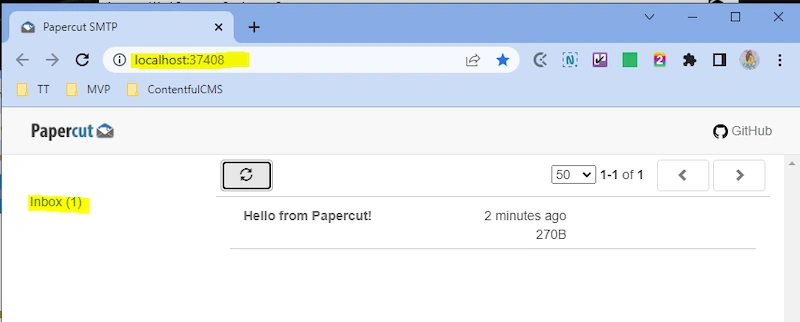
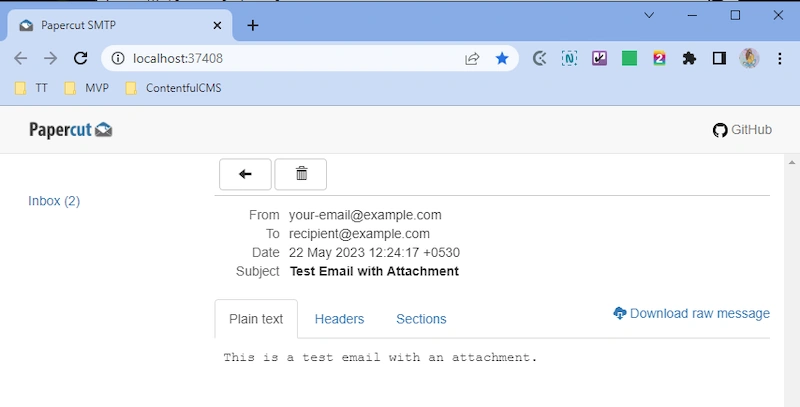
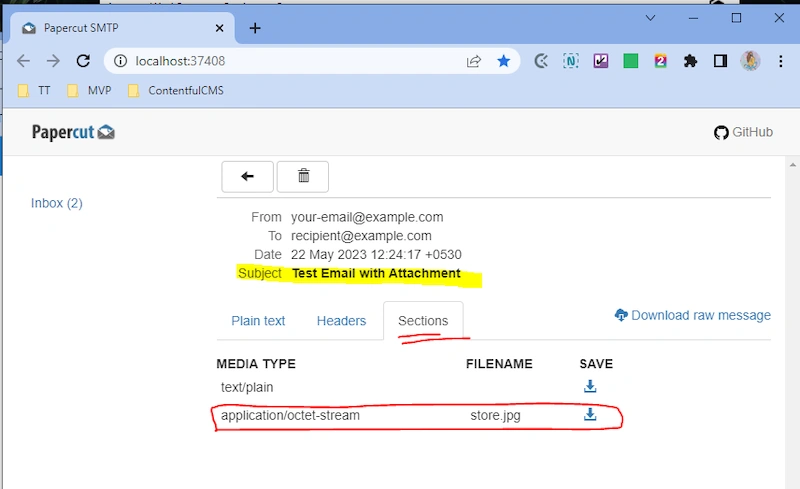
- Open a web browser and navigate to http://localhost:37408 (the Papercut default web interface address).
- You will see the Papercut interface showing the received emails.
- Make sure to replace the smtpServer, fromAddress, and toAddress variables with the appropriate values for your setup.
Note: Papercut allows you to view emails in real-time but does not deliver them to the actual recipients. It is a useful tool for testing and monitoring email sending functionality during development.
Remember to adjust and optimize the code according to your specific requirements.
Check the email in Papercut:
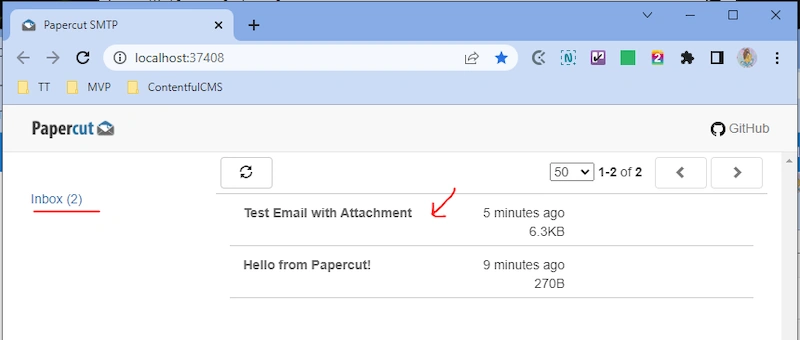
- You will see the emails sent from your console application in Papercut's web interface.
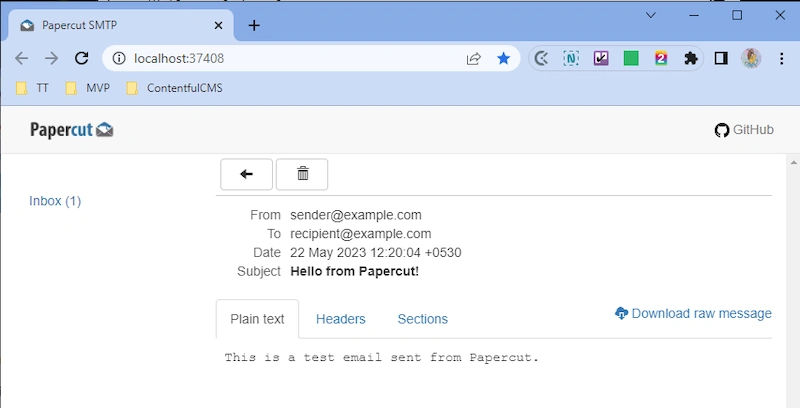
- Click on the email to view its details, including attachments.

1. Images from Papercut desktop app

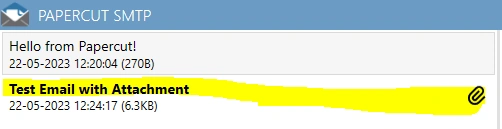

2. Images from the Papercut web app from the browser
Share your comments if you find this article really helpful to you :)
!!! Happy Coding !!!
Join the conversation! Your thoughts help the community grow.