

This series of articles will discuss the software development strategy, specifically the Version Control Tool branching strategies.
- Trunk-based or Feature-based Development (1) --- Definition
- Trunk-based or Feature-based Development (2) --- Comparison --- This article
A - Introduction
This article will discuss the comparisons between Trunk-based workflow and Gitflow. The content of this article
- A - Introduction
- B - Comparisons between Git-Flow and Trunk-Based Developments
- C - Git Flow Pros and Cons
- D - Trunk-based Development Pros and Cons
B - Comparisons between Git-Flow and Trunk-Based Developments
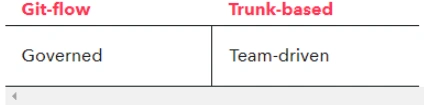
Philosophy
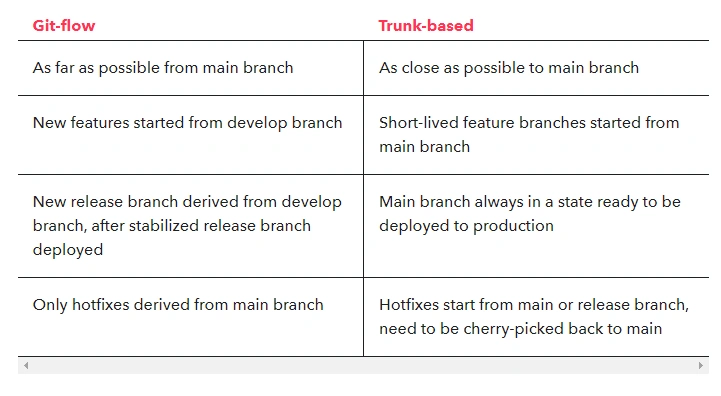
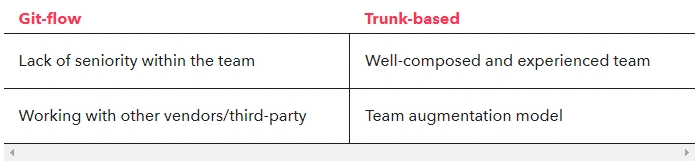
Team composition
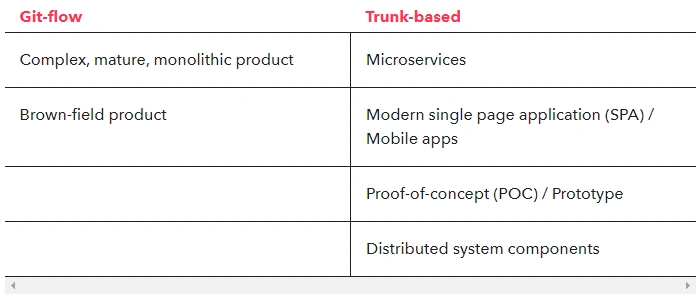
Product Type

Authoring process
Deployment
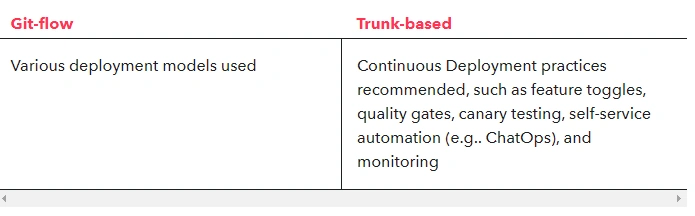
Release frequency

C - Git Flow Pros and Cons
When Does Git Flow Work Best?
-
When you run an open-source project.
This style comes from the open-source world, and it works best there. Since everyone can contribute, you want to have very strict access to all the changes. You want to be able to check every single line of code because, frankly, you can’t trust people contributing. Usually, those are not commercial projects, so development speed is not a concern. -
When you have a lot of junior developers.
If you work mostly with junior developers, then you want to have a way to check their work closely. You can give them multiple hints on how to do things more efficiently and help them improve their skills faster. People who accept pull requests have strict control over recurring changes so they can prevent deteriorating code quality. -
When you have an established product.
This style also seems to play well when you already have a successful product. In such cases, the focus is usually on application performance and load capabilities. That kind of optimization requires very precise changes. Usually, time is not a constraint, so this style works well here. What’s more, large enterprises are a great fit for this style. They need to control every change closely since they don’t want to break their multi-million dollar investment.
When Can Git Flow Cause Problems?
-
When you are just starting up.
If you are just starting up, then Git Flow is not for you. Chances are you want to create a minimal viable product quickly. Doing pull requests creates a huge bottleneck that slows the whole team down dramatically. You simply can’t afford it. The problem with Git flow is the fact that pull requests can take a lot of time. It’s just not possible to provide rapid development that way. -
When you need to iterate quickly.
Once you reach the first version of your product, you will most likely need to pivot it a few times to meet your customers’ needs. Again, multiple branches and pull requests reduce development speed dramatically and are not advised in such cases. -
When you work mostly with senior developers.
If your team consists mainly of senior developers who have worked with one another for a longer period of time, then you don’t really need the aforementioned pull request micromanagement. You trust your developers and know that they are professionals. Let them do their job, and don’t slow them down with all the Git flow bureaucracy.
D - Trunk-based Development Pros and Cons
When Does Trunk-based Development Work Best?
-
When you are just starting up.
If you are working on your minimum viable product, then this style is perfect for you. It offers maximum development speed with minimum formality. Since there are no pull requests, developers can deliver new functionality at the speed of light. Just be sure to hire experienced programmers. -
When you need to iterate quickly.
Once you reach the first version of your product and you notice that your customers want something different, then don’t think twice and use this style to pivot into a new direction. You are still in the exploration phase, and you need to be able to change your product as fast as possible. -
When you work mostly with senior developers.
If your team consists mainly of senior developers, then you should trust them and let them do their job. This workflow gives them the autonomy that they need and enables them to wield the mastery of their profession. Just give them purpose (tasks to accomplish) and watch how your product grows.
When Can Trunk-based Development Cause Problems?
-
When you run an open-source project.
If you are running an open-source project, then Git Flow is the better option. You need very strict control over changes, and you can’t trust contributors. After all, anyone can contribute. Including online trolls. -
When you have a lot of junior developers.
If you hire mostly junior developers, then it’s a better idea to tightly control what they are doing. Strict pull requests will help them to improve their skills and will find potential bugs more quickly. -
When you have established products or manage large teams.
If you already have a prosperous product or manage large teams at a huge enterprise, then Git Flow might be a better idea. You want to have strict control over what is happening with a well-established product worth millions of dollars. Probably, application performance and load capabilities are the most important things. That kind of optimization requires very precise changes.
E - Why Git Flow to Trunk-based: Merge conflicts and pain
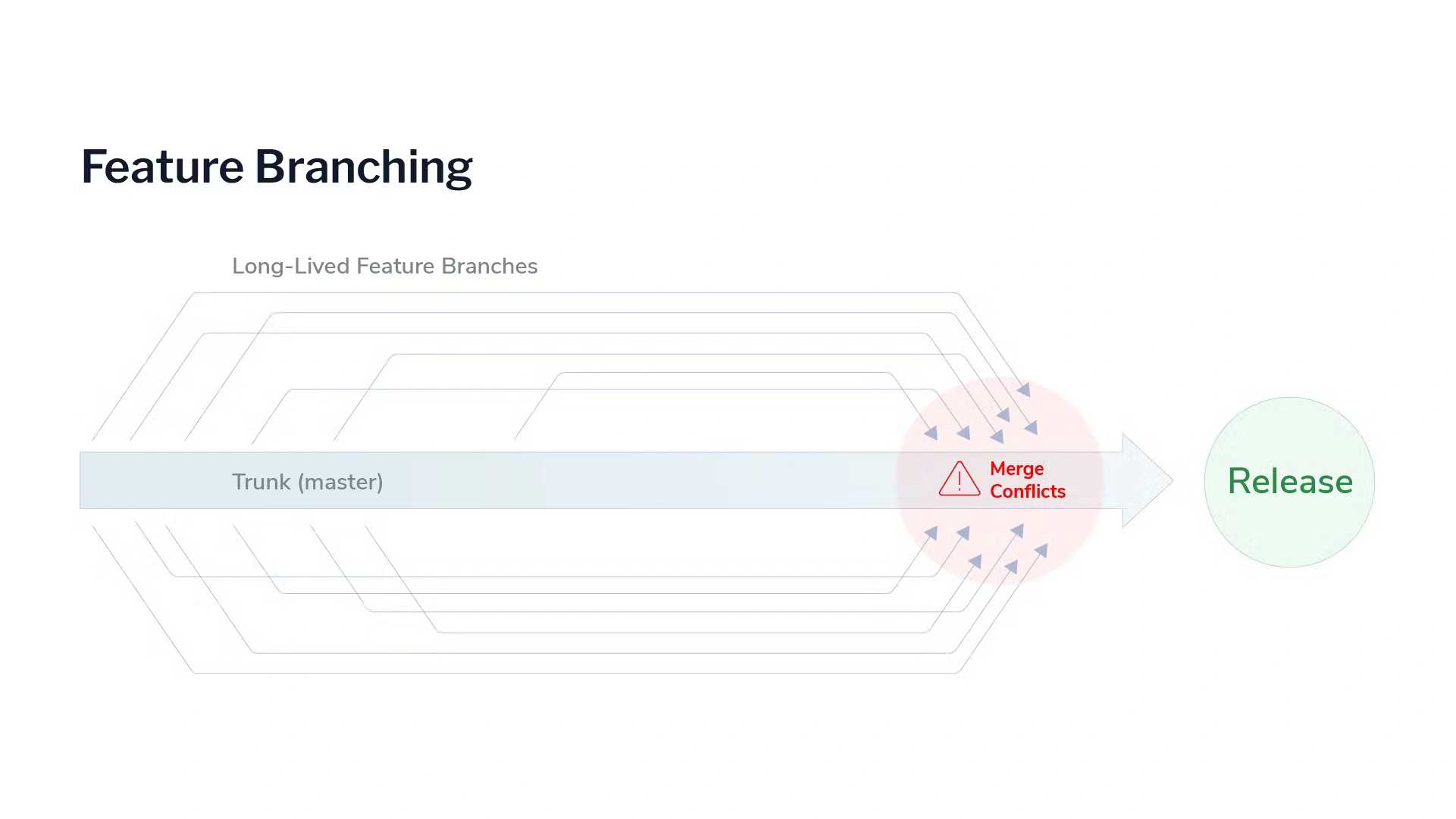
It’s easy for development teams to find themselves with a tangled mess of branches that need to be merged with the mainline all at once. The longer multiple developers keep their code changes from mixing with each other, the higher the risk that those changes will conflict (through changes to common code).
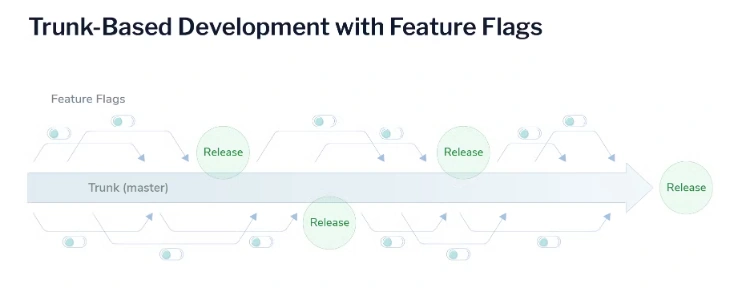
It’s changes to common code that prevent Git from handling merges automatically and cause developers to experience the classic horrors of source control management: merge conflicts that waste time, lost changes that vanish entirely, and regression defects from removed code that somehow find their way back in. Part of why trunk-based development has grown in popularity is because it helps avoid these painful merge conflicts. We’ll unpack trunk-based development in greater detail later.
References
- Why I Prefer Trunk-Based Development | Koen van Gilst
- A successful Git branching model » nvie.com
- Trunk-based vs feature-based development | CircleCI
- git - What is the difference between trunk-based development and gitflow? - Software Engineering Stack Exchange
- Git Flow vs. Trunk Based Development | Toptal®
- Introduction (trunkbaseddevelopment.com)
- Trunk-based Development | Atlassian
- Gitflow Workflow | Atlassian Git Tutorial
- Branching strategies: Git-flow vs. trunk-based development (devbridge.com)
Join the conversation! Your thoughts help the community grow.