

Introduction:
This article is intended to illustrate how to use triggers in databases systems to enforce business rules and react to events in database applications thus supporting the Active databases principles.
Business rules are kind of reactive constraints in the form of whenever events do action with a specification of what to do if certain event happens. The event is a request for the execution of some database operation such as delete or insert a row. The action is a statement of what needs to be done when the triggers is fired. A trigger may contain a pre-condition that must be evaluated to true in order to execute the trigger.
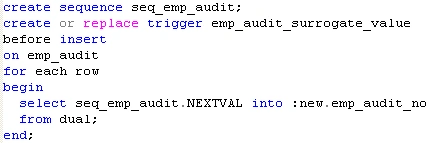
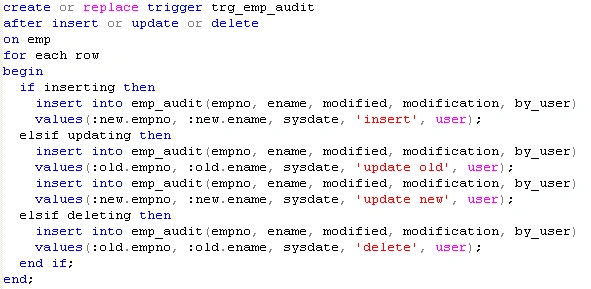
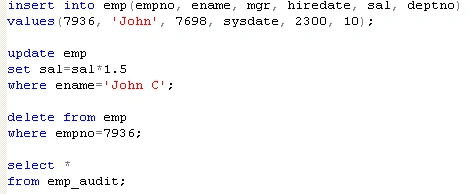
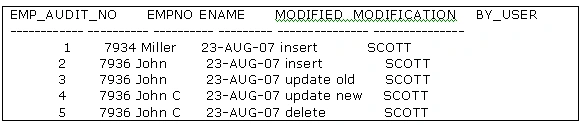
The example codes are written in T-SQL for Microsoft SQL Server and PL/SQL for Oracle Database and they are an illustrative implementation of one audit application, which records all the changes associated to one table in the Database System.
Trigger execution:
There are mainly two types of triggers supported by the SQL standard the before and after triggers although some vendors also support the instead of trigger.
The after trigger is executed automatically after the statement that fires the trigger completes but before the transaction is committed or rolled back.
The before trigger is executed automatically first and then allows the requested action on the database object to occur.
The instead of trigger is executed automatically in place of the triggering action.
In SQL Server 2005 we can find the after and instead of triggers; the after trigger is associated only to tables.
In Oracle Database we can find before and after triggers and instead of triggers associated only to views.
Trigger granularity:
There are two types of trigger granularity:
-
Row-level and
-
Statement-level granularity.
The row-level granularity assumes that a change to single row is an event, and changes to several rows are view as separate events, thus, this kind of trigger is execute multiple times and might know the old and new value of the affected row.
On the other hand, the statement-level granularity fires once for the whole statement such as insert, delete and update and not for individual rows.
Triggers in Microsoft SQL Server 2000/2005
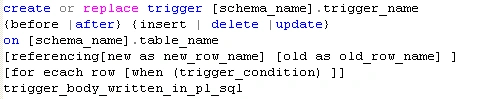
The SQL statement for the creation of trigger is shown in Listing 1:
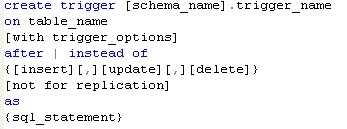
Listing 1: The SQL statement syntax for the trigger creation in Microsoft SQL Server:
It is remarkable to say that Microsoft SQL Server creates two virtual table named deleted and inserted to store the changes. These virtual tables not always have values and depend on the requested operation. When the operation is update the deleted table has the old values and the inserted table has the new ones. When the operation is insert, then the inserted table has the inserted or new values and the deleted table is empty. And finally, if the operation is delete, then the inserted table is empty and the deleted table has the deleted or old values.
When a trigger is fired, you can determine which columns have been modified by using the update function which returns true if an insert or update operation has occurred against the columns, otherwise it returns false.
As part of the new features of Microsoft SQL Server 2005, now you can define triggers which respond to server events for example for auditing when a table is created or dropped.
Let's illustrate the concepts using the proposed audit application. We're going to use the AdventureWorks database shipped with the installation of Microsoft SQL Server 2005.
First of all, we're going to illustrate the after trigger.
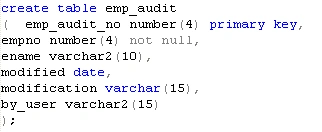
Let's create a table to store the audits for the modifications to the Purchasing.ShipMethod table using the entity identifier (ShipMethodID) and ship name (Name) from this base table as well as three new fields for storing the modification date, kind of operation (insert, update, delete) and who does the changes. Finally create the after trigger, which is fired when one modification operation occurs. The underlying SQL code is illustrated in Listing 2.
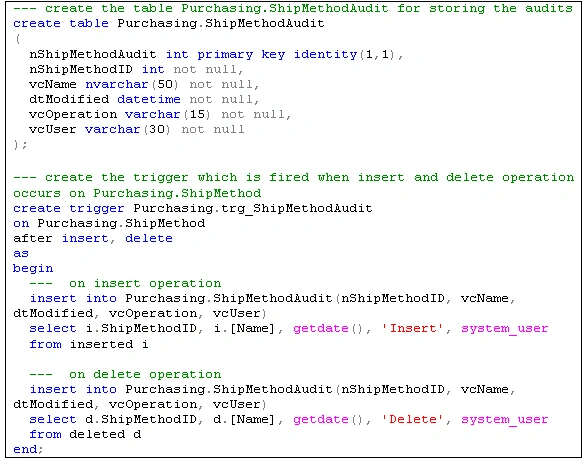
Listing 2: Create the audit table and trigger associated to Purchasing,ShipMethod table.
Now let's execute some database operations on the table Purchasing.ShipMethod and finally look at the audits.
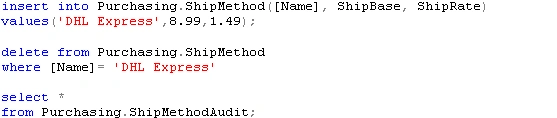
Listing 3: Execution of operations and examination of audit results.
Now let's demonstrate the use of instead of trigger which is allowed for both tables and views, although the main use is to handle data modifications to views which do not allow data modifications or the modification is unambiguous.
Assume that you want to select all the ship methods and the associated purchase orders. In order to achieve this purpose, we create a view as shown in Listing 4.

Listing 4: Creation of the view
If you try to update the previous view, you receive an error message warning that the view is not updateable because the modifications affect multiple base tables.
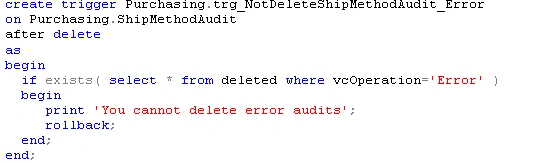
Finally let's code an instead of trigger to insert an audit row when the user tries to insert a row on the view Purchasing.v_ShipMethodWithAudit.
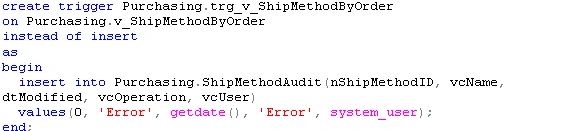
Listing 5: The creation of the instead of trigger
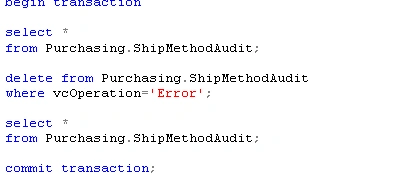
Now when you try to insert a row into the view v_ShipMethodByOrder and audit error is inserted into the table Purchasing.ShipMethodAudit as shown in Listing 6.





Mostafa HamadyPosted Aug 4, 2011, 5:06 AM
Post a Feedback, Comment, or Question about this article Post a Feedback, Comment, or Question about this article Post a Feedback, Comment, or Question about this article Post a Feedback, Comment, or Question about this article