

Article Overview
- Background
- Prerequisites
- Ranking Functions - ROW_NUMBER(), RANK(), DENSE_RANK() and NTILE()
- Complete Example
- Practical Scenario
- Summary
Background
There are various situations where you need to perform ranking on the result data set.
For example, you have Members data and you want to display Sr Number with member’s name. For this, you can use Row_Number().
Let us consider anothe. There are members having points and based on points you want to give rank to them. This can be achieved easily using Rank() function.
To perform such kind of various ranking operations on the result data set; SQL provides mainly the following four functions,
- ROW_NUMBER()
- RANK(),
- DENSE_RANK()
- NTILE()
Prerequisites
- You should have a basic knowledge of MS SQL and queries.
Ranking Functions - ROW_NUMBER(), RANK(), DENSE_RANK() and NTILE()
Now, let us understand each function one by one with practical example.
Before beginning, let us create one Member table and insert some data into it with the following script,
Create table
- CREATE TABLE Member
- (
- Id INT PRIMARY KEY,
- Name VARCHAR(25),
- Point INT
- )
Insert data into the table
- INSERT INTO Member VALUES (1,'Sachin', 978)
- INSERT INTO Member VALUES (2,'Rahul', 773)
- INSERT INTO Member VALUES (3,'Kamplesh', 1141)
- INSERT INTO Member VALUES (4,'Chirag', 773)
- INSERT INTO Member VALUES (5,'Pratik', 1242)
- INSERT INTO Member VALUES (6,'Rajesh', 1141)
- INSERT INTO Member VALUES (7,'Anil', 886)
ROW_NUMBER()
It is used to return a unique sequential number for the each row within the specified partition.
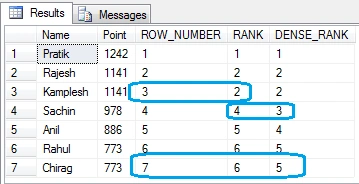
It starts from 1 for the first row in each partition and without repeating or skipping numbers in the ranking result of each partition. For duplicate values within the row set, the ranking ID numbers will be assigned arbitrarily. This scenario is covered in Example-2.
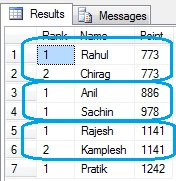
If PARTITION BY clause is specified, the ranking row number will be reset for each partition. This scenario is covered in Example-3.
Generally, ROW_NUMBER() is used to provide serial number to the records as mentioned in Example-1.
Syntax
ROW_NUMBER () OVER ([PARTITION BY value_exp, ... [ n ]] ORDER BY_clause)
Example 1
How to display member names in alphabet order with Serial Number like 1, 2, 3, etc.?
- SELECT ROW_NUMBER() OVER( ORDER BY Name) AS SrNo, Name FROM Member
Output
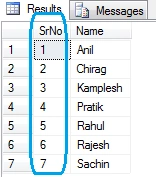
As you can see here, the default order is ascending order.
Example 2
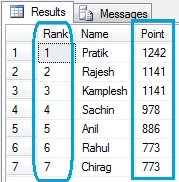
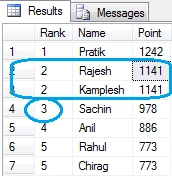
How to give ranks to the members based on their point and display it in top rank to least rank?
- SELECT ROW_NUMBER() OVER( ORDER BY Point desc) AS [Rank], Name, Point FROM Member
Output
Partition By clause
You can use partition by clause with it to divide result with some specified partition.
Example 3
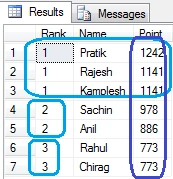
How to give ranks to point for the members based on their point and display it in top rank to least rank?
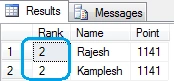
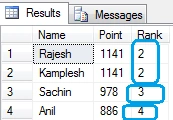
- SELECT ROW_NUMBER() OVER( PARTITION BY Point ORDER BY Point desc) AS [Rank]
- , Name, Point FROM Member
Output

Amit MohantyPosted Sep 9, 2020, 7:12 AM
Nice article