

This article explains the strategy to migrate SQL database workloads from on-premises to Azure-based cloud services. As part of the migration activity, we need to choose the right migration path for an on-premises SQL server to best possible Azure-based cloud services.
1. High-Level Approach
The SQL Server migration roadmap consists of five stages, each encompassing several important tasks required to complete a successful migration to Azure cloud services.

- Initiate and discover: Understand the database footprint like what data is available, where it is located, what platforms it resides on and the size of the data, Application database dependencies, and potential approaches to migration.
- Assess: Assess the discovered workload requirements any dependencies, and migration blockers.
- Plan: Plan and describe the workloads to be migrated, the tool to be used for migration, and choose the right target platform for the workload.
- Transform and optimize: Schema compatibility with target and transform if required. Optimize workloads to take advantage of new features.
- Migrate, validate, and remediate: Perform migration, validate successful migration, and remediate applications where required.
2. Choosing the right migration path - Target Platform and Migration Tools
The approach will depend on many factors but not limited to below.
- The size and complexity of the database
- The amount of downtime we can tolerate
- Overall migration strategy
Choosing the right Target Platform as Azure PaaS
| Target platform | Indicators to look for | Benefits |
| Azure SQL Database
Single Database |
A small number of databases or many databases but all with high steady usage | Lowest cost for single databases |
| Azure SQL Database
Managed Instances |
Do not own the application code or expensive to modify
Requires a high level of compatibility Uses features of SQL Server not yet supported by Azure SQL Databases |
Fully managed service whilst retaining a high level of compatibility with SQL Server
Supports SQL features such as cross-database queries which are unavailable in Azure SQL Database |
Choosing the right migration tools
| Migration Tool | Indicators to look for | Benefits |
| Transactional replication | Critical database with a small or non-existent maintenance window
Large databases (>1TB) |
Smallest possible outage requirements for switch over as source database remains online and servicing requests during synchronization of data
Maintaining transactional consistency |
| Azure SQL Migration extension for Azure Data Studio | Many databases to migrate with moderate maintenance window allowance
Large databases (>1TB) |
Supports moving multiple databases concurrently |
| Import Export Service/BACPAC | A small number of ad hoc databases to migrate
Small to medium-sized databases (<1TB) Low availability requirements with relaxed maintenance windows |
Quick and easy with no real setup requirements |
3. Migration Options
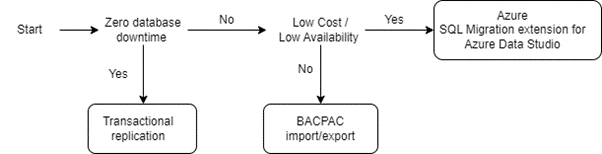
The migration options employed to move data to Azure will be selected based on the criticality of the workload and how long the application can be offline during the switchover.
Here is a simple workflow that can help with tool selection:
Option 1. Migration using Azure SQL Migration extension for Azure Data Studio
This option helps to migrate on-premises SQL Server databases to Azure PaaS with minimal downtime or where small amounts of downtime are acceptable. Azure Database Migration Service is a core component of the Azure SQL Migration extension architecture.
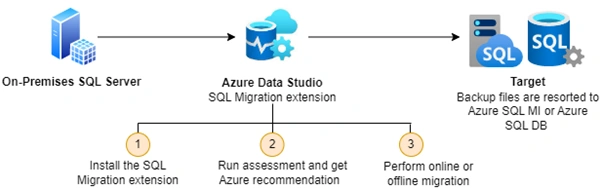
| Migration scenario | Migration mode |
| SQL Server to Azure SQL Managed Instance | Online / Offline |
| SQL Server to Azure SQL Database | Offline |
Option 2. Migration using BACPAC export/import (Offline)
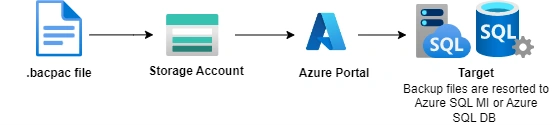
This option can be taken offline at a scheduled time, exporting a BACPAC file containing the data and schema of the source database and importing it into Azure.
Option 3. Migration using Transactional replication
For critical workloads, that can afford zero database downtime, SQL Server Transactional Replication should be used to synchronize all data between on-premises and Azure while keeping the source database online and servicing requests.
Summary
- Identify and set the target environment as part of the planning exercise
- Choose the right options for migration based on the use case and need. Each one of them has its own benefits, so the approach to migrate should be chosen based on various parameters
- Ensure that proof of concepts is conducted with the chosen approach
- Data migration is a key challenge and depends on the volume of the data to be migrated
Happy Learning!
Join the conversation! Your thoughts help the community grow.