

SharePoint 2016 general availability had been announced in the Future Of SharePoint conference in May 2016. The series that discusses the installation of SharePoint 2016 in Azure can be found at C# Corner from the below links.
- SharePoint 2016 installation in Azure-Part 1
- SharePoint 2016 installation in Azure-Part 2
- SharePoint 2016 installation in Azure-Part 3
In this article, we will see how to interact with site collection features in SharePoint 2016, using REST API. The scope of the article is,
- Fetch all the active site collection features
- Activate "Publishing" feature
- Deactivate "Publishing" feature.
Fetch Active Site Collection Features
The features that are active in a site collection can be retrieved by issuing an AJAX GET request, using the below REST URL.
In headers attribute, we specify the type of return data expected, which is JSON here.The result returned will be iterated in the success call back function.The header of the AJAX GET request will be plain and simple, as shown below.
- headers: {
- "accept": "application/json;odata=verbose",
- "X-RequestDigest": $("#__REQUESTDIGEST").val()
- }
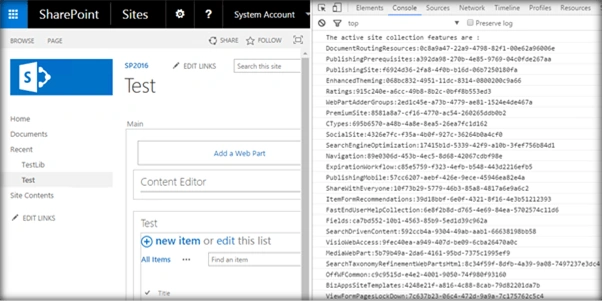
Full Code
- <script language="javascript" type="text/javascript" src="//ajax.googleapis.com/ajax/libs/jquery/1.8.1/jquery.min.js"></script>
- <script language="javascript" type="text/javascript">
- $(document).ready(function() {
- //Make sure to append $select . Else only DefinitionId will be retrieved
- var newSiteFeatureUrl = "/_api/site/features?$select=DisplayName,DefinitionId";
- activateSiteFeature(newSiteFeatureUrl)
- });
- function activateSiteFeature(newSiteFeatureUrl) {
- $.ajax({
- url: _spPageContextInfo.webAbsoluteUrl + newSiteFeatureUrl,
- type: "GET",
- headers: {
- "accept": "application/json;odata=verbose",
- "X-RequestDigest": $("#__REQUESTDIGEST").val()
- },
- success: function(data) {
- var items = data.d.results;
- console.log("The active site collection features are :");
- for (var i = 0; i < items.length; i++) {
- console.log(items[i].DisplayName + ":" + items[i].DefinitionId);
- }
- },
- error: function(error) {
- alert(JSON.stringify(error));
- }
- });
- }
- </script>
In order to activate a site collection feature, we can issue an AJAX POST request, using the REST URL.
"/_api/site/features/add('f6924d36-2fa8-4f0b-b16d-06b7250180fa')"
'f6924d36-2fa8-4f0b-b16d-06b7250180fa’ is the feature id for the site collection feature: "SharePoint Server Publishing Infrastructure". It has to be activated to use the SharePoint Publishing features.
The header section will look like the following.
- headers: {
- "accept": "application/json;odata=verbose",
- "X-RequestDigest": $("#__REQUESTDIGEST").val(),
- },
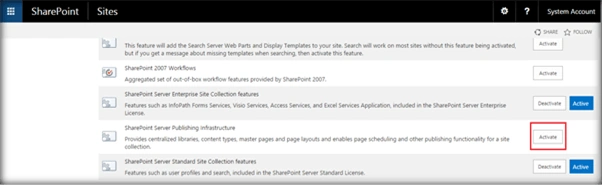
Output - Thus, the site collection "Publishing" feature has been enabled, as shown below.
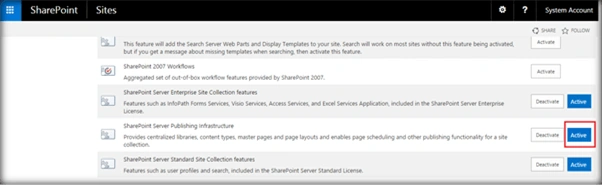
Full Code
- <script language="javascript" type="text/javascript" src="//ajax.googleapis.com/ajax/libs/jquery/1.8.1/jquery.min.js"></script>
- <script language="javascript" type="text/javascript">
- $(document).ready(function() {
- var newSiteFeatureUrl = "/_api/site/features/add('f6924d36-2fa8-4f0b-b16d-06b7250180fa')";
- activateSiteFeature(newSiteFeatureUrl)
- });
- function activateSiteFeature(newSiteFeatureUrl) {
- $.ajax({
- url: _spPageContextInfo.webAbsoluteUrl + newSiteFeatureUrl,
- type: "POST",
- headers: {
- "accept": "application/json;odata=verbose",
- "X-RequestDigest": $("#__REQUESTDIGEST").val()
- },
- success: function(data) {
- console.log(data);
- },
- error: function(error) {
- alert(JSON.stringify(error));
- }
- });
- }
- </script>
The header section will look like the following.
- headers: {
- "accept": "application/json;odata=verbose",
- "X-RequestDigest": $("#__REQUESTDIGEST").val(),
- },
- <script language="javascript" type="text/javascript" src="//ajax.googleapis.com/ajax/libs/jquery/1.8.1/jquery.min.js"></script>
- <script language="javascript" type="text/javascript">
- $(document).ready(function() {
- var newSiteFeatureUrl = "/_api/site/features/remove('f6924d36-2fa8-4f0b-b16d-06b7250180fa')";
- deActivateSiteFeature(newSiteFeatureUrl)
- });
- function deActivateSiteFeature(newSiteFeatureUrl) {
- $.ajax({
- url: _spPageContextInfo.webAbsoluteUrl + newSiteFeatureUrl,
- type: "POST",
- headers: {
- "accept": "application/json;odata=verbose",
- "X-RequestDigest": $("#__REQUESTDIGEST").val()
- },
- success: function(data) {
- console.log(data);
- },
- error: function(error) {
- alert(JSON.stringify(error));
- }
- });
- }
- </script>
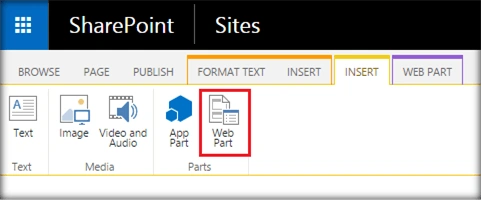
- Go to the edit settings of the SharePoint page and click on Web part from the Insert tab.
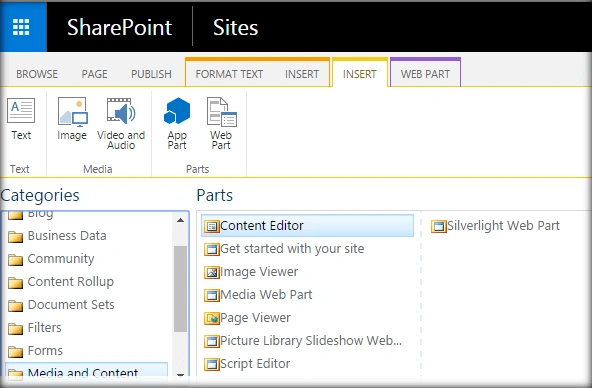
- Add Content Editor Web part.
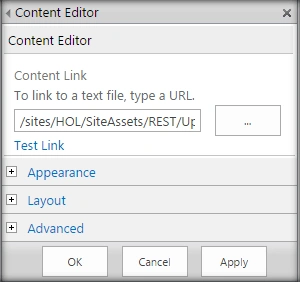
- Click on Edit Web part from Content Edit Web part. Assign the URL of the script text file and click on Apply.
Output - The SharePoint Server Publishing Infrastructure feature has now been deactivated.
Summary - Thus, we have seen how to fetch the details of all the activated features, activate and deactivate site collection features in SharePoint 2016 using REST API.
Join the conversation! Your thoughts help the community grow.