

This article discusses NuGet and how to set up a private NuGet feed in Visual Studio.
Introduction
This is the structure of this article:
- Introduction
- What is NuGet
- Introduction to NuGet
- The flow of Packages between Creators, Hosts, and Consumers
- NuGet Tools
- Adding Private NuGet Feed to Visual Studio
- Setup with NuGet Package Manager
- Setup with NuGet CLI
- Create and Publish a NuGet Package Using Visual Studio
- Summary
A - What is NuGet?
- NuGet is the package manager for .NET.
- The NuGet client tools provide the ability to produce and consume packages.
- The NuGet Gallery is the central package repository used by all package authors and consumers.
A-1: Introduction to NuGet
- Learn --- Quickstart: Install and use a package in Visual Studio
- Explore --- 256,074 packages
- Create --- Quickstart: Create and publish a NuGet package using Visual Studio
A-2: The Flow of Packages between Creators, Hosts, and Consumers
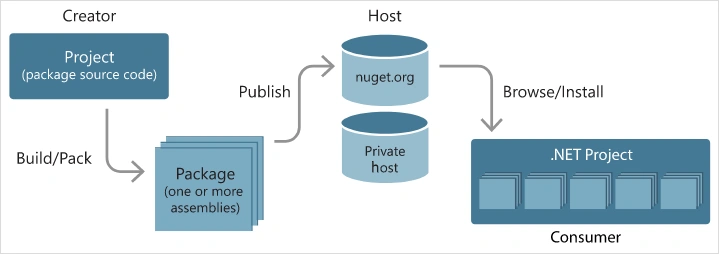
A-3: NuGet tools
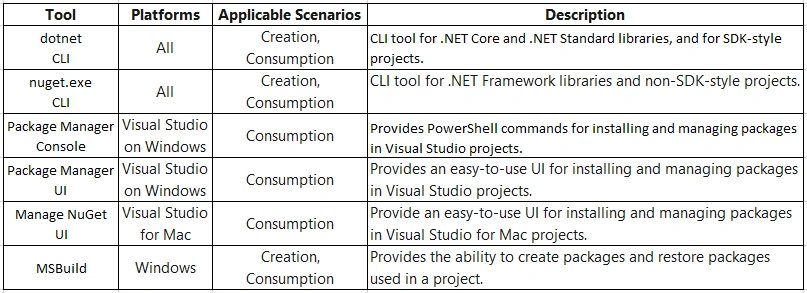
B - Adding Private NuGet Feed to Visual Studio
NuGet supports private hosts alongside the public nuget.org host, you can use NuGet packages to share code that's exclusive to an organization or a workgroup. You can also use NuGet packages as a convenient way to factor your own code for use in nothing but your own projects.
We will demo this by adding the Telerik NuGet Feed to Visual Studio [1][2].
B-1: Setup with NuGet Package Manager
-
Open Visual Studio.
-
Go to Tools > NuGet Package Manager > Package Manager Settings, select Package Manager Sources, and then click the + button.
-
Choose feed Name, set the feed URL to: https://nuget.telerik.com/nuget, and click OK.
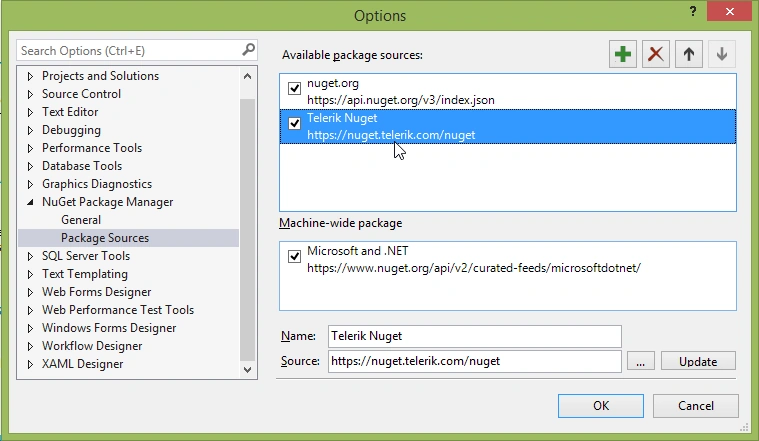
-
Create or load your project.
-
Go to Tools > NuGet Package Manager > Manage NuGet Packages for a solution.
-
In the upper right-hand corner of the Manage Packages for Solution window, select the Telerik Package source that you just added.
-
Choose the Online / Browse list of packages (depending on your VS version).
-
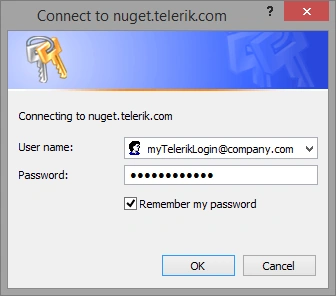
Enter your Telerik credentials in the Windows Authentication dialog (e.g., user: [email protected] and password: myPassPhraseForTelerikDotCom).
-
Enter your credentials only once by selecting the Remember my password checkbox.
Figure 2: Enter your Telerik.com credentials to access the Telerik NuGet feed:
-
Now all the packages that are licensed (paid or trial) to the above users are available in the Visual Studio NuGet Package manager.
B-2: Setup with NuGet CLI
-
Download the latest NuGet executable.
-
Open a Command Prompt and change the path to the nuget.exe location.
-
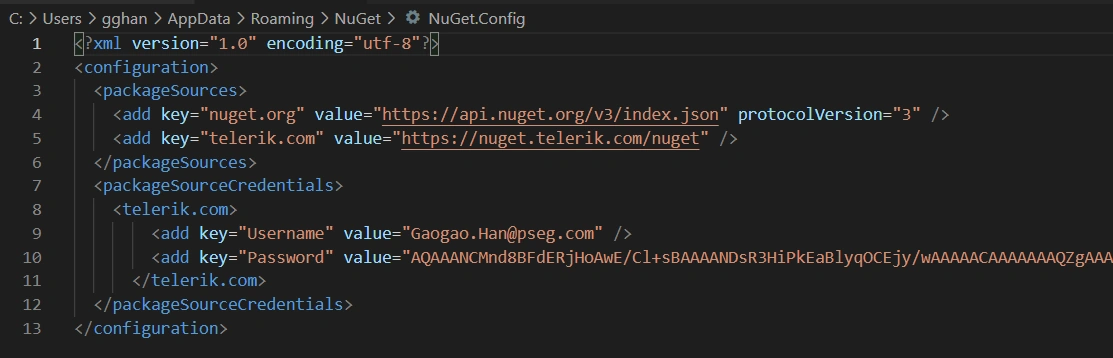
The command from the example below stores a token in the %AppData%\NuGet\NuGet.config file. Your original credentials cannot be obtained from this token.
NuGet Sources Add -Name "telerik.com" -Source "https://nuget.telerik.com/nuget" ^
-UserName "your login email" -Password "your password"
If you are unable to connect to the feed by using encrypted credentials, try the alternative approach of storing credentials in cleartext.
NuGet Sources Add -Name "telerik.com" -Source "https://nuget.telerik.com/nuget" ^
-UserName "your login email" -Password "your password" ^
-StorePasswordInClearText
If you have already stored a token instead of storing the credentials as clear text, you could update the definition in the %AppData%\NuGet\NuGet.config file using the following command,
NuGet Sources Update -Name "telerik.com" -Source "https://nuget.telerik.com/nuget" ^
-UserName "your login email" -Password "your password" ^
-StorePasswordInClearText
C - Create and Publish a NuGet Package Using Visual Studio
This should be part of the topic, but I personally have not had practice. So, I give a link for this topic, anybody needs it, you can go to it:
- Quickstart: Create and publish a NuGet package using Visual Studio (.NET Standard, Windows only) --- MS
Summary
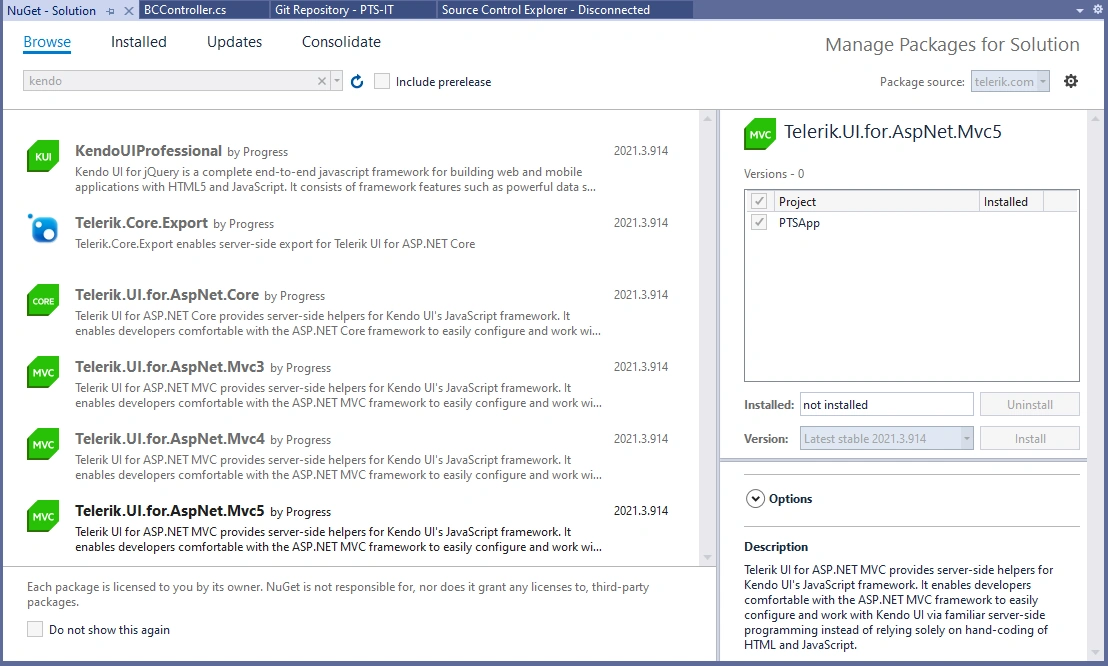
The discussion in this article, actually, is due to my adding the Telerik private NuGet to Visual Studio. While I failed by using Setup with NuGet Package Manager by whatever reason, I made it by using the tool NuGet executable to Setup with NuGet CLI,
Then, I got,
Reference
NuGet.org
- What is NuGet? --- nuget.org
MS
- An introduction to NuGet --- MS
- Install NuGet client tools --- MS
- NuGet pack and restore as MSBuild targets --- MS
- What happens when a NuGet package is installed? --- MS
Telerik
- Adding the Telerik NuGet Feed to your NuGet Package Sources --- youtube.com
- How to add the Telerik private NuGet feed to Visual Studio --- Telerik.com
- Setup the Telerik NuGet Feed --- Telerik.com
- Progress Telerik UI for ASP.NET MVC Extension --- marketplace.visualstudio.com
Join the conversation! Your thoughts help the community grow.