

Introduction
PnP-JS-Core library contains the number of extensible methods and properties, using which we can achieve the various actions in a simple code. To know more about this library component, visit the following links:
SharePoint has a lot of building blocks in the collections, which are used to form a SharePoint site. These are used in managing the content and generating the reports, based on the contents and settings etc.
Requirement
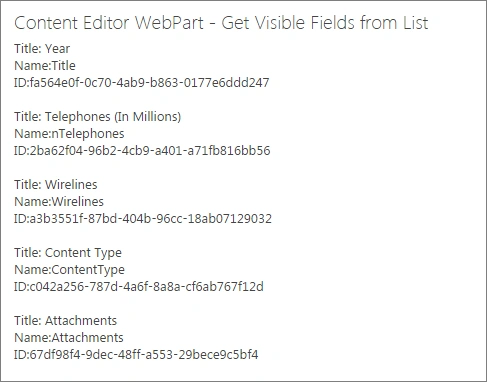
We got a requirement to show the fields, available for the list item in a list or library.
- To achieve the requirement, we are going to use the PnP JavaScript Library
Prerequisites
To use the PnP JS library, we should add the script file given below to the references in our code.
- Download pnp.js PnP JS file.
- Download fetch.js used by PnP js file to handle the Web requests and responses (Required in IE).
- Download es6-promise.js Used by PnP js file to handle web requests and responses (Required in IE).
Upload the above files to the library in SharePoint. Assume we have uploaded these files in Site Assets library for our example.
Code Skeleton
I have included all the above mentioned scripts and generated a skeleton code, given below, for adding the main code to retrieve the fields from the list:
- <script type="text/javascript" src="/siteassets/scripts/fetch.js"></script>
- <script type="text/javascript" src="/siteassets/scripts/es6-promise.js"></script>
- <script type="text/javascript" src="/siteassets/scripts/pnp.min.js"></script>
- <div id="sample"></div>
- <script type="text/javascript">
- //PnP Code snippet
- </script>
Solution
The following code snippet is used to get the visible fields information from SharePoint list, using PnP JavaScript library. Click here to read more about getting the visible fields from the list.
In our example, we have a sample list (Telephones Growth), which contains the following custom columns.
- Year
- Telephones (In Millions)
- Wirelines
- //fields property returns all fields from the retrieved list
- //then( ) runs on success
- //catch( ) runs on failure
- $pnp.sp.web.lists.getByTitle("Telephones Growth").fields.filter("ReadOnlyField eq false and Hidden eq false").get().then(function(result)
- {
- var fieldInfo = "";
- for (var i = 0; i < result.length; i++) {
- fieldInfo += "Title: " + result[i].Title + "<br/>";
- fieldInfo += "Name:" + result[i].InternalName + "<br/>";
- fieldInfo += "ID:" + result[i].Id + "<br/><br/>";
- }
- document.getElementById("sample").innerHTML = fieldInfo;
- }).catch(function(err) {
- alert(err);
- });
Prasanna MuraliPosted Aug 4, 2016, 10:59 AM
Nice share..
Vignesh ManiPosted Aug 4, 2016, 7:31 AM
Nice
Tarun DPosted Aug 4, 2016, 7:24 AM
Thanks for nice sharing..