

Today, we will learn about implementing Custom pagination in Angular 8. Angular 8 was recently released by Google.
Prerequisites
- Basic knowledge of Angular 8
- Code editor like Visual Studio code
So, let's get started.
Create a new project in Angular 8 by typing the following command.
- ng new custom-pagination-angular
- npm install jw-angular-pagination
- import { BrowserModule } from '@angular/platform-browser';
- import { NgModule } from '@angular/core';
- import { JwPaginationComponent } from 'jw-angular-pagination';
- import { AppComponent } from './app.component';
- @NgModule({
- declarations: [
- AppComponent,
- JwPaginationComponent
- ],
- imports: [
- BrowserModule
- ],
- providers: [],
- bootstrap: [AppComponent]
- })
- export class AppModule { }
- import { Component } from '@angular/core';
- @Component({
- selector: 'app-root',
- templateUrl: './app.component.html',
- styleUrls: ['./app.component.css']
- })
- export class AppComponent {
- title = 'custom-pagination-angular';
- data = [];
- pagedItems: Array<any>;
- constructor() { }
- ngOnInit() {
- this.data = Array(1000).fill(0).map((x, i) => ({ id: (i + 1), name: `Item Paged ${i + 1}`, product: `Product ${i + 1}` }));
- }
- beginPagination(pagedItems: Array<any>) {
- this.pagedItems = pagedItems;
- }
- }
- <div class="card text-center m-3">
- <h3 class="card-header">Angular 8 Custom Pagination Example</h3>
- <div class="card-body">
- <div *ngFor="let item of pagedItems">{{item.name}} for {{item.product}}</div>
- </div>
- <div class="card-footer pb-0 pt-3">
- <jw-pagination [items]="data" (changePage)="beginPagination($event)"></jw-pagination>
- </div>
- </div>
- <!doctype html>
- <html lang="en">
- <head>
- <meta charset="utf-8">
- <title>CustomPaginationAngular</title>
- <base href="/">
- <meta name="viewport" content="width=device-width, initial-scale=1">
- <link rel="icon" type="image/x-icon" href="favicon.ico">
- <link rel="stylesheet" href="https://maxcdn.bootstrapcdn.com/bootstrap/4.3.1/css/bootstrap.min.css">
- <script src="https://ajax.googleapis.com/ajax/libs/jquery/3.4.1/jquery.min.js"></script>
- <script src="https://cdnjs.cloudflare.com/ajax/libs/popper.js/1.14.7/umd/popper.min.js"></script>
- <script src="https://maxcdn.bootstrapcdn.com/bootstrap/4.3.1/js/bootstrap.min.js"></script>
- </head>
- <body>
- <app-root></app-root>
- </body>
- </html>
That’s it.
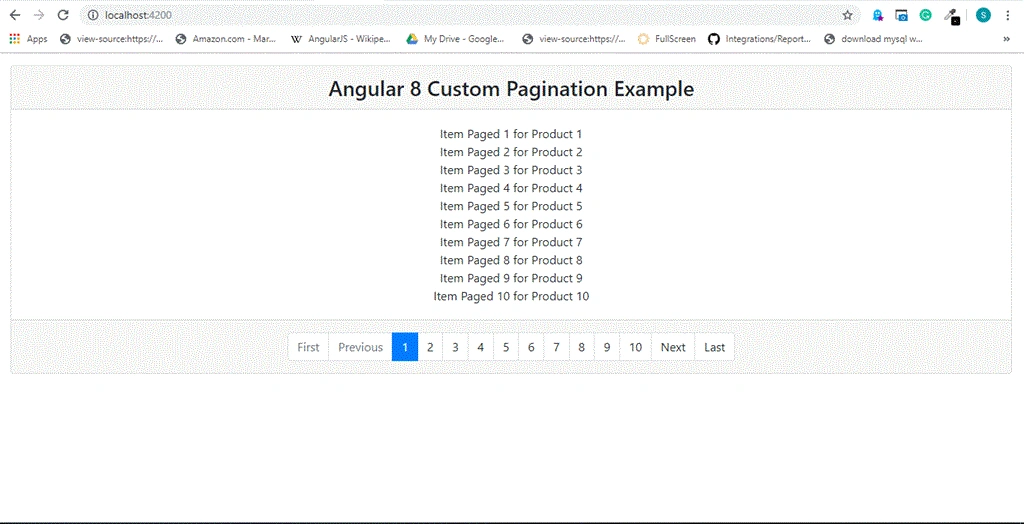
I hope you guys found something useful. Please give your valuable
feedback/comments/questions about this article. Please let me know how
you like and understand this article and how I could improve it.
Amit MohantyPosted Oct 2, 2019, 11:18 PM
Nice article
Pankajkumar PatelPosted Oct 2, 2019, 12:10 AM
Nice article