

You will get the following answers here.
- What is ViewState?
- How to store the value in ViewState?
- How to retrieve the value from ViewState?
- Example 1
ListBox EnableViewState property example
- Example 2
Manually ViewState storing.
What is ViewState?
ViewState is a client side mechanism. It stores the value in the page itself. Preserving the value of page controls between client to server and server to client is called "roundtrip". It stores the page or control value in the mode of hidden fields. Viewing the source of the page allows you to find the ViewState signature but stores the value in encrypted format even though any programmer can de-encrypt the value.
Storing the value between postbacks is great, but it stores the data in the page itself, that’s why the page becomes very heavy to load or takes time to render.
The ViewState is a dictionary kind of object which stores the value on the basis of KEY/VALUE.
By default, the ViewState is enabled, but we can enable or disable ViewState on Page level or Control level.
There are two properties on Page Level
- ViewStateMode
- EnableVIewState
- ViewStateEncryptionMode = “Always” / “Auto” / “Never”
Example
- <%@PageLanguage="C#"AutoEventWireup="true"CodeFile="Default.aspx.cs"Inherits="_Default"EnableViewState="true"ViewStateMode="Enabled"ViewStateEncryptionMode="Always"%>
For more details about the above properties, please visit here.
There is one property on Control Level.
- EnableViewState = “True” / “False”
Example
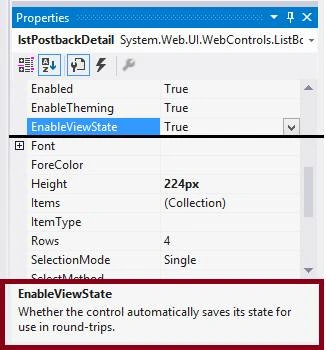
I took a list control on the page and switched to Properties of ListBox named “lstPostBackDetail”.
You can see there is a property called EnableViewState = True/False.
How to store the value in ViewState?
ViewState stores the value in a Key/Value pair basis.
Syntax
ViewState[“KeyName”] = Object / String .etc.
Example
- ViewState[“PageStartedDateTime”] = DateTime.Now;
- Create a new WebSite project project called“ ViewStateExample”

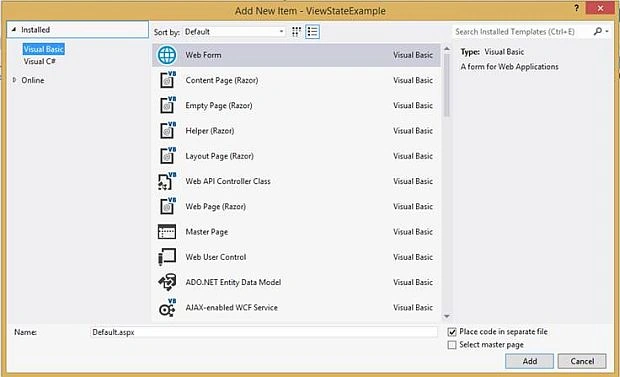
Right click on project and select Add-->Add New Item and select WebForm.

Example 1
After successfully adding a new webform, now double click on Default.aspx file in Solution Explorer and add four controls on the webpage.
- ListBox
- Button


Manoj KallaPosted Dec 27, 2016, 9:58 PM
Thank You........Roshan Mule
Roshan MulePosted Dec 27, 2016, 9:32 PM
Very Nice article sir.!!!
Subhashkumar YadavPosted Dec 27, 2016, 12:21 AM
Nice.....................................