

Introduction
If you are a novice to Azure cloud and want to learn what a logic app is, then go through my previous articles.
In this article, we will explore the overview of one of the services, named On-premise Data Gateway, in Azure.
Scenario
This article will help you to understand what an on-premise data gateway is, and in the next articles, we will go through the steps to help you how to install and configure it with a step-by-step approach. Let’s gear up.
Prerequisites
Basic knowledge of Azure Services
Background
- When you migrate/redesign/develop your application to the cloud, then many times, you need to connect to the resources that are present in on-premise servers.
- On-premise data gateway works with the following Azure resources.
- Logic Apps
- Power BI
- Microsoft Flow
- Azure Analysis Services
Overview
- The on-premise data gateway service comes under the integration services category in Azure.
- This gateway is nothing but a bridge between on-premise resources and Azure resources.
- If we need to connect with on-premise resources; e.g., SQL or FTP data source, etc., from Azure Services like Logic Apps, Power BI, Microsoft Flow, and Azure Analysis Services, then on-premise data gateway is one of the efficient and accurate solutions to make this integration possible.
- It helps us to communicate between two environments securely by encrypting the data and credentials without modifying the firewall settings.
- This gateway supports only Logic Apps, Power BI, Microsoft Flow, and Azure Analysis Services.
- Power BI: Power BI list of on-premise data source types
- Flow: List
- Logic Apps: List
- Transmission of data between these two environments happens through data compression and transport encryption.
How it works?
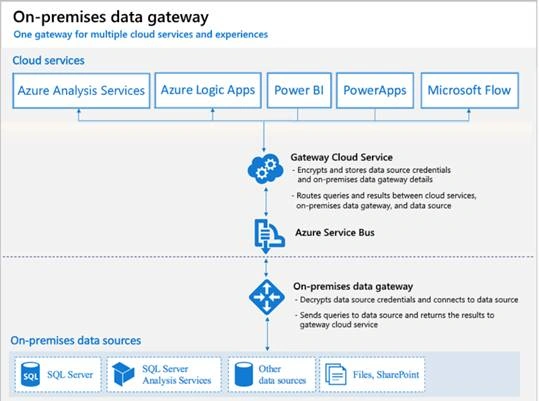
- Send a request from Azure resources to the Azure service bus through the connector.
- Connector builds a query with credentials and sends it to Azure Service Bus (fully managed enterprise integration message broker service).
- Azure service bus keeps requests in the queue for processing.
- On-premise data gateway polls and receives the pending requests from Azure service bus.
Note
The gateway creates an outbound connection to the Azure Service Bus. It communicates on outbound ports: TCP 443 (default), 5671, 5672, 9350 through 9354. We can also able to force to use HTTPs but that leads to reducing the performance.
- The gateway decrypts the credentials and connects to the data sources with those credentials and sends a request to execute it.
- On-premise data source executes the query and the results are sent back to the gateway
- Finally, the on-premise data gateway sends the results to the cloud service.
- The below image by Microsoft shows the detailed data flow of the on-premise data gateway
What about troubleshooting?
- On-premise data gateway maintains logs to help developers
- Gateway service logs: C:\Users\PBIEgwService\AppData\Local\Microsoft\On-premises data gateway\<yyyyymmdd>.<Number>.log
- Configuration logs: C:\Users\<username>\AppData\Local\Microsoft\On-premises data gateway\GatewayConfigurator.log
- Event logs: We can get it under Application and Services Logs.
- Open the event viewer.
- Expand ‘event viewer (local)’
- Go to ‘applications and services logs’
- Select ‘on-premises data gateway service’
Availability and Disaster Recovery
- For communication to Azure service from the on-premise data gateway, the gateway should be in a running state.
- When we install the gateway in the on-premise machine then we need to use one key called recovery key.
- By using the recovery key, we can restore or move the gateway to other machines.
- The recovery key also helps to migrate or recover the earlier settings of the gateway.
Note
- A single gateway can connect to multiple data sources.
- It is not compulsory to install this on-premise gateway connector on the machine where the data source is present.
- To minimize latency, you can install the gateway as close as possible to your data source, or on the same computer, assuming that you have permissions.
- We can install it anywhere within your on-premise network, but the destination data source must be accessible from a machine where the gateway is installed.
- Azure Application gateway and on-premise gateway are different things. Don’t be confused.
Summary
In this part 1, we have learned an overview of the on-premise gateway and its features.
In the next article, we will learn to execute the steps to install and configure it on on-premise machine.
Join the conversation! Your thoughts help the community grow.