

Introduction
In this article, we will cover the onion architecture using the ASP.Net 6 Web API. Onion architecture term is introduced by Jeffrey Palermo in 2008. This architecture provides us a better way to build applications using this architecture our applications are better testable, maintainable, and dependable on infrastructures like databases and services. Onion architecture solves common problems like coupling and separation of concerns.
What is Onion architecture?
In onion architecture, we have the domain layer, repository layer, service layer, and presentation layer. Onion architecture solves the problem that we face during the enterprise applications like coupling and separations of concerns. Onion architecture also solves the problem that we confronted in three-tier architecture and N-Layer architecture. In Onion architecture, our layer communicates with each other using interfaces.
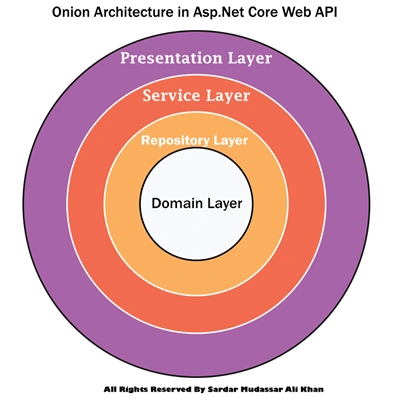
Layers in Onion Architecture
Onion architecture uses the concept of the layer but is different from N-layer architecture and 3-Tier architecture.
Domain Layer
This layer lies in the center of the architecture where we have application entities which are the application model classes or database model classes. Using the code first approach in the application development using Asp.net core these entities are used to create the tables in the database.
Repository Layer
The repository layer act as a middle layer between the service layer and model objects. We will maintain all the database migrations and database context Objects in this layer. We will add the interfaces that consist of the data access pattern for reading and writing operations with the database.
Service Layer
This layer is used to communicate with the presentation and repository layer. The service layer holds all the business logic of the entity. In this layer services interfaces are kept separate from their implementation for loose coupling and separation of concerns.
Presentation Layer
In the case of the API Presentation layer that presents us the object data from the database using the HTTP request in the form of JSON Object. But in the case of front-end applications, we present the data using the UI by consuming the APIS.
Advantages of Onion Architecture
- Onion architecture provides us with the batter maintainability of code because code depends on layers.
- It provides us with better testability for unit tests, we can write the separate test cases in layers without affecting the other module in the application.
- Using the onion architecture our application is loosely coupled because our layers communicate with each other using the interface.
- Domain entities are the core and center of the architecture and have access to databases and UI Layer.
- A complete implementation would be provided to the application at run time.
- The external layer never depends on the external layer.
Implementation of Onion Architecture
Now we are going to develop the project using the Onion Architecture
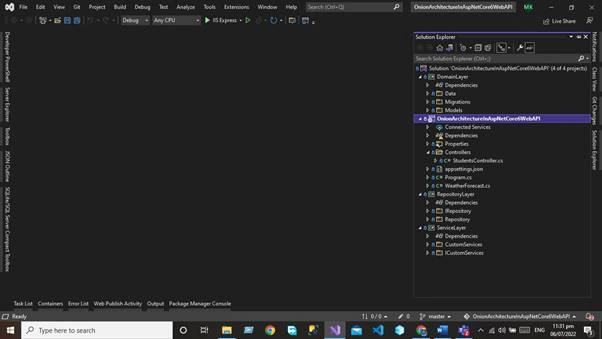
First, you need to create the Asp.net Core web API project using visual studio. After creating the project, we will add our layer to the project. After adding all the layers our project structure will look like this.
Project Structure.
Domain Layer
This layer lies in the center of the architecture where we have application entities which are the application model classes or database model classes. Using the code first approach in the application development using Asp.net core these entities are used to create the tables in the database
For the Domain layer, we need to add the library project to our application.
Right click on the Solution and then click on add option.
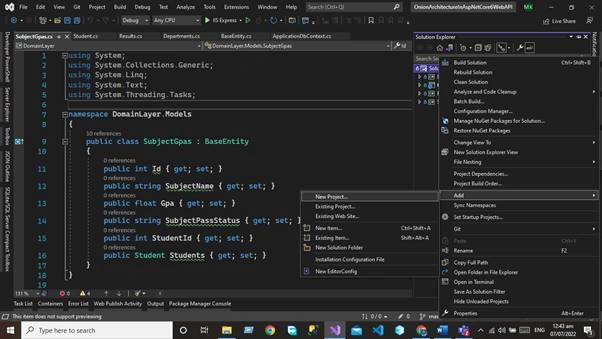
Add the library project to your solution
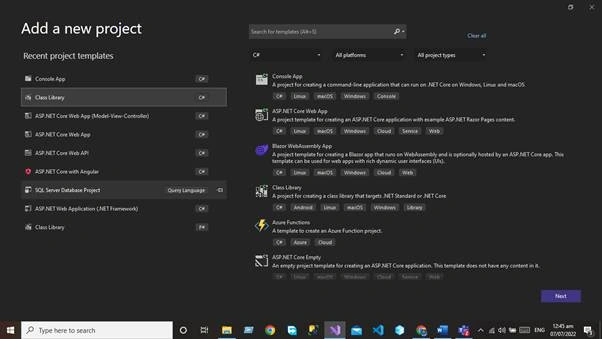
Name this project as Domain Layer
Models Folder
First, you need to add the Models folder that will be used to create the database entities. In the Models folder, we will create the following database entities.
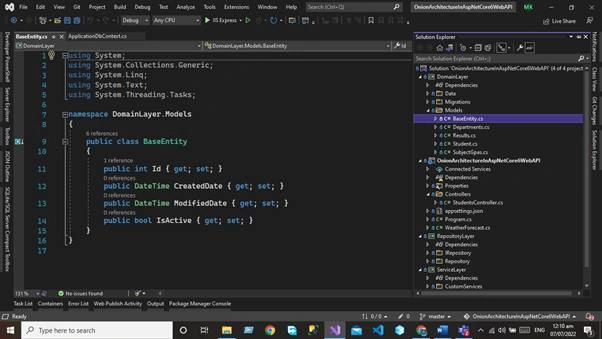
Base Entity
using System;
using System.Collections.Generic;
using System.Linq;
using System.Text;
using System.Threading.Tasks;
namespace DomainLayer.Models {
    public class BaseEntity {
        public int Id {
            get;
            set;
        }
        public DateTime CreatedDate {
            get;
            set;
        }
        public DateTime ModifiedDate {
            get;
            set;
        }
        public bool IsActive {
            get;
            set;
        }
    }
}
Department
Department entity will extend the base entity
using System;
using System.Collections.Generic;
using System.Linq;
using System.Text;
using System.Threading.Tasks;
namespace DomainLayer.Models {
    public class Departments: BaseEntity {
        public int Id {
            get;
            set;
        }
        public string DepartmentName {
            get;
            set;
        }
        public int StudentId {
            get;
            set;
        }
        public Student Students {
            get;
            set;
        }
    }
}
Result
Result Entity will extend the base entity
using System;
using System.Collections.Generic;
using System.ComponentModel.DataAnnotations;
using System.Linq;
using System.Text;
using System.Threading.Tasks;
namespace DomainLayer.Models {
    public class Resultss: BaseEntity {
        [Key]
        public int Id {
            get;
            set;
        }
        public string ? ResultStatus {
            get;
            set;
        }
        public int StudentId {
            get;
            set;
        }
        public Student Students {
            get;
            set;
        }
    }
}
Students
Student Entity will extend the base entity
using System;
using System.Collections.Generic;
using System.ComponentModel.DataAnnotations;
using System.Linq;
using System.Text;
using System.Threading.Tasks;
namespace DomainLayer.Models {
    public class Student: BaseEntity {
        [Key]
        public int Id {
            get;
            set;
        }
        public string ? Name {
            get;
            set;
        }
        public string ? Address {
            get;
            set;
        }
        public string ? Emial {
            get;
            set;
        }
        public string ? City {
            get;
            set;
        }
        public string ? State {
            get;
            set;
        }
        public string ? Country {
            get;
            set;
        }
        public int ? Age {
            get;
            set;
        }
        public DateTime ? BirthDate {
            get;
            set;
        }
    }
}
SubjectGpa
Subject GPA Entity will extend the Base Entity
using System;
using System.Collections.Generic;
using System.Linq;
using System.Text;
using System.Threading.Tasks;
namespace DomainLayer.Models {
    public class SubjectGpas: BaseEntity {
        public int Id {
            get;
            set;
        }
        public string SubjectName {
            get;
            set;
        }
        public float Gpa {
            get;
            set;
        }
        public string SubjectPassStatus {
            get;
            set;
        }
        public int StudentId {
            get;
            set;
        }
        public Student Students {
            get;
            set;
        }
    }
}
Data Folder
Add the Data in the domain that is used to add the database context class. The database context class is used to maintain the session with the underlying database using which you can perform the CRUD operation.
Write click on the application and create the class ApplicationDbContext.cs
using DomainLayer.Models;
using Microsoft.EntityFrameworkCore;
using System;
using System.Collections.Generic;
using System.Linq;
using System.Text;
using System.Threading.Tasks;
namespace DomainLayer.Data {
    public class ApplicationDbContext: DbContext {
        public ApplicationDbContext(DbContextOptions < ApplicationDbContext > options): base(options) {}
        protected override void OnModelCreating(ModelBuilder builder) {
            base.OnModelCreating(builder);
        }
        public DbSet < Student > Students {
            get;
            set;
        }
        public DbSet < Departments > Departments {
            get;
            set;
        }
        public DbSet < SubjectGpas > SubjectGpas {
            get;
            set;
        }
        public DbSet < Resultss > Results {
            get;
            set;
        }
    }
}
After Adding the DbSet properties we need to add the migration using the package manager console and run the command Add-Migration.
add-migration OnionArchitectureV1
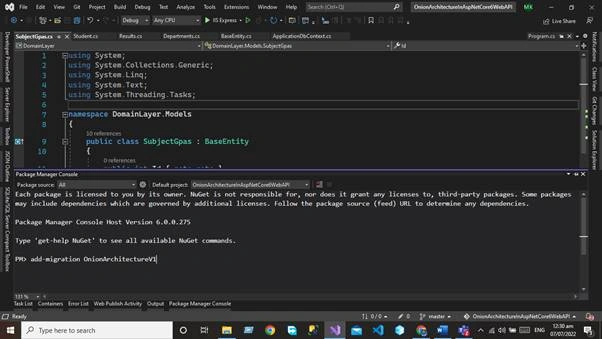
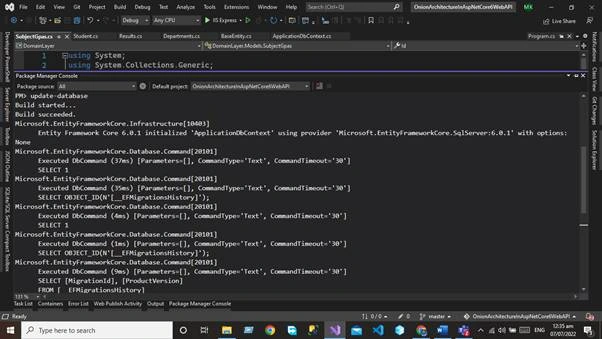
After executing the commands now, you need to update the database by executing the update-database Command
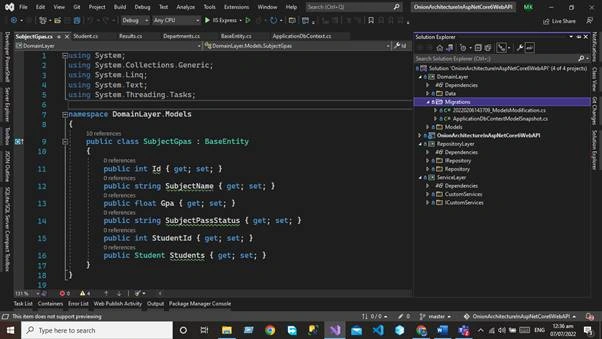
Migration Folder
After executing both commands now you can see the migration folder in the domain layer.
Repository Layer
The repository layer act as a middle layer between the service layer and model objects. We will maintain all the database migrations and database context Objects in this layer. We will add the interfaces that consist the of data access pattern for reading and writing operations with the database.
Now we will work on Repository Layer. We will follow the same project as we did for the Domain layer. Add the library project in your application and give a name to that project Repository layer.
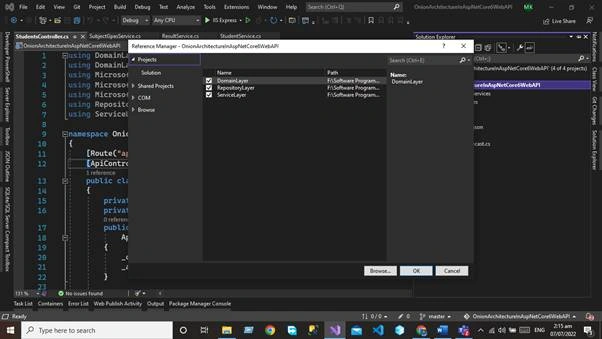
But here we need to add the project reference of the Domain layer in the repository layer. Write click on the project and then click the Add button after that we will add the project references in the Repository layer.
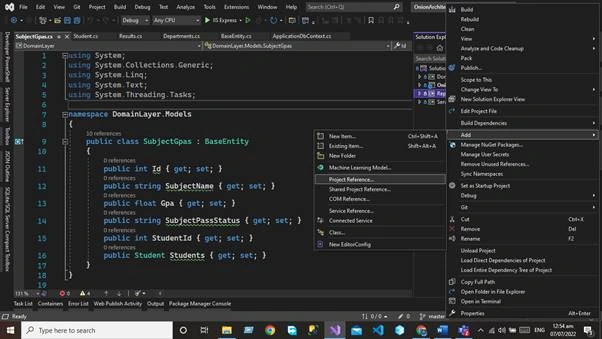
Click on project reference now and select the Domain layer.
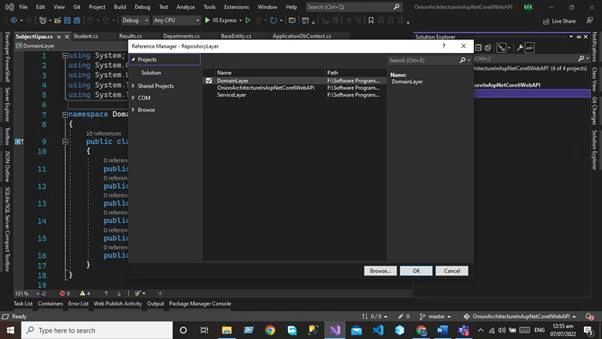
Now we need to add the two folders.
- IRepository
- Repository
IRepository
IRepsitory folder contains the generic interface, using this interface we will create the CRUD operation for our all entities.
Generic Interface will extend the Base-Entity for using some properties. The code for the generic interface is given below.
using DomainLayer.Models;
namespace RepositoryLayer.IRepository {
    public interface IRepository < T > where T: BaseEntity {
        IEnumerable < T > GetAll();
        T Get(int Id);
        void Insert(T entity);
        void Update(T entity);
        void Delete(T entity);
        void Remove(T entity);
        void SaveChanges();
    }
}
Repository
Now we create the Generic repository that extends the Generic IRepository Interface. The code for the generic repository is given below
using DomainLayer.Data;
using DomainLayer.Models;
using Microsoft.EntityFrameworkCore;
using RepositoryLayer.IRepository;
using System;
using System.Collections.Generic;
using System.Linq;
using System.Text;
using System.Threading.Tasks;
namespace RepositoryLayer.Repository {
    public class Repository < T > : IRepository < T > where T: BaseEntity {
        #region property
        private readonly ApplicationDbContext _applicationDbContext;
        private DbSet < T > entities;
        #endregion
        #region Constructor
        public Repository(ApplicationDbContext applicationDbContext) {
            _applicationDbContext = applicationDbContext;
            entities = _applicationDbContext.Set < T > ();
        }
        #endregion
        public void Delete(T entity) {
            if (entity == null) {
                throw new ArgumentNullException("entity");
            }
            entities.Remove(entity);
            _applicationDbContext.SaveChanges();
        }
        public T Get(int Id) {
            return entities.SingleOrDefault(c => c.Id == Id);
        }
        public IEnumerable < T > GetAll() {
            return entities.AsEnumerable();
        }
        public void Insert(T entity) {
            if (entity == null) {
                throw new ArgumentNullException("entity");
            }
            entities.Add(entity);
            _applicationDbContext.SaveChanges();
        }
        public void Remove(T entity) {
            if (entity == null) {
                throw new ArgumentNullException("entity");
            }
            entities.Remove(entity);
        }
        public void SaveChanges() {
            _applicationDbContext.SaveChanges();
        }
        public void Update(T entity) {
            if (entity == null) {
                throw new ArgumentNullException("entity");
            }
            entities.Update(entity);
            _applicationDbContext.SaveChanges();
        }
    }
}
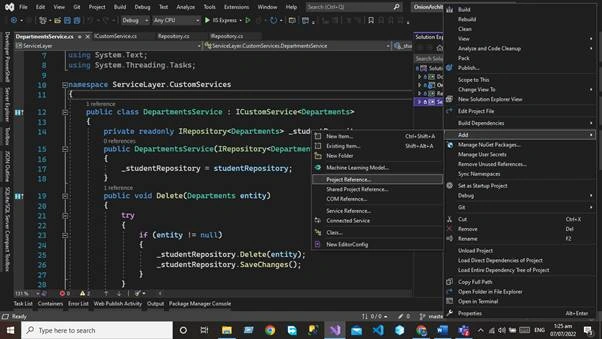
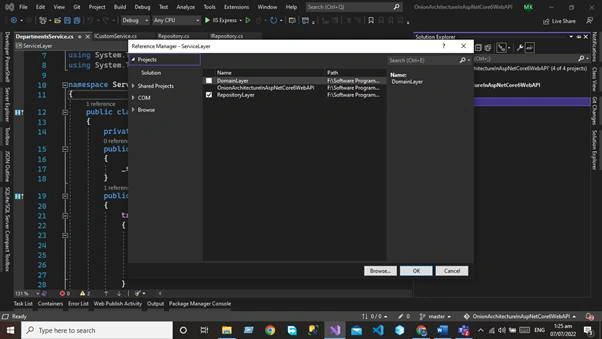
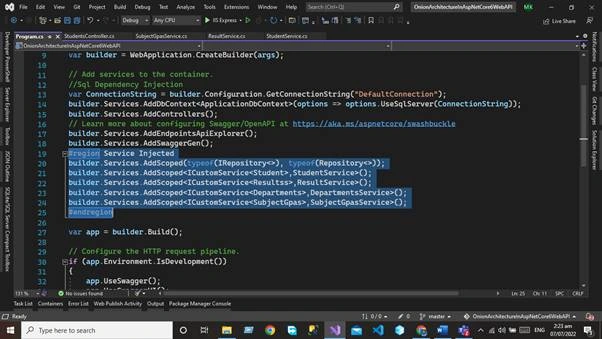
We will use this repository in our service layer.
Hamid KhanPosted Jul 8, 2023, 4:03 AM
Very good explanation with examples!!!!!!!!1111
StevePosted Mar 9, 2023, 8:53 AM
Sorry, but for me there are a lot of mistakes - On domain model you are using KeyAttribute which is used as primary key indicator which infact is used by any kind of persistence (infrastructure). Wrong location. - When using EF you don't need repositories at all - DbContext is EF and therefore infrastructure (layer). The domain layer is the wrong place. - Whats the benefit of having all services exactly the same signatures as the repositories? Services provide business case methods not low level access to entities. - I highly recommend abstractions between database models, domain models and dto models. Further I would question if using code-first is a useful approach when implementing onion architecture, which somehow also brings in DDD. - The repository layer (which makes no sense at all) brings in infrastructure topics between core layers. All infrastructure implementations shoud be in that exact layer, which is generally the most outer layer of the onion architecture. - Do not inject DbContext into controllers, generally no infrastructure things in there. - Whats the purpose of injection the ApplicationDbContext into the controller? It's not used anywhere. - Your api endpoints violating REST principles Most problems occur due to the fact that the onion architecture is not exactly standardized. Lots of it relay on personal opinion. But I think if someone has completely understand the abstractions it's not that hard or complex. Unfortunately there are a lot of bad explanations or examples out there.
Lennart JanssonPosted Jul 25, 2022, 8:18 AM
You are injecting ApplicationDbContext into your controllers which is totally unneccesary, it is already injected into your repository and the context could even be hidden behind an interface to make it implement a clean Repository pattern. EF Core is already from the beginning implementing the Repository pattern so what you are doing is adding a Repository pattern on top of an already existing Repository pattern. You are using plural form for your entities Resultss, Departments and SubjectGpas but NOT for Student? EF will take care of the pluralization for you in a proper way.
Hamid KhanPosted Jul 17, 2022, 8:06 PM
Well explain............
Peter PosnagPosted Jul 9, 2022, 1:42 AM
From the moment you reference EF in your domain layer, you are creating a coupling with an external layer, domain should know nothing about how the database is handled