

Data interoperability with Microsoft office applications has become easier with ADO.net.
The Microsoft Office System exposes objects through COM objects. Microsoft released a suite of Primary Interop Assemblies (PIAs) that are optimized for accessing COM objects from .NET-based assemblies. These generally get installed into your system when you install MS office.
The data can be easily transferred from an Excel spreadsheet to an access database using ADO.net and suite of these Microsoft office interop assemblies. Here first we will make use of Microsoft Jet OLE DB provider to establish connection to an excel spreadsheet. The process to be followed is as under:
Create an Excel sheet you want to transfer data from. Let's assume the file is named Book.xls and the first sheet is the default sheet Sheet1.
Add reference to Microsoft Office Access Interop Assembly.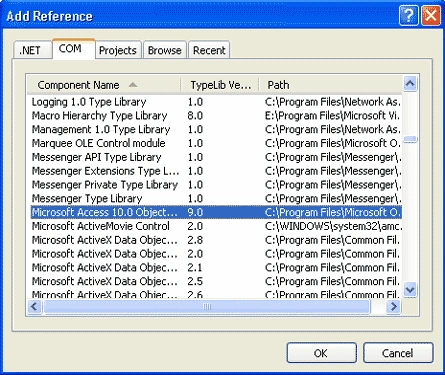
Right click on added reference's property to ensure that the Path of the assembly points to GAC.
e.g.:
C:\WINDOWS\assembly\GAC\Microsoft.Office.Interop.Access\10.0.4504.0__31bf3856ad364e35\Microsoft.Office.Interop.Access.dll
Remove any previously created Access file and create a new one to import data into.
if (File.Exists(@"C:\Book.mdb"))
{
File.Delete(@"C:\ Book.mdb");
}
Access.Application _accessData;
_accessData = new Access.ApplicationClass();
_accessData.Visible = false;
_accessData.NewCurrentDatabase(@"C:\ Book.mdb");
_accessData.CloseCurrentDatabase();
_accessData.Quit(Microsoft.Office.Interop.Access.AcQuitOption.acQuitSaveAll);
_accessData = null;
Now let's establish connection to our data source (Excel file) using Microsoft Jet OLE DB provider.
string _filename = @"C:\Book.xls";
string _conn;
_conn = "Provider=Microsoft.Jet.OLEDB.4.0;" + @"Data Source=" + _fileName + ";" +
"Extended Properties=Excel 8.0;";
OleDbConnection _connection = new OleDbConnection(_conn);
Use OledbCommand object to select all the data from sheet1 and execute a ExecuteNonQuery to import data into Book.mdb.
OleDbCommand _command = new OleDbCommand();
_command.Connection = _connection;
try
{
_command.CommandText = @"SELECT * INTO [MS Access;Database=C:\Book.mdb].[Sheet1] FROM [Sheet1$]";
_connection.Open();
saradhi saradhiPosted Oct 13, 2010, 6:50 AM
hi, i'm using the same code u guided me.but i'm getting error:Cannot update.Database or object is read only.And i already checked the file type.this is not read only....Plz help for this.......
sai mPosted May 24, 2010, 9:06 AM
hi all, thanks i am using the same code u guided me i am writing code in <acronym title="Visual Basic">vb</acronym> windows form i am getting error as : 'FillAccessDatabase' is not declared. i think some code is missing can u please trace me out. please try to help me out. i am running code in vb windows application. i have added all references also and my code is : Private Sub Button1_Click(ByVal sender As System.Object, ByVal e As System.EventArgs) Handles Button1.Click Dim _accessData As Access.Application _accessData = New Access.ApplicationClass() _accessData.Visible = False _accessData.NewCurrentDatabase("C:\Book.mdb") _accessData.CloseCurrentDatabase() _accessData.Quit(<leo_highlight style="border-bottom: 2px solid rgb(255, 255, 150); background: transparent none repeat scroll 0% 0%; cursor: pointer; display: inline; -moz-background-clip: border; -moz-background-origin: padding; -moz-background-inline-policy: continuous;" id="leoHighlights_Underline_2" onclick="leoHighlightsHandleClick('leoHighlights_Underline_2')" onmouseover="leoHighlightsHandleMouseOver('leoHighlights_Underline_2')" onmouseout="leoHighlightsHandleMouseOut('leoHighlights_Underline_2')" leohighlights_keywords="microsoft" leohighlights_url_top="http%3A//shortcuts.thebrowserhighlighter.com/leonardo/plugin/highlights/3_1/tbh_highlightsTop.jsp?keywords%3Dmicrosoft%26domain%3Dwww.vbdotnetforums.com" leohighlights_url_bottom="http%3A//shortcuts.thebrowserhighlighter.com/leonardo/plugin/highlights/3_1/tbh_highlightsBottom.jsp?keywords%3Dmicrosoft%26domain%3Dwww.vbdotnetforums.com" leohighlights_underline="true">Microsoft</leo_highlight>.Office.Interop.Access.A cQuitOption.acQuitSaveAll) _accessData = Nothing Dim filename As String = "C:\Book.xls" Dim _connection As OleDbConnection = MakeExcelConnection(filename) FillAccessDatabase(_connection) Dim _command As OleDbCommand = New OleDbCommand() _command.Connection = _connection Try _command.CommandText = "SELECT * INTO [MS Access;Database=C:\Book.mdb].[Sheet1] FROM [Sheet1$]" _connection.Open() _command.ExecuteNonQuery() _connection.Close() MessageBox.Show("The import is complete!") Catch e1 As Exception MessageBox.Show("Import Failed, correct Column name in the sheet!") End Try End Sub Private Shared Function MakeExcelConnection(ByVal fileName As String) As OleDbConnection Dim _conn As String _conn = "Provider=<leo_highlight style="background: transparent none repeat scroll 0% 0%; cursor: pointer; display: inline; -moz-background-clip: -moz-initial; -moz-background-origin: -moz-initial; -moz-background-inline-policy: -moz-initial;" id="leoHighlights_Underline_3" onclick="leoHighlightsHandleClick('leoHighlights_Underline_3')" onmouseover="leoHighlightsHandleMouseOver('leoHighlights_Underline_3')" onmouseout="leoHighlightsHandleMouseOut('leoHighlights_Underline_3')" leohighlights_keywords="microsoft" leohighlights_url_top="http%3A//shortcuts.thebrowserhighlighter.com/leonardo/plugin/highlights/3_1/tbh_highlightsTop.jsp?keywords%3Dmicrosoft%26domain%3Dwww.vbdotnetforums.com" leohighlights_url_bottom="http%3A//shortcuts.thebrowserhighlighter.com/leonardo/plugin/highlights/3_1/tbh_highlightsBottom.jsp?keywords%3Dmicrosoft%26domain%3Dwww.vbdotnetforums.com" leohighlights_underline="true">Microsoft</leo_highlight>.Jet.OLEDB.4.0;" & "Data Source=" & fileName & ";" & "Extended Properties=Excel 8.0;" Dim _connection As OleDbConnection = New OleDbConnection(_conn) Return _connection End Function <!--Session data-->
Genious BoyPosted Dec 16, 2009, 2:42 AM
Vandita you looks so pretty...
sri nandhiniPosted May 11, 2009, 3:18 PM
can you please tell me how to import data from excel to data grid using vb.net and compare them.I am using .net 2005.
pritiPosted Mar 7, 2008, 6:52 AM
hi, i want to append new data from excel sheet into the table that i have been lready created in access. i have already tried the code to import data from excel to access but i ant to append data at rutime. plz help for this thanks priti
ravi kumarPosted Mar 5, 2008, 3:32 AM
HELLO MADEM CAN U HELP ME IN THE SIMILAR ARTICLE HOW TO MAKE THIS FOR EXCEL TO OUTLOOK CALENDER
DanielPosted Nov 15, 2007, 12:42 PM
Could you please tell me if is possible instead of Excel file to use XML? My data is contained into an XML and I would like to transfer it to ACCESS Thank you
shivam dineshkumarPosted Aug 14, 2007, 1:28 AM
mam i am a final year mca student in this sem we have a min project i need help in that i need some sample project in vb.net and also how to make data base connection and back up i believe your help mam