

What is Swagger?
Swagger is a simple yet powerful representation of your RESTful API. With the largest ecosystem of API tooling on the planet, thousands of developers are supporting Swagger in almost every modern programming language and deployment environment.
Step 1 Adding Swagger to Web API Project
To add Swagger to Web API, we just need to install an open source project called Swashbuckle via NuGet.
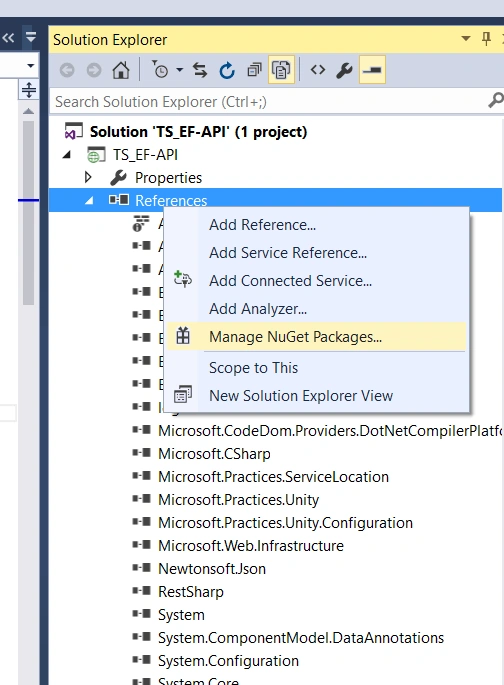
Step 2 Install Swagger from NuGet.
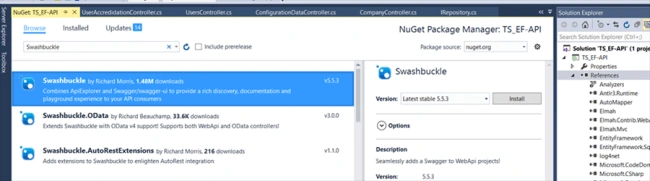
After Installation, you can see the swaggerconfig.cs under app_start folder in your respective project.
Step 3 View the Swaggerconfig.cs
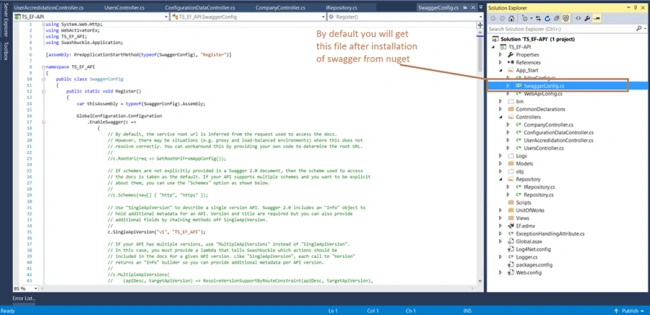
Step 3 View the Swaggerconfig.cs
Step 4 Configuring Swagger
At minimum, we need this line to enable Swagger and Swagger UI.
At minimum, we need this line to enable Swagger and Swagger UI.
- GlobalConfiguration.Configuration
- .EnableSwagger(c => c.SingleApiVersion("Version", "Project Name"))
- .EnableSwaggerUi();
Example
- GlobalConfiguration.Configuration
- .EnableSwagger(c => c.SingleApiVersion("v1", "TS_EF_API"));
- .EnableSwaggerUi();
Step 5 Now, run your API application.
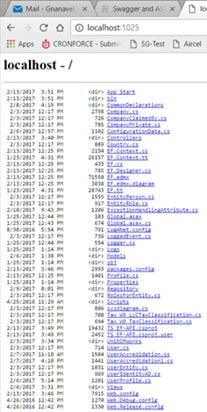
Step 6
Just type swagger after service. You will get the UI of swagger with list API including whatever we wrote in services.
example - http://localhost:1025/swagger/ui/index
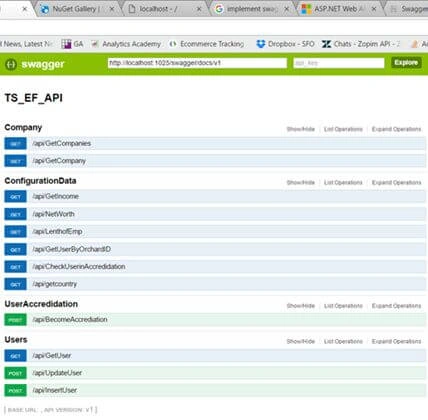
Step 7
Just click one API to view respective data. Click "Try it out" button to view the result.
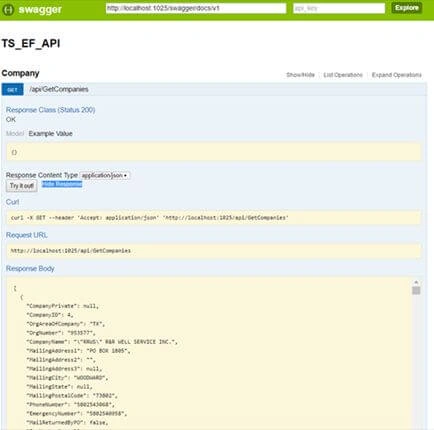
Just type swagger after service. You will get the UI of swagger with list API including whatever we wrote in services.
example - http://localhost:1025/swagger/ui/index
Step 7
Just click one API to view respective data. Click "Try it out" button to view the result.
Step 8
Enable Swagger to use XML comments
Enable Swagger to use XML comments
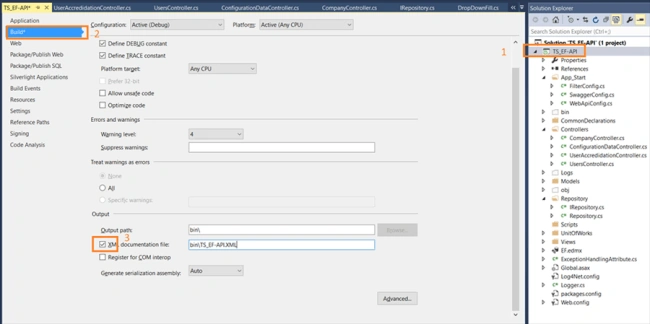
- Just right click on your project and go to Properties.
- Select "Build" tab.
- Check XML Documentation file under output group.
Step 9
Replace c.IncludeXmlComments(path) in swaggerconfig.cs
example
c.IncludeXmlComments(string.Format(@"{0}\bin\TS_EF-API.XML", System.AppDomain.CurrentDomain.BaseDirectory));
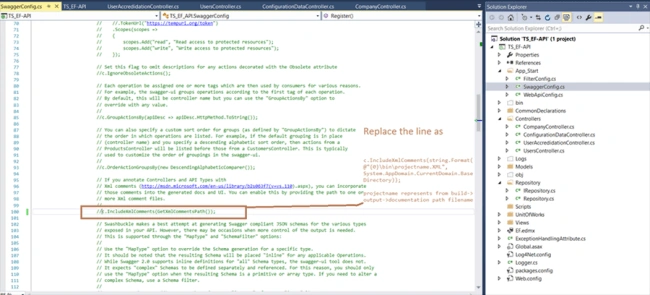
Replace c.IncludeXmlComments(path) in swaggerconfig.cs
example
c.IncludeXmlComments(string.Format(@"{0}\bin\TS_EF-API.XML", System.AppDomain.CurrentDomain.BaseDirectory));

Step 10
You can see the warning and suggestion from swagger
So here, we need to add the comments to each and every class, method and properties. While adding comments, we need to mention proper remarks.
Warning
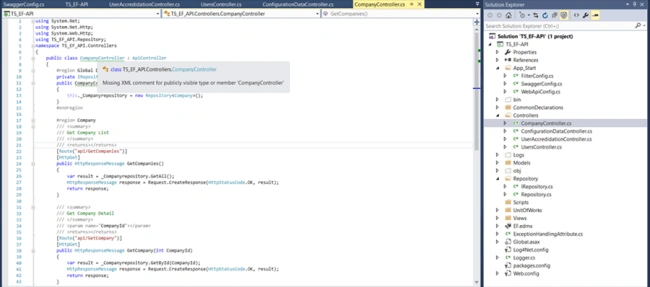
So we are going to add the comments to everything so as to make proper API.
- using System.Collections.Generic;
- using System.Net;
- using System.Net.Http;
- using System.Web.Http;
- using System.Web.Http.Description;
- using TS_EF_API.Repository;
- namespace TS_EF_API.Controllers {
- /// <summary>
- /// Company
- /// </summary>
- public class CompanyController: ApiController
- {#region Global Declaration
- private IRepository < Company > _Companyrepository = null;
- /// <summary>
- /// Constructor for Company Controller
- /// </summary>
- public CompanyController() {
- this._Companyrepository = new Repository < Company > ();
- }#endregion
- #region Company
- /// <summary>
- /// Get Company List
- /// </summary>
- /// <returns code="200"></returns>
- [ResponseType(typeof(IEnumerable < Company > ))]
- [Route("api/GetCompanies")]
- [HttpGet]
- public HttpResponseMessage GetCompanies() {
- var result = _Companyrepository.GetAll();
- HttpResponseMessage response = Request.CreateResponse(HttpStatusCode.OK, result);
- return response;
- }
- /// <summary>
- /// Get Company Detail
- /// </summary>
- /// <param name="CompanyId"></param>
- /// <returns code="200"></returns>
- [ResponseType(typeof(Company))]
- [Route("api/GetCompany")]
- [HttpGet]
- public HttpResponseMessage GetCompany(int CompanyId) {
- var result = _Companyrepository.GetById(CompanyId);
- HttpResponseMessage response = Request.CreateResponse(HttpStatusCode.OK, result);
- return response;
- }#endregion
- }
- }
models,
- //------------------------------------------------------------------------------
- // <auto-generated>
- // This code was generated from a template.
- //
- // Manual changes to this file may cause unexpected behavior in your application.
- // Manual changes to this file will be overwritten if the code is regenerated.
- // </auto-generated>
- //------------------------------------------------------------------------------
- namespace TS_EF_API
- {
- using System;
- using System.Collections.Generic;
- /// <summary>
- /// Company Modal
- /// </summary>
- public partial class Company {
- /// <summary>
- /// Company Id
- /// </summary>
- public int CompanyID {
- get;
- set;
- }
- /// <summary>
- /// CompanyName
- /// </summary>
- public string CompanyName {
- get;
- set;
- }
- /// <summary>
- /// Company MailingAddress1
- /// </summary>
- public string MailingAddress1 {
- get;
- set;
- }
- /// <summary>
- ///Company MailingAddress2
- /// </summary>
- public string MailingAddress2 {
- get;
- set;
- }
- }
- }
Step 11 Now, just rebuild and run your Service
http://localhost:1025/swagger/docs/v1 ------> now you can see this URL in Swagger UI, and just copy that url and paste in another table
Step 12
http://localhost:1025/swagger/docs/v1
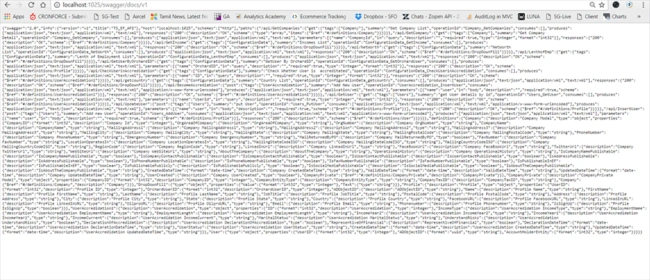
Here, you can see API data is available in JSON format. Now, we need to convert this as document.
Step 13
Search in Google for JSON formatter.
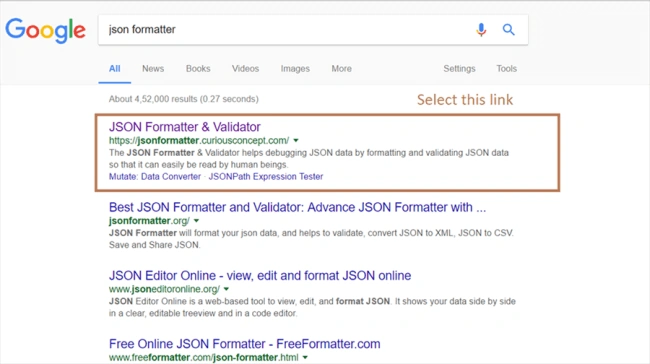
http://localhost:1025/swagger/docs/v1
Here, you can see API data is available in JSON format. Now, we need to convert this as document.
Step 13
Search in Google for JSON formatter.
Step 14
Paste that JSON data and click "Process".
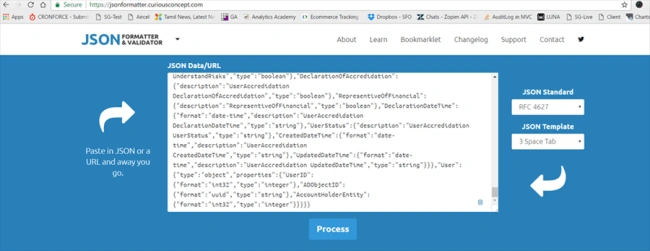
Paste that JSON data and click "Process".
After this, you will get to know whether the json is valid or not and you will get the standard form structure with document.
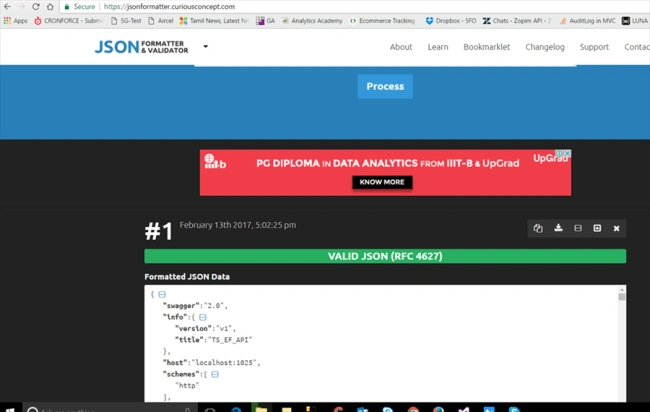
Click download button to view full service document. This document is enough to review your full API and check whether you wrote it in proper way or not.
Example of documentation
- {
- "swagger": "2.0",
- "info": {
- "version": "v1",
- "title": "TS_EF_API"
- },
- "host": "localhost:1025",
- "schemes": ["http"],
- "paths": {
- "/api/GetCompanies": {
- "get": {
- "tags": ["Company"],
- "summary": "Get Company List",
- "operationId": "Company_GetCompanies",
- "consumes": [],
- "produces": ["application/json", "text/json", "application/xml", "text/xml"],
- "responses": {
- "200": {
- "description": "OK",
- "schema": {
- "type": "array",
- "items": {
- "$ref": "#/definitions/Company"
- }
- }
- }
- }
- }
- },
- "/api/GetCompany": {
- "get": {
- "tags": ["Company"],
- "summary": "Get Company Detail",
- "operationId": "Company_GetCompany",
- "consumes": [],
- "produces": ["application/json", "text/json", "application/xml", "text/xml"],
- "parameters": [{
- "name": "CompanyId",
- "in": "query",
- "description": "",
- "required": true,
- "type": "integer",
- "format": "int32"
- }],
- "responses": {
- "200": {
- "description": "OK",
- "schema": {
- "$ref": "#/definitions/Company"
- }
- }
- }
- }
- }
Advantages
- Standard form of service
- Everyone easily understands our code
- Easy to test
- No need to write document
Sujeet SinghPosted Aug 17, 2021, 10:59 AM
How to enable Header input in Swagger UI
Bhagwat GarjePosted Jan 8, 2021, 6:29 AM
Very helpful full this article
krishna MPosted Jun 8, 2020, 7:00 AM
When i install swagger i don't get the swaggerconfig.cs file. why is that ??
Ganesh GanesanPosted Apr 22, 2019, 6:24 AM
Guys. We have two controllers(SwaggerTestController, valuesController) and displayed in Swagger appropriately. But assume that we have two or more controllers, but I want to display a particular controller based on our needs at run time. Could anyone explain how to perform this.
shanoob AkberPosted Feb 19, 2019, 3:44 AM
I have a requirement to create web services from yaml files..Would you please adviseme..
Kaushal PareekPosted Dec 4, 2018, 9:35 AM
Nice Article.. Very well explained. Thanks
Hadshana KamalanathanPosted Jul 22, 2018, 1:06 AM
Nice article..
Malitha Shan PathiragePosted Nov 20, 2017, 12:43 AM
Nice article, very helpful.
Manav PandyaPosted Aug 8, 2017, 7:45 AM
I have google it enough but not able to find proper solution
Manav PandyaPosted Aug 8, 2017, 7:45 AM
Ok i got this error : Could not load file or assembly 'System.Web.Http, Version=4.0.0.0, Culture=neutral, PublicKeyToken=31bf3856ad364e35' or one of its dependencies. The located assembly's manifest definition does not match the assembly reference. (Exception from HRESULT: 0x80131040)
Manav PandyaPosted Aug 8, 2017, 6:12 AM
There is red line below : .EnableSwaggerUi();
Manav PandyaPosted Aug 8, 2017, 6:11 AM
I have faced some error
Karthick KumarPosted May 3, 2017, 7:35 AM
It's helped me lot.Thanks