

My previous article was about how to download records from the database in Excel files.You can check this link .Today, in this article, I will explain how to upload records from Excel files to the database using Stored Procedure, and also check all types of validations. I will check required filed validation, Excel format validation, null validation, if the employee number is unique (here I used an example of employee records) etc.
Step1
First, let's create a table.

Then, let's create stored procedure. In this stored procedure, we have created a procedure for inserting records and checking for duplicate employee numbers.
- Create proc usp_InsertNewEmployeeDetails
- (
- @EmployeeNo int = null,
- @FirstName varchar(50) = null,
- @LastName varchar(50) = null,
- @DateOfBirth datetime = null,
- @Address varchar(50) = null,
- @MobileNo varchar(200) = null,
- @PostelCode varchar(50) = null,
- @EmailId varchar(50) = null
- )
- as
- begin
- IF EXISTS(select EmployeeNo from EmployeeInfo where EmployeeNo=@EmployeeNo)
- return 0
- ELSE
- begin
- Insert into EmployeeInfo(
- EmployeeNo,FirstName,LastName,
- DateOfBirth,Address,MobileNo,PostelCode,
- EmailId
- )
- values
- (
- @EmployeeNo,@FirstName,@LastName,
- @DateOfBirth,@Address,@MobileNo,@PostelCode,
- @EmailId)
- end
- end
Step2
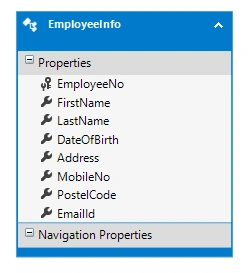
Now, we have to add the table in an MVC application. I have used Entity Framework with LINQ query.
- For that, I created an MVC application and went through, File->New ->Web application ->select MVC ->OK.
- Go to Model folder ->Right click -> Add -> New item -> ADO.NET Entity Data Model -> click Add -> select database first approach->Click Next.
- Select "New Connection" and give the connection details, then select database ->Click OK.
- Choose tables and stored procedure and click OK.
Step3
Now, we have to download LinqToExcel.dll file; so for this, right click on project file. After that, select 'Manage NueGet Package' and search for LinqToExcel. When found, download this dll.

Step4
Now, we have to create a Controller class. First, put a namespace.
using LinqToExcel;
Then, create an action method for View.
- public ActionResult ExcelUpload()
- {
- return View();
- }
Now, we have to create a View - right click the action name, select View, and click OK.
- <div align="center">
- @if (ViewBag.Message != null)
- {
- <span class="alert alert-warning"> @ViewBag.Message</span>
- }
- <div align="right" class="btn btn-default">
- @using (Html.BeginForm("UploadExcel", "ExcelDemo", FormMethod.Post, new { @enctype = "multipart/form-data" }))
- {
- <input type="file" id="fileUpload" class="btn btn-primary" name="FileUpload" /><br />
- <input type="submit" class="btn btn-primary" name="UploadNewEmployee" id="fileUploadExcel" value="Upload New Employee Details" />
- }
- </div>
- </div>
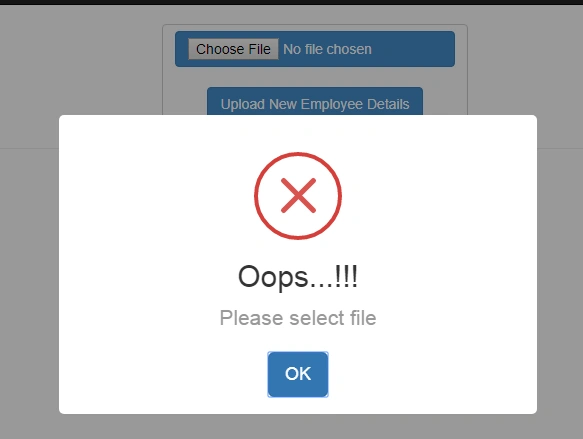
Here, I have used sweetAlert to check the required field validation of file upload. So first, we have to download library for this and add the following code.
- <link href="~/Scripts/sweetalert.css" rel="stylesheet" />
- <script src="~/Scripts/jquery-1.10.2.js"></script>
- <script src="~/Scripts/sweetalert.js"></script>
- <script>
- $('#fileUploadExcel').click(function (e) {
- if ($('#fileUpload').val() === "")
- {
- sweetAlert("Oops...!!!", "Please select file", "error");
- return false;
- }
- });
- </script>
Click without selecting a file, then see the output.
Step5
Now, let's write code for insert recods from Excel file to Controller. In this, first I checked Excel file fomat.
- if (FileUpload.ContentType == "application/vnd.ms-excel" || FileUpload.ContentType == "application/vnd.openxmlformats-officedocument.spreadsheetml.sheet")
- {
- string filename = FileUpload.FileName;
- if (filename.EndsWith(".xlsx"))
- {
- }
Next I checked Uploaded Excel file
- string targetpath = Server.MapPath("~/DetailFormatInExcel/");
- FileUpload.SaveAs(targetpath + filename);
- string pathToExcelFile = targetpath + filename;
- string sheetName = "Sheet1";

Then I checked if employee number is null or not
- if (a.EmployeeNo != null)
- {
- }
I created a separate method for postdata
- public int PostExcelData(int employeeNo,string firstName, string lastName, DateTime? dateOfBirth, string address,string mobileNo,string postelCode, string emailId)
- {
- EmployeeDBEntities DbEntity = new EmployeeDBEntities();
- var InsertExcelData = DbEntity.usp_InsertNewEmployeeDetails(employeeNo,firstName, lastName, dateOfBirth,address,mobileNo,postelCode, emailId);
- return InsertExcelData;
- }
I called the postdata method
- int resullt = PostExcelData(a.EmployeeNo, a.FirstName, a.LastName, myBirthdate, a.Address, a.MobileNo, a.PostelCode, a.EmailId);
- if (resullt <= 0)
- {
- data = "Hello User, Found some duplicate values! Only unique employee number has inserted and duplicate values(s) are not inserted";
- ViewBag.Message = data;
- continue;
Then I checked for duplicate records also. It will automatically skip the duplicate records.
- [HttpPost]
- public ActionResult UploadExcel(EmployeeInfo objEmpDetail, HttpPostedFileBase FileUpload)
- {
- EmployeeDBEntities objEntity = new EmployeeDBEntities();
- string data = "";
- if (FileUpload != null)
- {
- if (FileUpload.ContentType == "application/vnd.ms-excel" || FileUpload.ContentType == "application/vnd.openxmlformats-officedocument.spreadsheetml.sheet")
- {
- string filename = FileUpload.FileName;
- if (filename.EndsWith(".xlsx"))
- {
- string targetpath = Server.MapPath("~/DetailFormatInExcel/");
- FileUpload.SaveAs(targetpath + filename);
- string pathToExcelFile = targetpath + filename;
- string sheetName = "Sheet1";
- var excelFile = new ExcelQueryFactory(pathToExcelFile);
- var empDetails = from a in excelFile.Worksheet<EmployeeInfo>(sheetName) select a;
- foreach (var a in empDetails)
- {
- if (a.EmployeeNo != null)
- {
- DateTime? myBirthdate = null;
- if (a.MobileNo.Length > 12)
- {
- data = "Phone number should be 10 to 12 disit";
- ViewBag.Message = data;
- }
- myBirthdate = Convert.ToDateTime(a.DateOfBirth);
- int resullt = PostExcelData(a.EmployeeNo, a.FirstName, a.LastName, myBirthdate, a.Address, a.MobileNo, a.PostelCode, a.EmailId);
- if (resullt <= 0)
- {
- data = "Hello User, Found some duplicate values! Only unique employee number has inserted and duplicate values(s) are not inserted";
- ViewBag.Message = data;
- continue;
- }
- else
- {
- data = "Successful upload records";
- ViewBag.Message = data;
- }
- }
- else
- {
- data = a.EmployeeNo + "Some fields are null, Please check your excel sheet";
- ViewBag.Message = data;
- return View("ExcelUpload");
- }
- }
- }
- else
- {
- data = "This file is not valid format";
- ViewBag.Message = data;
- }
- urn View("ExcelUpload");
- }
- else
- {
- data = "Only Excel file format is allowed";
- ViewBag.Message = data;
- return View("ExcelUpload");
- }
- }
- else
- {
- if (FileUpload == null)
- {
- data = "Please choose Excel file";
- }
- ViewBag.Message = data;
- urn View("ExcelUpload");
- }
- }
- public int PostExcelData(int employeeNo,string firstName, string lastName, DateTime? dateOfBirth, string address,string mobileNo,string postelCode, string emailId)
- {
- EmployeeDBEntities DbEntity = new EmployeeDBEntities();
- var InsertExcelData = DbEntity.usp_InsertNewEmployeeDetails(employeeNo,firstName, lastName, dateOfBirth,address,mobileNo,postelCode, emailId);
- return InsertExcelData;
- }
So finally, the coding part is done. Now, we will check if the Excel file uploads or not.
Now, I have created an Excel file and filled in some records.


After uploading this Excel file, we can check in the database to see whether our records are inserted or not.

That's it. Thanks for reading this article. I hope you enjoyed it.
Satyasheel DangePosted Nov 13, 2019, 12:42 AM
Hi Mitthi... can you do this using code first approach...
Muhammad AslamPosted Sep 28, 2019, 8:04 AM
Mithilesh! its working fine on localhost, but when i upload on live server, it gives error, need ur help
Shambhu NathPosted Mar 29, 2019, 3:55 AM
Error : The 'Microsoft.ACE.OLEDB.12.0' provider is not registered on the local machine
eshwar giriPosted Nov 21, 2018, 12:43 AM
Thanks , everything is working but when i try to insert excel file in wrong format i get an error in foreach loop "empDetails " says 'input string was not in correct format' how to handle it plz
Jignesh KumarPosted Nov 13, 2018, 7:12 AM
Nice article Thanks for sharing @Mithilesh Kumar
G Krishna RaoPosted Sep 25, 2018, 1:13 AM
Thanks for the article..Instead of bulk records insertion, i am looking for a code which can read the excel data row by row and insert the same one by one in db using loop.i am using dynamic insertion, i mean excel can have any no. of columns and data. Can you plz help..?
Aniket NarvankarPosted Aug 13, 2018, 9:45 AM
Very Nice Article
anurag pathakPosted Aug 3, 2018, 1:34 AM
How to upload 5800 excel data..... it giving proxy error (using MVC)
pabitra beheraPosted May 18, 2018, 4:55 AM
Good one , thank you Mithilesh, Its working fine
lol lotPosted Apr 27, 2018, 9:35 AM
'Invalid cast from 'System.DateTime' to 'System.TimeSpan'.' ERROR How to fix it?
Nithish ReddyPosted Mar 21, 2018, 2:02 AM
Hi , how to upload a csv file using class library for model and data access layer in MVC5
Marcos FerreiraPosted Mar 12, 2018, 6:07 AM
Hello, first of all thank you for this fantastic example. Only problem I find is that it's throwing an error on "var excelFile = new ExcelQueryFactory(pathToExcelFile); var empDetails = from a in excelFile.Worksheet<ImportTest>(sheetName) select a; foreach (var a in empDetails)" -- "IErrorInfo.GetDescription failed with E_FAIL(0x80004005)."
Nasrun HidayatPosted Feb 27, 2018, 4:24 AM
Why error Non-invocable member 'DbEntity.usp_InsertNewEmployeeDetails' cannot be used like a method?
Farzana SahulPosted Jan 8, 2018, 2:46 PM
When I downloaded the project, Business layer was missing ..can you please throw some light on this
Saravanakumar SekaranPosted Jul 11, 2017, 6:11 AM
Wow superb article !!!!