

Introduction
MySQL is a popular database management system that provides a variety of powerful commands for managing and manipulating data in a database. The UPDATE statement updates data in a table. It allows you to change the values in one or more columns of a single row or multiple rows.UPDATE is the most important data manipulation command in Structured Query Language, which allows users to update or modify the existing data in database tables.
What are the DML Commands in MySQL?
DML stands for Data Manipulation Language.DML commands played with table data which means DML commands in Structured Query Language change the data present in the MySQL database. We can easily access, store, modify, update, and delete the existing records from the database using DML commands.
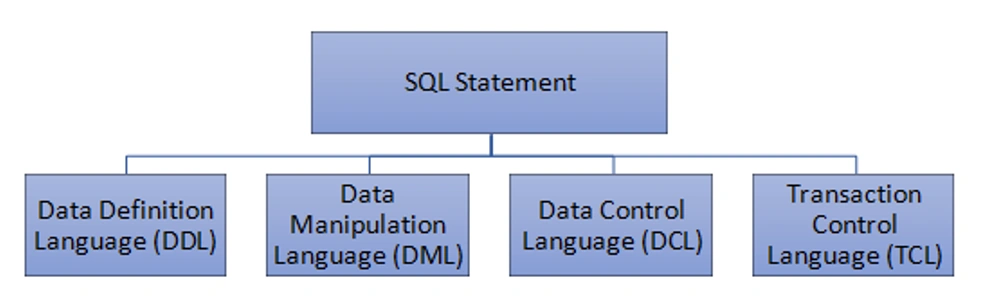 There are four main DML commands in MySQL,
- SELECT Command
- INSERT Command
- UPDATE Command
- DELETE Command
UPDATE Command in MySQL
The UPDATE Mysql command is used to edit data in an existing table in a database management system such as MySQL. It's a DML (Data Manipulation Language) statement that lets you update the data in one or more rows of a table based on a condition.
Syntax
UPDATE table_name
SET column1 = value1, column2 = value2, ...
WHERE condition;
Here, 'UPDATE', 'SET', and 'WHERE' are the Mysql keywords, and 'Table_name' is the name of the table whose values you want to update.
- Firstly we specify the name of the table that you want to update data after the UPDATE keyword.
- Second, specify which column you want to update and the new value in the SET clause. To update values in multiple columns, you use a list of comma-separated assignments by supplying a value in each column’s assignment in the form of a literal value, an expression, or a subquery.
- Third, specify which rows to be updated using a condition in the WHERE clause. The WHERE clause is optional. If you omit it, the UPDATE statement will modify all rows in the table.
Note. Be careful when updating records in a table! Notice the WHERE clause in the UPDATE statement. The WHERE clause specifies which record(s) should be updated. If you omit the WHERE clause, all records in the table will be updated!
Example
First, we create a Mysql table then we can apply the UPDATE command to update table data.
CREATE TABLE table_name(
  department_id INT AUTO_INCREMENT PRIMARY KEY,
  department_name VARCHAR(50) NOT NULL,
  location_id INT,
  department_address VARCHAR(100),
  salary INT
  );
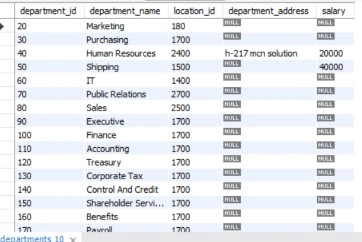
UPDATE a table data in Mysql. This example describes how to update the value of a single field.
UPDATE departments SET salary = 40000 WHERE department_id=50;
Output
Example
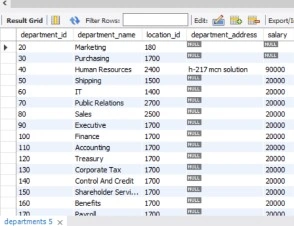
This example describes how to update the value of multiple fields of the database table.
UPDATE departments SET salary = 90000, `department_address` = 'h-217 mcn solution' WHERE `department_id` = 40 AND location_id = 2400 ;
Output
Update Warning! Be careful when updating records. If you forget the WHERE clause, then all records will be updated!
Example
UPDATE departments SET salary = 00000;
In this example, if we forget to add where clause, then every record will be updated.
Conclusion
In Mysql, the UPDATE command is a crucial tool for managing and altering data. It provides a great lot of flexibility for changing data in a database by allowing you to alter single or many rows and columns. Whether you need to update a single value or make changes to several rows, the UPDATE command is a great tool that may help you reach your objectives quickly. And here, we see how to use the UPDATE command under DML commands and see the corresponding outputs in Mysql.
Join the conversation! Your thoughts help the community grow.