

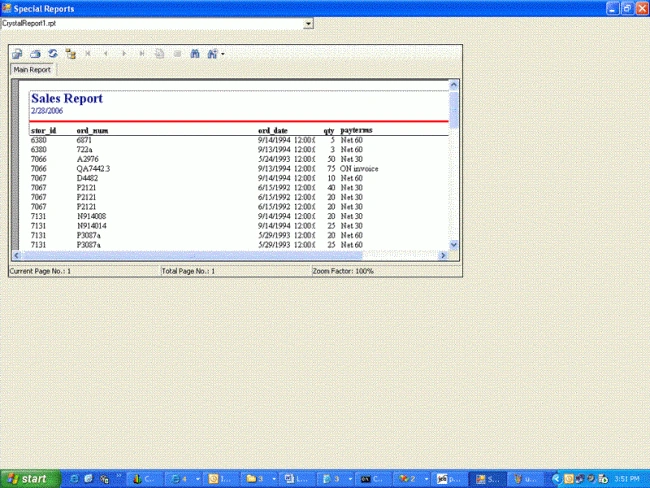
Some time we have multiple reports for the application and we need to load the report based on the user's selection. The following piece of code will explain how to achieve this.
using System;
using System.Drawing;
using System.Collections;
using System.ComponentModel;
using System.Windows.Forms;
using System.Data;
using System.IO;
namespace DyanamicReport
{
/// <summary>
/// </summary>
public class Form1 : System.Windows.Forms.Form
{
private System.Windows.Forms.ComboBox CboReport;
private System.Windows.Forms.Panel panel1;
private CrystalDecisions.Windows.Forms.CrystalReportViewer cptReports;
/// <summary>
/// Required designer variable.
/// </summary>
private System.ComponentModel.Container components = null;
public Form1()
{
//
// Required for Windows Form Designer support
//
InitializeComponent();
//
// TODO: Add any constructor code after InitializeComponent call
//
}
/// <summary>
/// Clean up any resources being used.
/// </summary>
protected override void Dispose( bool disposing )
{
if( disposing )
{
if (components != null)
{
components.Dispose();
}
}
base.Dispose( disposing );
}
#region Windows Form Designer generated code
/// <summary>
/// Required method for Designer support - do not modify
/// the contents of this method with the code editor.
/// </summary>
private void InitializeComponent()
{
this.CboReport = new System.Windows.Forms.ComboBox();
this.cptReports = new CrystalDecisions.Windows.Forms.CrystalReportViewer();
this.panel1 = new System.Windows.Forms.Panel();
this.panel1.SuspendLayout();
this.SuspendLayout();
//
// CboReport
//
this.CboReport.Location = new System.Drawing.Point(0, 0);
this.CboReport.Name = "CboReport";
this.CboReport.Size = new System.Drawing.Size(496, 21);
this.CboReport.TabIndex = 0;
this.CboReport.SelectedIndexChanged += new System.EventHandler
(this.CboReport_SelectedIndexChanged_1);
//
// cptReports
//
this.cptReports.ActiveViewIndex = -1;
this.cptReports.BorderStyle = System.Windows.Forms.BorderStyle.FixedSingle;
this.cptReports.Location = new System.Drawing.Point(4, 3);
Ravi PrakashPosted Jul 12, 2011, 8:13 AM
string[] fileList = Directory.GetFiles (Directory.GetCurrentDirectory() + @"\Reports", "*.rpt");
Ravi PrakashPosted Jul 12, 2011, 6:07 AM
please write down proper control name not shortcut thanks Ravi Prakash my email Id [email protected]
Ravi PrakashPosted Jul 12, 2011, 6:06 AM
please write down proper control name not shortcut thanks Ravi Prakash
wahahaha hehehehePosted Jun 24, 2011, 2:42 AM
lupet
karthik knPosted May 8, 2009, 8:00 AM
hey i want to sent dynamically header and footer to the crystal report like user can adjust at runtime how can i achive that
Fahmy SihabdeeneditedPosted Mar 26, 2008, 7:29 AMEdited Mar 26, 2008, 7:45 AM
c# now in half way but i want to know how to create crystal report by connecting a table
Amit KumarPosted Jan 16, 2008, 2:26 AM
Hi Susmita i would like to know about Crystal report - how to generate crystal report at run time its depends upon the SQL Query. Amit
karuna karanPosted Dec 20, 2007, 5:01 AM
you are really great mam
siva kumarPosted Aug 29, 2007, 3:34 AM
i want to display a receipt in a crystal report from four sqlserver table, any one having idea to send me thanks