

In enterprise applications, our focus is on the representation of data in the form of information. Visual elements are the best way to represent data so that data can be easy to understand.
The objective of the business application is to turn data into data analysis so that top authorities can make some important decisions. The best way is data visualization charts. Unfortunately, there are not enough built-in controls in MVC that give the best pictorial representation of data. However, there are several third-party component vendors that provide rich chart data controls and one of those component vendors is Infragistics.
In this tutorial, I will show you how to build a complete data-presentable MVC web application using Visual Studio 2017, C#, and Ignite UI JavaScript chart controls. You can download a trial version of Ignite UI for JavaScript here.
The tutorial will cover following charts and their subcategories:
- Business chart
- Polar Chart
- Radial Chart
- Range Chart
- Shape Chart
- Spline Chart
- Stacked Chart
- Step Chart
Let’s start. First, create an MVC web application in Visual Studio 2017 and open “~/Views/Shared/_Layout.cshtml” page and add the following Ignite-UI CSS
- theme.css
- CSS
And also add the scripts files
- core.js
- dv.js
- <!-- Ignite UI Required Combined CSS Files -->
- <link href="http://cdn-na.infragistics.com/igniteui/2017.2/latest/css/themes/infragistics/infragistics.theme.css" rel="stylesheet" />
- <link href="http://cdn-na.infragistics.com/igniteui/2017.2/latest/css/structure/infragistics.css" rel="stylesheet" />
- <!-- Ignite UI Required Combined JavaScript Files -->
- <script src="http://cdn-na.infragistics.com/igniteui/2017.2/latest/js/infragistics.core.js"></script>
- <script src="http://cdn-na.infragistics.com/igniteui/2017.2/latest/js/infragistics.dv.js"></script>
Listing 1.
Also make sure your project includes “jquery-1.11.3.js”, “modernizr-2.8.3.js”, and “jquery-ui” (1.11.1) and above versions if not please add the following scripting links.
- <script src="http://ajax.aspnetcdn.com/ajax/modernizr/modernizr-2.8.3.js"></script>
- <script src="http://code.jquery.com/jquery-1.11.3.min.js"></script>
- <script src="http://code.jquery.com/ui/1.11.1/jquery-ui.min.js"></script>
Listing 2.
Now, add a new controller named “ChartsController.cs” also add a view named “index.cshtml” in “~/views/Charts/” and make it the default controller in “~/App_Start/RouteConfig.cs” file as shown in Listing 3.
- public static void RegisterRoutes(RouteCollection routes)
- {
- routes.IgnoreRoute("{resource}.axd/{*pathInfo}");
- routes.MapRoute(
- name: "Default",
- url: "{controller}/{action}/{id}",
- defaults: new { controller = "Charts", action = "Index", id = UrlParameter.Optional }
- );
- }
Listing 3.
Add two data models “Chart” and “Charts” in models folder. These data models will represent the main and subcategories of charts as shown in listing 4 and 5.
- /// <summary>
- /// This will represent the chart
- /// </summary>
- public class Chart
- {
- /// <summary>
- /// Every chart has a Id like 1, 2, 3 so on
- /// </summary>
- public int Id { get; set; }
- /// <summary>
- /// Category Id will hold the Id of parent chart to maintain Category and sub category relationship
- /// </summary>
- public int CategoryId { get; set; }
- /// <summary>
- /// Name of the Chart
- /// </summary>
- public string Name { get; set; }
- /// <summary>
- /// To hold the data for a chart
- /// </summary>
- public string Data { get; set; }
- }
Listing 4.
- /// <summary>
- /// This class will represent the List of charts with main and sub subcategories
- /// </summary>
- public class Charts
- {
- /// <summary>
- /// This is main category of chart
- /// </summary>
- public Chart Category { get; set; }
- /// <summary>
- /// This will hold the subcategories of this main chart
- /// </summary>
- public List<Chart> SubCategory { get; set; }
- }
Listing 5.
Now, open the ChartsController.cs and the following code. We have a property chart, it will hold the list of charts in ignite ui and in the constructor of ChartsController we are calling the LoadCharts() method that assigns the list of charts as shown in Listing 6.
- /// <summary>
- /// This will hold list of charts
- /// </summary>
- public List<Charts> Charts { get; set; }
- /// <summary>
- /// Constructor to initialize the charts property
- /// </summary>
- public ChartsController()
- {
- Charts = LoadCharts();
- }
- /// <summary>
- /// This Method will add all the charts
- /// </summary>
- /// <returns></returns>
- public List<Charts> LoadCharts()
- {
- return Charts = new List<Charts>()
- {
- new Charts
- {
- Category = new Chart { Id = 1, CategoryId = 0, Name = "Business Chart" },
- SubCategory = new List<Chart>
- {
- new Chart { Id = 1, CategoryId =1, Name = "Bar" },
- new Chart { Id = 2, CategoryId =1, Name = "Bubble" },
- new Chart { Id = 3, CategoryId =1, Name = "Column" },
- new Chart { Id = 4, CategoryId =1, Name = "Doughnut" },
- new Chart { Id = 5, CategoryId =1, Name = "Financial" },
- new Chart { Id = 6, CategoryId =1, Name = "Funnel" },
- new Chart { Id = 7, CategoryId =1, Name = "Line" },
- new Chart { Id = 8, CategoryId =1, Name = "Pie" },
- new Chart { Id = 8, CategoryId =1, Name = "Point" },
- new Chart { Id = 8, CategoryId =1, Name = "Scatter" },
- new Chart { Id = 8, CategoryId =1, Name = "Sparkline" }
- }
- },
- new Charts
- {
- Category = new Chart { Id = 2, CategoryId = 0, Name = "Polar Chart" },
- SubCategory = new List<Chart>
- {
- new Chart { Id = 1, CategoryId =2, Name = "Polar Area" },
- new Chart { Id = 2, CategoryId =2, Name = "Polar Line" },
- new Chart { Id = 3, CategoryId =2, Name = "Polar Point" },
- new Chart { Id = 4, CategoryId =2, Name = "Polar Spline" },
- new Chart { Id = 5, CategoryId =2, Name = "Polar Spline Area" }
- }
- },
- new Charts
- {
- Category = new Chart { Id = 3, CategoryId = 0, Name = "Radial Chart" },
- SubCategory = new List<Chart>
- {
- new Chart { Id = 1, CategoryId =3, Name = "Radial Area" },
- new Chart { Id = 2, CategoryId =3, Name = "Radial Line" },
- new Chart { Id = 3, CategoryId =3, Name = "Radial Column" },
- new Chart { Id = 4, CategoryId =3, Name = "Radial Pie" }
- }
- },
- new Charts
- {
- Category = new Chart { Id = 4, CategoryId = 0, Name = "Range Chart" },
- SubCategory = new List<Chart>
- {
- new Chart { Id = 1, CategoryId =4, Name = "Range Area" },
- new Chart { Id = 2, CategoryId =4, Name = "Range Column" }
- }
- },
- new Charts
- {
- Category = new Chart { Id = 5, CategoryId = 0, Name = "Spline Chart" },
- SubCategory = new List<Chart>
- {
- new Chart { Id = 1, CategoryId =5, Name = "Spline" },
- new Chart { Id = 2, CategoryId =5, Name = "Spline Area" }
- }
- },
- new Charts
- {
- Category = new Chart { Id = 6, CategoryId = 0, Name = "Stacked Chart" },
- SubCategory = new List<Chart>
- {
- new Chart { Id = 1, CategoryId =6, Name = "Stacked Area" },
- new Chart { Id = 2, CategoryId =6, Name = "Stacked Bar" },
- new Chart { Id = 3, CategoryId =6, Name = "Stacked Column" },
- new Chart { Id = 4, CategoryId =6, Name = "Stacked Line" },
- new Chart { Id = 5, CategoryId =6, Name = "Stacked Spline" },
- new Chart { Id = 6, CategoryId =6, Name = "Stacked Spline Area" },
- new Chart { Id = 7, CategoryId =6, Name = "100% Stacked Area" },
- new Chart { Id = 8, CategoryId =6, Name = "100% Stacked Bar" },
- new Chart { Id = 9, CategoryId =6, Name = "100% Stacked Column" },
- new Chart { Id = 10, CategoryId =6, Name = "100% Stacked Line" },
- new Chart { Id = 11, CategoryId =6, Name = "100% Stacked Spline" },
- new Chart { Id = 12, CategoryId =6, Name = "100% Stacked Spline Area" }
- }
- },
- new Charts
- {
- Category = new Chart { Id = 7, CategoryId = 0, Name = "Step Chart" },
- SubCategory = new List<Chart>
- {
- new Chart { Id = 1, CategoryId =7, Name = "Step Area" },
- new Chart { Id = 2, CategoryId =7, Name = "Step Line" },
- new Chart { Id = 3, CategoryId =7, Name = "Waterfall" }
- }
- },
- new Charts
- {
- Category = new Chart { Id = 8, CategoryId = 0, Name = "Shape Chart" },
- SubCategory = new List<Chart>
- {
- new Chart { Id = 1, CategoryId =7, Name = "Binding Break Point Event" },
- new Chart { Id = 2, CategoryId =7, Name = "Polygon" },
- new Chart { Id = 3, CategoryId =7, Name = "Polyline" }
- }
- }
- };
- }
Listing 6.
Index() action has a list of charts. In this charts property, we are constructing another list of charts with the help of this. This list contains the list of SelectListItem class with value and text properties that are going to bind with the drop-down on the view with the help of ViewData as shown in Listing 7.
- public ActionResult Index()
- {
- List<SelectListItem> Charts = new List<SelectListItem>();
- var CategorysCharts = (from chart in this.Charts select chart.Category).ToList();
- foreach (var chart in CategorysCharts)
- {
- Charts.Add(new SelectListItem { Value = chart.Id.ToString(), Text = chart.Name });
- }
- ViewData["CategoryCharts"] = Charts;
- ViewData["SubCategoryCharts"] = new List<SelectListItem>();
- return View();
- }
Listing 7.
In listing 8, GetSubCategoryCharts() method is taking one argument, CategoryChartId, and returning the list of subcategories of charts.
- [HttpPost]
- public ActionResult GetSubCategoryCharts(string CategoryChartId)
- {
- int pId;
- List<Chart> charts = new List<Chart>();
- if (!string.IsNullOrEmpty(CategoryChartId))
- {
- pId = Convert.ToInt32(CategoryChartId);
- List<Chart> SubCategoryCharts = (from chart in Charts where chart.Category.Id == pId select chart.SubCategory).FirstOrDefault();
- SubCategoryCharts.ForEach(x =>
- {
- charts.Add(new Chart { Id = x.Id, Name = x.Name, CategoryId=x.CategoryId });
- });
- }
- return Json(charts, JsonRequestBehavior.AllowGet);
- }
Listing 8.
Now, open the view to add two dropdowns controls, one for main chart category and another one for subcategories as shown in Listing 9.
When user will change the item in ddlMainCategoryChart dropdown, LoadSubCategoryCharts() javascript function will add the list of subcategories charts in ddlSubCategoryChart dropdown and when user will select subcategory chart using ddlSubCategoryChart, a javascript function renderChart() will load that particular chart as partial view with the help of LoadPartialView().
- @model charts_demo_ignite_ui.Models.Chart
- <script>
- function LoadSubCategoryCharts() {
- var id = $('#ddlMainCategoryChart').val();
- $.ajax({
- type: "post",
- url: "/Charts/GetSubCategoryCharts",
- dataType: "html",
- data: "CategoryChartId=" + id,
- contentType: "application/x-www-form-urlencoded;charset=utf-8",
- // async: true,
- success: function (data) {
- var items = "";
- items = "<option value=''>--select--</option>";
- $.each(JSON.parse(data), function (i, item) {
- items += "<option value=\"" + item.Id + "\">" + item.Name + "</option>";
- });
- $('#ddlSubCategoryChart').html(items);
- },
- error: function (e) { display(e); }
- });
- }
- function renderChart() {
- var name = $("#ddlSubCategoryChart :selected").text();
- $.ajax({
- type: "post",
- url: "/Charts/RenderChart",
- dataType: "html",
- data: "name=" + name,
- contentType: "application/x-www-form-urlencoded;charset=utf-8",
- // async: true,
- success: function (result) { LoadPartialView(result); },
- error: function (e) {
- console.log(JSON.stringify(e));
- }
- });
- }
- function LoadPartialView(result) {
- $("#partialView").html("");
- $("#partialView").html(result);
- }
- </script>
- @{
- ViewBag.Title = "ignite UI Charts";
- }
- <br />
- <div class="form-group">
- <label class="col-lg-2 control-label" for="business">Charts:</label>
- <div class="col-lg-10">
- @Html.DropDownListFor(model => model.Id, ViewData["CategoryCharts"] as List<SelectListItem>, "Select", new { onchange = "LoadSubCategoryCharts();", @id = "ddlMainCategoryChart", @class = "form-control input-xlarge required", @type = "text", @autocomplete = "off" })
- </div>
- </div>
- <br />
- <br />
- <div class="form-group">
- <label class="col-lg-2 control-label" for="business">Subcategory Charts:</label>
- <div class="col-lg-10">
- @Html.DropDownListFor(model => model.Id, ViewData["SubCategoryCharts"] as List<SelectListItem>, "Select", new { onchange = "renderChart();", @id = "ddlSubCategoryChart", @class = "form-control input-xlarge required", @type = "text", @autocomplete = "off" })
- </div>
- </div>
- <br />
- <br />
- <div class="form-group">
- <div id="partialView">
- </div>
- </div>
Listing 9.
Add a partial view named “~/Views/Shared/_RenderChart.cshtml” in which we can render our chart.
Now, build the project and run it in the web browser.
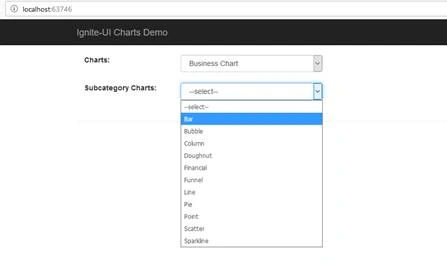
Figure 1.
Web user interface is ready to render ignite-ui charts.
Let’s add data models which are going to be used as data source for the charts. In Listing 10 the “CountryEnergyProductionModel” will represent the year-by-year energy production for five countries. This data model is going to be used in "Stacked Area", "Stacked Bar", "Stacked", "Stacked Line","Stacked Spline","Stacked Spline Area","100 % Stacked Area","100 % Stacked Bar","100 % Stacked Column","100% Stacked Line","100% Stacked Spline","100% Stacked Spline Area","Bar","Column","Line" ,"Point".
- public class CountryEnergyProductionModel
- {
- public int Year { get; set; }
- public double Canada { get; set; }
- public double SaudiArabia { get; set; }
- public double Russia { get; set; }
- public double UnitedStates { get; set; }
- public double China { get; set; }
- public string GetCountriesEnergyProductionInJosn()
- {
- List<CountryEnergyProductionModel> data = new List<CountryEnergyProductionModel>();
- CountryEnergyProductionModel year1 = new CountryEnergyProductionModel();
- year1.Year = 2005;
- year1.Canada = 18.8932;
- year1.SaudiArabia = 25.4401;
- year1.Russia = 51.0796;
- year1.UnitedStates = 69.4437;
- year1.China = 63.9524;
- data.Add(year1);
- CountryEnergyProductionModel year2 = new CountryEnergyProductionModel();
- year2.Year = 2006;
- year2.Canada = 19.2273;
- year2.SaudiArabia = 24.6105;
- year2.Russia = 52.0557;
- year2.UnitedStates = 70.7539;
- year2.China = 68.2333;
- data.Add(year2);
- CountryEnergyProductionModel year3 = new CountryEnergyProductionModel();
- year3.Year = 2007;
- year3.Canada = 19.5439;
- year3.SaudiArabia = 23.7326;
- year3.Russia = 52.5599;
- year3.UnitedStates = 71.4000;
- year3.China = 73.2809;
- data.Add(year3);
- CountryEnergyProductionModel year4 = new CountryEnergyProductionModel();
- year4.Year = 2008;
- year4.Canada = 19.0196;
- year4.SaudiArabia = 25.1682;
- year4.Russia = 52.5460;
- year4.UnitedStates = 73.2178;
- year4.China = 78.3599;
- data.Add(year4);
- CountryEnergyProductionModel year5 = new CountryEnergyProductionModel();
- year5.Year = 2009;
- year5.Canada = 18.3249;
- year5.SaudiArabia = 22.837;
- year5.Russia = 50.4291;
- year5.UnitedStates = 72.6409;
- year5.China = 84.0643;
- data.Add(year5);
- var json = new JavaScriptSerializer().Serialize(data);
- return json;
- }
- }
Listing 10.
As shown in Listing 11, second data model is “CountryPopulationModel” which represents the country-wise population growth for 2 years for the following countries: “China”, “India”, “United States”, and “Brazil”; and this data model is going to be used in "Spline", "Spline Area", "Step Area", "Step Line", "Waterfall", "Doughnut", and "Pie".
- public class CountryPopulationModel
- {
- public string CountryName { get; set; }
- public int Pop1995 { get; set; }
- public int Pop2005 { get; set; }
- public string GetCountriesPopulationInJson()
- {
- List<CountryPopulationModel> countries = new List<CountryPopulationModel>();
- CountryPopulationModel country1 = new CountryPopulationModel();
- country1.CountryName = "China";
- country1.Pop1995 = 1216;
- country1.Pop2005 = 1216;
- countries.Add(country1);
- CountryPopulationModel country2 = new CountryPopulationModel();
- country2.CountryName = "India";
- country2.Pop1995= 920;
- country2.Pop2005= 1090;
- countries.Add(country2);
- CountryPopulationModel country3 = new CountryPopulationModel();
- country3.CountryName = "United States";
- country3.Pop1995 = 266;
- country3.Pop2005 = 295;
- countries.Add(country3);
- CountryPopulationModel country4 = new CountryPopulationModel();
- country4.CountryName = "Indonesia";
- country4.Pop1995 = 197;
- country4.Pop2005 = 229;
- countries.Add(country4);
- CountryPopulationModel country5 = new CountryPopulationModel();
- country5.CountryName = "Brazil";
- country5.Pop1995 = 161;
- country5.Pop2005 = 186;
- countries.Add(country5);
- var json = new JavaScriptSerializer().Serialize(countries);
- return json;
- }
- }
Listing 11.
In listing 12, CityTemperatureModel data model represents the counties wise temperature for two cities on a particular date and it shows the variation in temperature every two hours. This data model will be used in "Radial Area", "Radial Column", "Radial Line", "Radial Pie", "Range Area", and "Range Column".
- public class CityTemperatureModel
- {
- public dynamic Date { get; set; }
- public string Time { get; set; }
- public double NewYorkCityTemp { get; set; }
- public double PhiladelphiaTemp { get; set; }
- public string GetCountriesTemperatureInJson()
- {
- List<CityTemperatureModel> countries = new List<CityTemperatureModel>();
- CityTemperatureModel country1 = new CityTemperatureModel();
- country1.Date= "2013-07-16";
- country1.Time="1:00";
- country1.NewYorkCityTemp=85.46;
- country1.PhiladelphiaTemp=86.72;
- countries.Add(country1);
- CityTemperatureModel country2 = new CityTemperatureModel();
- country2.Date="2013-07-16";
- country2.Time="3:00";
- country2.NewYorkCityTemp=82.76;
- country2.PhiladelphiaTemp=84.74;
- countries.Add(country2);
- CityTemperatureModel country3 = new CityTemperatureModel();
- country3.Date="2013-07-16";
- country3.Time="5:00";
- country3.NewYorkCityTemp=80.6;
- country3.PhiladelphiaTemp=82.94;
- countries.Add(country3);
- CityTemperatureModel country4 = new CityTemperatureModel();
- country4.Date="2013-07-16";
- country4.Time="7:00";
- country4.NewYorkCityTemp=79.34;
- country4.PhiladelphiaTemp = 82.22;
- countries.Add(country4);
- CityTemperatureModel country5 = new CityTemperatureModel();
- country5.Date="2013-07-16";
- country5.Time="9:00";
- country5.NewYorkCityTemp=82.76;
- country5.PhiladelphiaTemp = 86;
- countries.Add(country5);
- CityTemperatureModel country6 = new CityTemperatureModel();
- country6.Date="2013-07-16";
- country6.Time="11:00";
- country6.NewYorkCityTemp=86.54;
- country6.PhiladelphiaTemp= 88.88;
- countries.Add(country6);
- CityTemperatureModel country7 = new CityTemperatureModel();
- country7.Date="2013-07-16";
- country7.Time="13:00";
- country7.NewYorkCityTemp=89.78;
- country7.PhiladelphiaTemp = 93.38;
- countries.Add(country7);
- CityTemperatureModel country8 = new CityTemperatureModel();
- country8.Date="2013-07-16";
- country8.Time="15:00";
- country8.NewYorkCityTemp=92.48;
- country8.PhiladelphiaTemp= 93.2;
- countries.Add(country8);
- CityTemperatureModel country9 = new CityTemperatureModel();
- country9.Date="2013-07-16";
- country9.Time="17:00";
- country9.NewYorkCityTemp=93.2;
- country9.PhiladelphiaTemp = 92.3;
- countries.Add(country9);
- CityTemperatureModel country10 = new CityTemperatureModel();
- country10.Date="2013-07-16";
- country10.Time="19:00";
- country10.NewYorkCityTemp=91.4;
- country10.PhiladelphiaTemp= 92.48;
- countries.Add(country10);
- CityTemperatureModel country11 = new CityTemperatureModel();
- country11.Date="2013-07-16";
- country11.Time="21:00";
- country11.NewYorkCityTemp=88.52;
- country11.PhiladelphiaTemp= 89.78;
- countries.Add(country11);
- CityTemperatureModel country12 = new CityTemperatureModel();
- country12.Date="2013-07-16";
- country12.Time="23:00";
- country12.NewYorkCityTemp=88.16;
- country12.PhiladelphiaTemp = 86.72;
- countries.Add(country12);
- var json = new JavaScriptSerializer().Serialize(countries);
- return json;
- }
- }
Listing 12.
In listing 13, the data model WeatherModel represent the hour wise weather forecast on a particular date, and this data model is used in Polar Area", "Polar Line", "Polar Point", "Polar Spline", and "Polar Spline Area".
- public class WeatherModel
- {
- public int id { get; set; }
- public dynamic Date { get; set; }
- public string Time { get; set; }
- public double WindSpeed { get; set; }
- public double WindDirection { get; set; }
- public string GetCountriesTemperatureInJson()
- {
- List<WeatherModel> weatherReport = new List<WeatherModel>();
- WeatherModel weather1 = new WeatherModel();
- weather1.id = 0;
- weather1.Date = "2013-07-16";
- weather1.Time = "10:00";
- weather1.WindSpeed = 3.305;
- weather1.WindDirection = 141;
- weatherReport.Add(weather1);
- WeatherModel weather2 = new WeatherModel();
- weather2.id = 1;
- weather2.Date = "2013-07-16";
- weather2.Time = "11:00";
- weather2.WindSpeed = 5.832;
- weather2.WindDirection = 181;
- weatherReport.Add(weather2);
- WeatherModel weather3 = new WeatherModel();
- weather3.id = 2;
- weather3.Date = "2013-07-16";
- weather3.Time = "12:00";
- weather3.WindSpeed = 5.637;
- weather3.WindDirection = 179;
- weatherReport.Add(weather3);
- WeatherModel weather4 = new WeatherModel();
- weather4.id = 3;
- weather4.Date = "2013-07-16";
- weather4.Time = "13:00";
- weather4.WindSpeed = 8.747;
- weather4.WindDirection = 196;
- weatherReport.Add(weather4);
- WeatherModel weather5 = new WeatherModel();
- weather5.id = 4;
- weather5.Date = "2013-07-16";
- weather5.Time = "14:00";
- weather5.WindSpeed = 8.553;
- weather5.WindDirection = 208;
- weatherReport.Add(weather5);
- WeatherModel weather6 = new WeatherModel();
- weather6.id = 5;
- weather6.Date = "2013-07-16";
- weather6.Time = "15:00";
- weather6.WindSpeed = 7.581;
- weather6.WindDirection = 207;
- weatherReport.Add(weather6);
- WeatherModel weather7 = new WeatherModel();
- weather7.id = 6;
- weather7.Date = "2013-07-16";
- weather7.Time = "16:00";
- weather7.WindSpeed = 7.775;
- weather7.WindDirection = 211;
- weatherReport.Add(weather7);
- WeatherModel weather8 = new WeatherModel();
- weather8.id = 7;
- weather8.Date = "2013-07-16";
- weather8.Time = "17:00";
- weather8.WindSpeed = 6.026;
- weather8.WindDirection = 214;
- weatherReport.Add(weather8);
- WeatherModel weather9 = new WeatherModel();
- weather9.id = 8;
- weather9.Date = "2013-07-16";
- weather9.Time = "18:00";
- weather9.WindSpeed = 6.803;
- weather9.WindDirection = 208;
- weatherReport.Add(weather9);
- WeatherModel weather10 = new WeatherModel();
- weather10.id = 9;
- weather10.Date = "2013-07-16";
- weather10.Time = "19:00";
- weather10.WindSpeed = 0.583;
- weather10.WindDirection = 236;
- weatherReport.Add(weather10);
- WeatherModel weather11 = new WeatherModel();
- weather11.id = 10;
- weather11.Date = "2013-07-16";
- weather11.Time = "20:00";
- weather11.WindSpeed = 6.609;
- weather11.WindDirection = 307;
- weatherReport.Add(weather11);
- WeatherModel weather12 = new WeatherModel();
- weather12.id = 10;
- weather12.Date = "2013-07-16";
- weather12.Time = "21:00";
- weather12.WindSpeed = 0.000;
- weather12.WindDirection = 357;
- weatherReport.Add(weather12);
- var json = new JavaScriptSerializer().Serialize(weatherReport);
- return json;
- }
- }
Listing 15.
Add the RenderChart action method in ChartsController that will load the partial view _RenderChart.cshtml with charts data model which contains the data property. It has JSON formatted data that will plot the chart on the page as shown in listing 16.
- public ActionResult RenderChart(string name)
- {
- string data = string.Empty;
- CountryPopulationModel countryPopulation = new CountryPopulationModel();
- CityTemperatureModel cityTemperature = new CityTemperatureModel();
- CountryEnergyProductionModel countryEnergy = new CountryEnergyProductionModel();
- WeatherModel weather = new WeatherModel();
- switch (name)
- {
- case "Stacked Area":
- case "Stacked Bar":
- case "Stacked Column":
- case "Stacked Line":
- case "Stacked Spline":
- case "Stacked Spline Area":
- case "100% Stacked Area":
- case "100% Stacked Bar":
- case "100% Stacked Column":
- case "100% Stacked Line":
- case "100% Stacked Spline":
- case "100% Stacked Spline Area":
- case "Bar":
- case "Column":
- case "Line":
- case "Point":
- data = countryEnergy.GetCountriesEnergyProductionInJosn();
- break;
- case "Radial Area":
- case "Radial Column":
- case "Radial Line":
- case "Radial Pie":
- case "Range Area":
- case "Range Column":
- data = cityTemperature.GetCountriesTemperatureInJson();
- break;
- case "Spline":
- case "Spline Area":
- case "Step Area":
- case "Step Line":
- case "Waterfall":
- case "Doughnut":
- case "Pie":
- data = countryPopulation.GetCountriesPopulationInJson();
- break;
- case "Polar Area":
- case "Polar Line":
- case "Polar Point":
- case "Polar Spline":
- case "Polar Spline Area":
- data = weather.GetCountriesTemperatureInJson();
- break;
- default:
- break;
- }
- return PartialView("_RenderChart", new charts_demo_ignite_ui.Models.Chart { Name = name, Data = data });
- }
Listing 16.
In _RenderCharts.cshtml file add the following code which will render the chart with the data which will be selected in subcategory dropdown list as shown in listing 17.
- @model charts_demo_ignite_ui.Models.Chart
- @{
- switch (@Model.Name)
- {
- case "Bar":
- @Html.Partial("~/Views/shared/BusinessCharts/_Bar.cshtml", Model)
- break;
- case "Bubble":
- @Html.Partial("~/Views/shared/BusinessCharts/_Bubble.cshtml")
- break;
- case "Column":
- @Html.Partial("~/Views/shared/BusinessCharts/_Column.cshtml", Model)
- break;
- case "Doughnut":
- @Html.Partial("~/Views/shared/BusinessCharts/_Doughnut.cshtml", Model)
- break;
- case "Financial":
- @Html.Partial("~/Views/shared/BusinessCharts/_Financial.cshtml")
- break;
- case "Funnel":
- @Html.Partial("~/Views/shared/BusinessCharts/_Funnel.cshtml")
- break;
- case "Line":
- @Html.Partial("~/Views/shared/BusinessCharts/_Line.cshtml", Model)
- break;
- case "Pie":
- @Html.Partial("~/Views/shared/BusinessCharts/_Pie.cshtml", Model)
- break;
- case "Point":
- @Html.Partial("~/Views/shared/BusinessCharts/_Point.cshtml", Model)
- break;
- case "Scatter":
- @Html.Partial("~/Views/shared/BusinessCharts/_Scatter.cshtml")
- break;
- case "Sparkline":
- @Html.Partial("~/Views/shared/BusinessCharts/_Sparkline.cshtml")
- break;
- case "Polar Area":
- @Html.Partial("~/Views/shared/PolarCharts/_PolarArea.cshtml", Model)
- break;
- case "Polar Line":
- @Html.Partial("~/Views/shared/PolarCharts/_PolarLine.cshtml", Model)
- break;
- case "Polar Point":
- @Html.Partial("~/Views/shared/PolarCharts/_PolarPoint.cshtml", Model)
- break;
- case "Polar Spline":
- @Html.Partial("~/Views/shared/PolarCharts/_PolarSpline.cshtml", Model)
- break;
- case "Polar Spline Area":
- @Html.Partial("~/Views/shared/PolarCharts/_PolarSplineArea.cshtml", Model)
- break;
- case "Radial Area":
- @Html.Partial("~/Views/shared/RadialCharts/_RadialArea.cshtml", Model)
- break;
- case "Radial Column":
- @Html.Partial("~/Views/shared/RadialCharts/_RadialColumn.cshtml", Model)
- break;
- case "Radial Line":
- @Html.Partial("~/Views/shared/RadialCharts/_RadialLine.cshtml", Model)
- break;
- case "Radial Pie":
- @Html.Partial("~/Views/shared/RadialCharts/_RadialPie.cshtml", Model)
- break;
- case "Range Area":
- @Html.Partial("~/Views/shared/RangeCharts/_RangeArea.cshtml", Model)
- break;
- case "Range Column":
- @Html.Partial("~/Views/shared/RangeCharts/_RangeColumn.cshtml", Model)
- break;
- case "Spline":
- @Html.Partial("~/Views/shared/SplineCharts/_Spline.cshtml", Model)
- break;
- case "Spline Area":
- @Html.Partial("~/Views/shared/SplineCharts/_SplineArea.cshtml", Model)
- break;
- case "Stacked Area":
- @Html.Partial("~/Views/shared/StackedCharts/_StackedArea.cshtml", Model)
- break;
- case "Stacked Bar":
- @Html.Partial("~/Views/shared/StackedCharts/_StackedBar.cshtml", Model)
- break;
- case "Stacked Column":
- @Html.Partial("~/Views/shared/StackedCharts/_StackedColumn.cshtml", Model)
- break;
- case "Stacked Line":
- @Html.Partial("~/Views/shared/StackedCharts/_StackedLine.cshtml", Model)
- break;
- case "Stacked Spline":
- @Html.Partial("~/Views/shared/StackedCharts/_StackedSpline.cshtml", Model)
- break;
- case "Stacked Spline Area":
- @Html.Partial("~/Views/shared/StackedCharts/_StackedSplineArea.cshtml", Model)
- break;
- case "100% Stacked Area":
- @Html.Partial("~/Views/shared/StackedCharts/_100StackedArea.cshtml", Model)
- break;
- case "100% Stacked Bar":
- @Html.Partial("~/Views/shared/StackedCharts/_100StackedBar.cshtml", Model)
- break;
- case "100% Stacked Column":
- @Html.Partial("~/Views/shared/StackedCharts/_100StackedColumn.cshtml", Model)
- break;
- case "100% Stacked Line":
- @Html.Partial("~/Views/shared/StackedCharts/_100StackedLine.cshtml", Model)
- break;
- case "100% Stacked Spline":
- @Html.Partial("~/Views/shared/StackedCharts/_100StackedSpline.cshtml", Model)
- break;
- case "100% Stacked Spline Area":
- @Html.Partial("~/Views/shared/StackedCharts/_100StackedSplineArea.cshtml", Model)
- break;
- case "Step Area":
- @Html.Partial("~/Views/shared/StepCharts/_StepArea.cshtml",Model)
- break;
- case "Step Line":
- @Html.Partial("~/Views/shared/StepCharts/_StepLine.cshtml", Model)
- break;
- case "Waterfall":
- @Html.Partial("~/Views/shared/StepCharts/_Waterfall.cshtml", Model)
- break;
- case "Binding Break Event Data":
- @Html.Partial("~/Views/shared/ShapeCharts/_BindingBreakEvenData.cshtml")
- break;
- case "Polygon":
- @Html.Partial("~/Views/shared/ShapeCharts/_Polygon.cshtml")
- break;
- case "Polyline":
- @Html.Partial("~/Views/shared/ShapeCharts/_Polyline.cshtml")
- break;
- default:
- break;
- }
- }
Listing 17.
Each chart has HTML and script with the data source property that draws the chart in the web page, and we need to assign the data source for each chart and in the .cshtml page, we have a markup @Html.Raw(Model.Data) which will populate the data source as JSON.
Business Charts
Let’s render the business charts category.
Bar Chart
To render the bar chart we have added a partial view “~/views/shared/BusinessCharts/_Bar.cshtml” and add the following html in it as shown in Listing 18.
- @model charts_demo_ignite_ui.Models.Chart
- <script type="text/javascript" src="https://www.igniteui.com/data-files/world-energy-production.js"></script>
- <script type="text/javascript">
- var lastFiveYears = @Html.Raw(Model.Data);
- $(document).ready(function () {
- $("#barChart").igDataChart({
- width: "98%",
- height: "550px",
- dataSource: lastFiveYears,
- title: "Energy Production Per Country",
- subtitle: "3 years Total Primary Energy producers",
- legend: { element: "barLegend" },
- axes: [{
- name: "xAxis",
- type: "numericX",
- title: "Quadrillion Btu"
- }, {
- name: "yAxis",
- type: "categoryY",
- label: "Year"
- }],
- series: [
- {
- name: "series1",
- title: "Russia",
- type: "bar",
- isHighlightingEnabled: true,
- isTransitionInEnabled: true,
- xAxis: "xAxis",
- yAxis: "yAxis",
- valueMemberPath: "Russia"
- }, {
- name: "series2",
- title: "United States",
- type: "bar",
- isHighlightingEnabled: true,
- isTransitionInEnabled: true,
- xAxis: "xAxis",
- yAxis: "yAxis",
- valueMemberPath: "UnitedStates"
- }, {
- name: "series3",
- title: "China",
- type: "bar",
- isHighlightingEnabled: true,
- isTransitionInEnabled: true,
- xAxis: "xAxis",
- yAxis: "yAxis",
- valueMemberPath: "China"
- }]
- });
- });
- </script>
- <style type="text/css">
- td {
- vertical-align: top;
- }
- .chartElement {
- padding-bottom: 20px;
- }
- </style>
- Bar Chart
- <table>
- <tr>
- <td id="barChart" class="chartElement"></td>
- <td id="barLegend" style="float: left"></td>
- </tr>
- </table>
Listing 18.
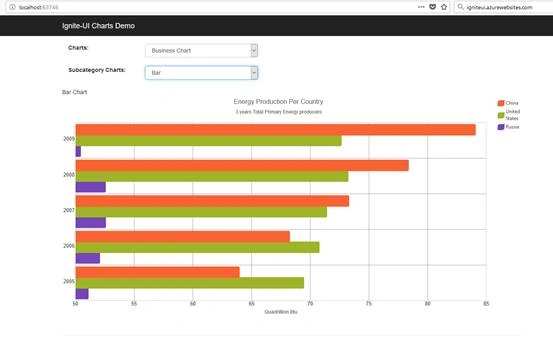
Figure 2.
Bubble Chart
To render the bar chart we have added a partial view “~/views/shared/BusinessCharts/_Bubble.cshtml” so add the following HTML in it as shown in Listing 19.
- <script type="text/javascript" src="https://www.igniteui.com/data-files/us-fao-gross-production.js"></script>
- <div class="chartContainer">
- <div class="chart">
- <h4>Bubble Chart</h4>
- <div id="chartBubble"></div>
- </div>
- </div>
- <div class="UNdata-attribution">
- Agricultural data from:<br />
- <a href="http://data.un.org/" target="_blank">UNdata</a>
- </div>
- <script type="text/javascript">
- var agriculturalData = [
- { "Country": "United States of America", "Element": "Gross Production 1999-2001 (1000 I$)", "Year": 2007, "Value_Unit": "1,000,000 Int. $", "Value": 184698, "Population_Unit": "1,000,000 People", "Population": 302 },
- { "Country": "United States of America", "Element": "Gross Production 1999-2001 (1000 I$)", "Year": 2006, "Value_Unit": "1,000,000 Int. $", "Value": 176803, "Population_Unit": "1,000,000 People", "Population": 299 },
- { "Country": "United States of America", "Element": "Gross Production 1999-2001 (1000 I$)", "Year": 2005, "Value_Unit": "1,000,000 Int. $", "Value": 181432, "Population_Unit": "1,000,000 People", "Population": 296 },
- { "Country": "United States of America", "Element": "Gross Production 1999-2001 (1000 I$)", "Year": 2004, "Value_Unit": "1,000,000 Int. $", "Value": 183519, "Population_Unit": "1,000,000 People", "Population": 294 },
- { "Country": "United States of America", "Element": "Gross Production 1999-2001 (1000 I$)", "Year": 2003, "Value_Unit": "1,000,000 Int. $", "Value": 172458, "Population_Unit": "1,000,000 People", "Population": 291 },
- { "Country": "United States of America", "Element": "Gross Production 1999-2001 (1000 I$)", "Year": 2002, "Value_Unit": "1,000,000 Int. $", "Value": 167494, "Population_Unit": "1,000,000 People", "Population": 288 },
- { "Country": "United States of America", "Element": "Gross Production 1999-2001 (1000 I$)", "Year": 2001, "Value_Unit": "1,000,000 Int. $", "Value": 170755, "Population_Unit": "1,000,000 People", "Population": 285 },
- { "Country": "United States of America", "Element": "Gross Production 1999-2001 (1000 I$)", "Year": 2000, "Value_Unit": "1,000,000 Int. $", "Value": 173640, "Population_Unit": "1,000,000 People", "Population": 282 }
- ];
- $(function () {
- function createBubbleChart(selector, dataSource) {
- $(selector).igDataChart({
- width: "400px",
- height: "400px",
- dataSource: dataSource,
- title: "U.S. Agricultural Production Per Year",
- subtitle: "Data from 2000-2007",
- axes: [{
- name: "xAxis",
- type: "numericX",
- interval: 10,
- title: "Year",
- }, {
- name: "yAxis",
- type: "numericY",
- title: "Billions of USD",
- maximumValue: 200000,
- formatLabel: function (val) {
- var bVal = (val / 1000),
- rounded = Math.round(bVal * 100) / 100;
- return "$" + rounded;
- }
- }],
- series: [{
- name: "bubble",
- type: "bubble",
- xAxis: "xAxis",
- yAxis: "yAxis",
- xMemberPath: "Year",
- yMemberPath: "Value",
- radiusMemberPath: "Population",
- fillMemberPath: "Population",
- labelMemberPath: "Population",
- markerType: "circle",
- radiusScale: {
- minimumValue: 2,
- maximumValue: 12,
- isLogarithmic: true
- },
- fillScale: {
- type: "value",
- brushes: ["red", "orange", "yellow"],
- minimumValue: 150,
- maximumValue: 400
- }
- }],
- horizontalZoomable: true,
- verticalZoomable: true,
- windowResponse: "immediate"
- });
- }
- var dataSource = agriculturalData;
- createBubbleChart("#chartBubble", dataSource);
- });
- </script>
Listing 19.
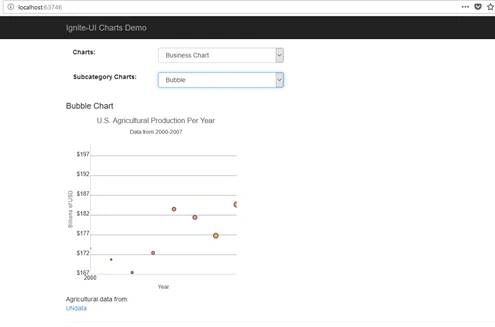
Figure 2.
Column Chart
To render the bar chart we have added a partial view “~/views/shared/BusinessCharts/_Column.cshtml” so add the following HTML in it as shown in Listing 20.
- @model charts_demo_ignite_ui.Models.Chart
- <script type="text/javascript" src="https://www.igniteui.com/data-files/world-energy-production.js"></script>
- <script type="text/javascript">
- var lastFiveYears = @Html.Raw(Model.Data);
- $(function () {
- $("#columnChart").igCategoryChart({
- width: "98%",
- height: "350px",
- dataSource: lastFiveYears,
- chartType: "column",
- legend: { element: "columnLegend" },
- title: "$$(Chart_title_energy_production)",
- subtitle: "$$(Chart_subtitle_energy_production)",
- yAxisTitle: "$$(NumericAxis_title_energy_production)",
- isTransitionInEnabled: true,
- transitionInDuration: 500
- });
- });
- </script>
- <style type="text/css">
- td {
- vertical-align: top;
- }
- .chartElement {
- padding-bottom: 20px;
- }
- </style>
- <div style="display: table">
- <div id="columnChart" class="chartElement" style="display: table-cell; width: auto; padding-right: 50px"></div>
- <div id="columnLegend" style="width: 100px; display: table-cell;"></div>
- </div>
- <div class="EIA-attribution">
- $$(Chart_lbl_energyDataFrom):<br />
- <a href="http://www.eia.gov" target="_blank">U.S. Energy Information Administration (September 2012) </a>
- </div>
Listing 20
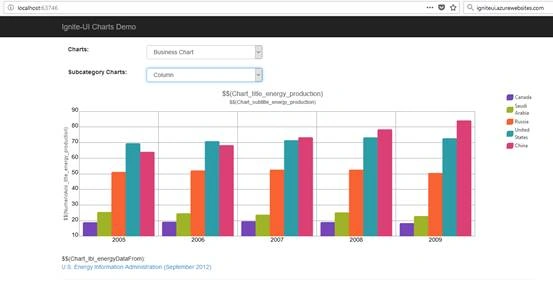
Figure 3.
Doughnut Chart
To render the bar chart we have added a partial view “~/views/shared/BusinessCharts/_Doughnut.cshtml” so add the following HTML in it as shown in Listing 21.
- @model charts_demo_ignite_ui.Models.Chart
- <script id="populationTooltipTemplate" type="text/x-ig-tmpl">
- <div class="ui-chart-tooltip">
- <div>1995 Population: <label style="font-weight:500">${item.CountryName}</label> - <label style="font-weight:500">${item.Pop1995}0 000 000</label></div>
- </div>
- </script>
- <div id="chart"></div>
- <script>
- $(function () {
- var data = @Html.Raw(Model.Data);
- $("#chart").igDoughnutChart({
- width: "100%",
- height: "550px",
- series:
- [{
- name: "Pop1995",
- labelMemberPath: "CountryName",
- valueMemberPath: "Pop1995",
- dataSource: data,
- labelsPosition: "bestFit",
- formatLabel: function (context) {
- return context.itemLabel + " (" + context.item.Pop1995 + ")";
- },
- showTooltip: true,
- tooltipTemplate: "populationTooltipTemplate",
- brushes: ["#B284BE", "#5D8AA8", "#C9FFE5", "#7CB9E8", "#F19CBB"]
- }]
- });
- });
- </script>
Listing 21
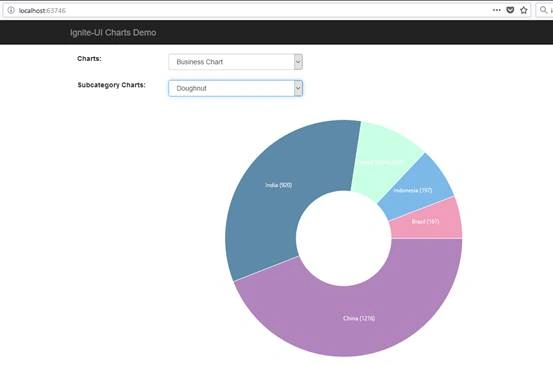
Figure 4.
Financial Chart
To render the bar chart we have added a partial view “~/views/shared/BusinessCharts/_Financial.cshtml” so add the following html in it as shown in Listing 22.
- <script type="text/javascript" src="https://www.igniteui.com/data-files/financial-data.js"></script>
- <script type="text/javascript">
- var dataAdobe = [
- { "Index": 1, "Date": "7/18/2013", "Open": 48.04, "High": 48.52, "Low": 48, "Close": 48.19, "Volume": 2641582 },
- { "Index": 2, "Date": "7/17/2013", "Open": 48.17, "High": 48.4, "Low": 47.78, "Close": 48.04, "Volume": 3135777 },
- { "Index": 3, "Date": "7/16/2013", "Open": 48.05, "High": 48.13, "Low": 47.36, "Close": 47.48, "Volume": 2473018 },
- { "Index": 4, "Date": "7/15/2013", "Open": 48.25, "High": 48.46, "Low": 48.1, "Close": 48.12, "Volume": 2122706 },
- { "Index": 5, "Date": "7/12/2013", "Open": 48.35, "High": 48.63, "Low": 48.08, "Close": 48.39, "Volume": 4135697 },
- { "Index": 6, "Date": "7/11/2013", "Open": 47.62, "High": 48, "Low": 47.5, "Close": 47.99, "Volume": 3293492 },
- { "Index": 7, "Date": "7/10/2013", "Open": 47.09, "High": 47.33, "Low": 46.64, "Close": 47.25, "Volume": 2683537 },
- { "Index": 8, "Date": "7/9/2013", "Open": 46.76, "High": 47.31, "Low": 46.73, "Close": 47.26, "Volume": 2578815 },
- { "Index": 9, "Date": "7/8/2013", "Open": 47.03, "High": 47.49, "Low": 46.44, "Close": 46.62, "Volume": 2813076 },
- { "Index": 10, "Date": "7/5/2013", "Open": 46.69, "High": 47.1, "Low": 46.55, "Close": 47, "Volume": 1614563 },
- { "Index": 11, "Date": "7/3/2013", "Open": 45.71, "High": 46.82, "Low": 45.66, "Close": 46.42, "Volume": 1601483 },
- { "Index": 12, "Date": "7/2/2013", "Open": 46, "High": 46.48, "Low": 45.72, "Close": 46.03, "Volume": 3025049 },
- { "Index": 13, "Date": "7/1/2013", "Open": 45.23, "High": 47.19, "Low": 44.88, "Close": 46.24, "Volume": 6341593 },
- { "Index": 14, "Date": "6/28/2013", "Open": 45.99, "High": 45.99, "Low": 45.39, "Close": 45.56, "Volume": 4052512 },
- { "Index": 15, "Date": "6/27/2013", "Open": 45.9, "High": 46.26, "Low": 45.59, "Close": 45.93, "Volume": 2916446 },
- { "Index": 16, "Date": "6/26/2013", "Open": 44.95, "High": 45.92, "Low": 44.9, "Close": 45.68, "Volume": 5356322 },
- { "Index": 17, "Date": "6/25/2013", "Open": 44.04, "High": 44.44, "Low": 43.46, "Close": 44.37, "Volume": 3368384 },
- { "Index": 18, "Date": "6/24/2013", "Open": 44.34, "High": 44.6, "Low": 43.37, "Close": 43.6, "Volume": 4492827 },
- { "Index": 19, "Date": "6/21/2013", "Open": 44.92, "High": 45, "Low": 44.23, "Close": 44.77, "Volume": 6294691 },
- { "Index": 20, "Date": "6/20/2013", "Open": 45.28, "High": 45.29, "Low": 44.45, "Close": 44.9, "Volume": 5488904 }
- ];
- var data = [
- { "Index": 1, "Date": "7/18/2013", "Open": 35.72, "High": 35.89, "Low": 35.22, "Close": 35.44, "Volume": 49547075 },
- { "Index": 2, "Date": "7/17/2013", "Open": 36.34, "High": 36.39, "Low": 35.49, "Close": 35.74, "Volume": 37289320 },
- { "Index": 3, "Date": "7/16/2013", "Open": 36.01, "High": 36.43, "Low": 35.96, "Close": 36.27, "Volume": 36378681 },
- { "Index": 4, "Date": "7/15/2013", "Open": 35.66, "High": 36.22, "Low": 35.58, "Close": 36.17, "Volume": 34145645 },
- { "Index": 5, "Date": "7/12/2013", "Open": 35.58, "High": 35.73, "Low": 35.28, "Close": 35.67, "Volume": 35502638 },
- { "Index": 6, "Date": "7/11/2013", "Open": 35, "High": 35.77, "Low": 34.9, "Close": 35.68, "Volume": 53638234 },
- { "Index": 7, "Date": "7/10/2013", "Open": 34.34, "High": 34.81, "Low": 34.32, "Close": 34.7, "Volume": 29658734 },
- { "Index": 8, "Date": "7/9/2013", "Open": 34.58, "High": 34.6, "Low": 34.14, "Close": 34.35, "Volume": 25320908 },
- { "Index": 9, "Date": "7/8/2013", "Open": 34.35, "High": 34.59, "Low": 33.98, "Close": 34.32, "Volume": 32398742 },
- { "Index": 10, "Date": "7/5/2013", "Open": 34.09, "High": 34.24, "Low": 33.58, "Close": 34.21, "Volume": 26085981 },
- { "Index": 11, "Date": "7/3/2013", "Open": 33.66, "High": 34.37, "Low": 33.6, "Close": 34.01, "Volume": 15994380 },
- { "Index": 12, "Date": "7/2/2013", "Open": 34.41, "High": 34.44, "Low": 33.63, "Close": 33.94, "Volume": 37634572 },
- { "Index": 13, "Date": "7/1/2013", "Open": 34.75, "High": 34.99, "Low": 34.33, "Close": 34.36, "Volume": 31064000 },
- { "Index": 14, "Date": "6/28/2013", "Open": 34.38, "High": 34.79, "Low": 34.34, "Close": 34.54, "Volume": 65548196 },
- { "Index": 15, "Date": "6/27/2013", "Open": 34.52, "High": 34.78, "Low": 34.5, "Close": 34.62, "Volume": 28993542 },
- { "Index": 16, "Date": "6/26/2013", "Open": 34.12, "High": 34.48, "Low": 33.89, "Close": 34.35, "Volume": 48667834 },
- { "Index": 17, "Date": "6/25/2013", "Open": 34.08, "High": 34.38, "Low": 33.46, "Close": 33.67, "Volume": 44073348 },
- { "Index": 18, "Date": "6/24/2013", "Open": 32.94, "High": 34.2, "Low": 32.57, "Close": 33.72, "Volume": 56113708 },
- { "Index": 19, "Date": "6/21/2013", "Open": 33.66, "High": 33.73, "Low": 33.05, "Close": 33.26, "Volume": 85338395 },
- { "Index": 20, "Date": "6/20/2013", "Open": 34.26, "High": 34.33, "Low": 33.37, "Close": 33.49, "Volume": 54496758 }
- ];
- $(function () {
- $("#candlestickChart").igDataChart({
- width: "100%",
- height: "500px",
- title: "Microsoft (MSFT) vs. Adobe (ADBE)",
- subtitle: "A comparison of stocks over time",
- horizontalZoomable: true,
- verticalZoomable: true,
- windowResponse: "immediate",
- axes: [{
- name: "xAxis",
- type: "categoryX",
- dataSource: data,
- label: "Date",
- title: "Date",
- interval: 10
- }, {
- name: "yAxis",
- type: "numericY",
- title: "Price",
- }],
- series: [{
- name: "series1",
- dataSource: data,
- title: "Price Series",
- type: "financial",
- displayType: "candlestick",
- isTransitionInEnabled: true,
- isHighlightingEnabled: true,
- xAxis: "xAxis",
- yAxis: "yAxis",
- openMemberPath: "Open",
- highMemberPath: "High",
- lowMemberPath: "Low",
- closeMemberPath: "Close",
- showTooltip: true,
- thickness: 1,
- trendLineBrush: "rgba(68, 172, 214, .8)",
- trendLineThickness: 5,
- trendLineType: "exponentialAverage",
- negativeBrush: "rgba(198, 45, 54, .8)"
- }, {
- name: "series2",
- dataSource: dataAdobe,
- title: "Price Series",
- type: "financial",
- isTransitionInEnabled: true,
- isHighlightingEnabled: true,
- displayType: "candlestick",
- xAxis: "xAxis",
- yAxis: "yAxis",
- openMemberPath: "Open",
- highMemberPath: "High",
- lowMemberPath: "Low",
- closeMemberPath: "Close",
- showTooltip: true,
- thickness: 1,
- trendLineBrush: "rgba(73, 73, 73, .8)",
- trendLineThickness: 5,
- trendLineType: "exponentialAverage",
- negativeBrush: "rgba(198, 45, 54, .8)"
- }],
- });
- $("#ohlcChart").igDataChart({
- width: "100%",
- height: "500px",
- title: "Microsoft (MSFT) vs. Adobe (ADBE)",
- subtitle: "A comparison of stocks over time",
- axes: [{
- name: "xAxis",
- type: "categoryX",
- dataSource: data,
- label: "Date",
- interval: 10,
- title: "Date",
- }, {
- name: "yAxis",
- type: "numericY",
- title: "Price",
- }],
- series: [{
- name: "series1",
- dataSource: data,
- title: "Price Series",
- type: "financial",
- isTransitionInEnabled: true,
- displayType: "ohlc",
- xAxis: "xAxis",
- yAxis: "yAxis",
- openMemberPath: "Open",
- highMemberPath: "High",
- lowMemberPath: "Low",
- closeMemberPath: "Close",
- showTooltip: true,
- thickness: 2,
- trendLineBrush: "rgba(68, 172, 214, .8)",
- trendLineThickness: 5,
- trendLineType: "exponentialAverage",
- negativeBrush: "rgba(198, 45, 54, .8)"
- }, {
- name: "series2",
- dataSource: dataAdobe,
- title: "Price Series",
- type: "financial",
- isTransitionInEnabled: true,
- displayType: "ohlc",
- xAxis: "xAxis",
- yAxis: "yAxis",
- openMemberPath: "Open",
- highMemberPath: "High",
- lowMemberPath: "Low",
- closeMemberPath: "Close",
- showTooltip: true,
- thickness: 2,
- trendLineBrush: "rgba(73, 73, 73, .8)",
- trendLineThickness: 5,
- trendLineType: "exponentialAverage",
- negativeBrush: "rgba(198, 45, 54, .8)"
- }],
- horizontalZoomable: true,
- verticalZoomable: true,
- windowResponse: "immediate"
- });
- });
- </script>
- <style type="text/css">
- td {
- vertical-align: top;
- }
- .chartElement {
- margin-right: 10px;
- }
- .chart-container {
- width: 49%;
- box-sizing: border-box;
- float: left;
- }
- .chart-container h3 {
- text-align: center
- }
- #charts {
- padding: 1px;
- }
- </style>
- <div id="charts">
- <div class="chart-container">
- <h3>Candlestick</h3>
- <div id="candlestickChart" class="chartElement"></div>
- </div>
- <div class="chart-container">
- <h3>OHLC</h3>
- <div id="ohlcChart" class="chartElement"></div>
- <table>
- <tr><td><div class="Quandldata-attribution">Stock data from: <a href="http://www.quandl.com/" target="_blank">Quandl</a></div></td></tr>
- </table>
- </div>
- </div>
Listing 22.
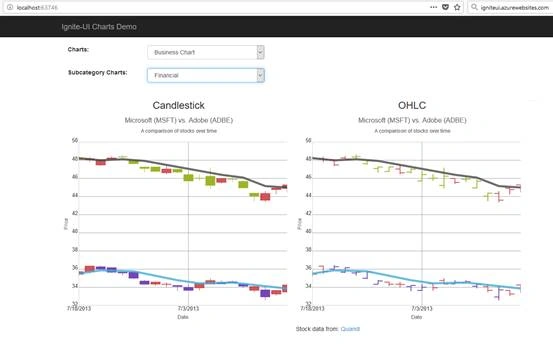
Figure 5.
Funnel Chart
To render the bar chart we have added a partial view “~/views/shared/BusinessCharts/_Funnel.cshtml” so add the following HTML in it as shown in Listing 23.
- <link href="https://www.igniteui.com/css/charts/chart-samples.css" type="text/css" rel="stylesheet" />
- <script type="text/javascript">
- var data = [
- { Budget: 30, Department: "Administration" },
- { Budget: 50, Department: "Sales" },
- { Budget: 60, Department: "IT" },
- { Budget: 50, Department: "Marketing" },
- { Budget: 100, Department: "Development" },
- { Budget: 20, Department: "Support" }
- ];
- $(function () {
- // Create a basic funnel chart
- $("#chartNormal").igFunnelChart({
- width: "100%", //"325px",
- height: "450px",
- dataSource: data,
- valueMemberPath: "Budget",
- innerLabelMemberPath: "Budget",
- innerLabelVisibility: "visible",
- outerLabelMemberPath: "Department",
- outerLabelVisibility: "visible"
- });
- // Create a funnel chart with weighted size slices
- $("#chartWeighted").igFunnelChart({
- width: "100%", //"325px",
- height: "450px",
- leftMargin: 20,
- dataSource: data,
- valueMemberPath: "Budget",
- innerLabelMemberPath: "Budget",
- innerLabelVisibility: "visible",
- outerLabelMemberPath: "Department",
- outerLabelVisibility: "visible",
- funnelSliceDisplay: "weighted"
- });
- // Create an inverted funnel chart
- $("#chartInverted").igFunnelChart({
- width: "100%", //"325px",
- height: "450px",
- leftMargin: 20,
- dataSource: data,
- valueMemberPath: "Budget",
- innerLabelMemberPath: "Budget",
- innerLabelVisibility: "visible",
- isInverted: true
- });
- });
- </script>
- <div class="sampleContent">
- <div class="chartContainer chartContainer3">
- <h4>Funnel Chart</h4>
- <div id="chartNormal"></div>
- </div>
- <div class="chartContainer chartContainer3">
- <h4>Weighted Slices</h4>
- <div id="chartWeighted"></div>
- </div>
- <div class="chartContainer chartContainer3">
- <h4>Inverted Funnel Chart</h4>
- <div id="chartInverted"></div>
- </div>
- </div>
Listing 23
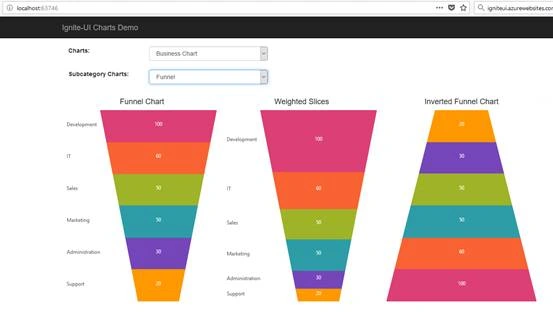
Figure 6.
Line Chart
To render the bar chart we have added a partial view “~/views/shared/BusinessCharts/_Line.cshtml” so add the following HTML in it as shown in Listing 24.
- @model charts_demo_ignite_ui.Models.Chart
- <script type="text/javascript" src="https://www.igniteui.com/data-files/uk-france-population.js"></script>
- <script type="text/javascript">
- $(function () {
- var lastFiveYears = @Html.Raw(Model.Data);
- $("#lineChart").igCategoryChart({
- width: "98%",
- height: "400px",
- legend: { element: "lineLegend" },
- title: "$$(Chart_title_countries_pop)",
- subtitle: "$$(Chart_subtitle_countries_1995_v_2005)",
- yAxisTitle: "$$(NumericAxis_title_population)",
- dataSource: data,
- chartType: "line",
- isTransitionInEnabled: true,
- transitionInDuration: 500
- });
- });
- </script>
- <style type="text/css">
- .selectionOptions {
- margin-bottom: 10px;
- }
- td {
- vertical-align: top;
- }
- .chartElement {
- padding-bottom: 20px;
- }
- </style>
- <div style="display: table">
- <div id="lineChart" class="chartElement" style="display: table-cell; width: auto; padding-right: 50px"></div>
- <div id="lineLegend" style="width: 100px; display: table-cell;"></div>
- </div>
- <div class="Quandl-attribution">
- $$(Chart_lbl_popDataFrom):
- <a href="http://www.quandl.com/" target="_blank">Quandl</a>
- </div>
Listing 24
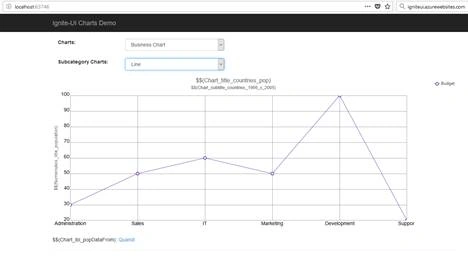
Figure 7.
Pie Chart
To render the bar chart we have added a partial view “~/views/shared/BusinessCharts/_Pie.cshtml” so add the following HTML in it as shown in Listing 25.
- @model charts_demo_ignite_ui.Models.Chart
- <style type="text/css">
- #chart {
- position: relative;
- float: left;
- margin-right: 10px;
- margin-bottom: 10px;
- }
- </style>
- <div id="chart"></div>
- <script>
- $(function () {
- var data = @Html.Raw(Model.Data)
- $("#chart").igPieChart({
- width: "435px",
- height: "435px",
- dataSource: data, //JSON data defined above
- dataValue: "Pop2005",
- dataLabel: "CountryName",
- labelsPosition: "bestFit"
- });
- });
- </script>
Listing 25.
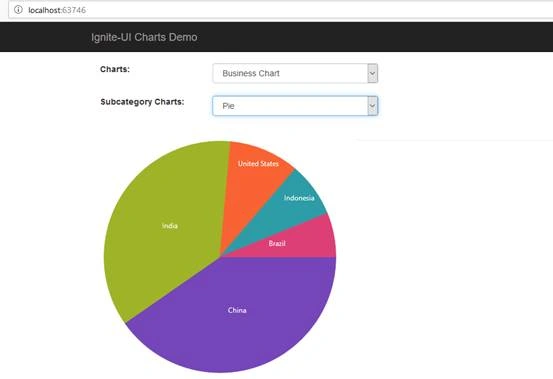
Figure 8.
Point Chart
To render the bar chart we have added a partial view “~/views/shared/BusinessCharts/_Point.cshtml” so add the following HTML in it as shown in Listing 26.
- @model charts_demo_ignite_ui.Models.Chart
- <script type="text/javascript" src="https://www.igniteui.com/data-files/uk-france-population.js"></script>
- <script type="text/javascript">
- $(function () {
- var lastFiveYears = @Html.Raw(Model.Data);
- $("#pointChart").igCategoryChart({
- width: "98%",
- height: "400px",
- legend: { element: "pointLegend" },
- title: "$$(Chart_title_countries_pop)",
- subtitle: "$$(Chart_subtitle_countries_1995_v_2005)",
- yAxisTitle: "$$(NumericAxis_title_population)",
- dataSource: data,
- chartType: "point",
- isTransitionInEnabled: true,
- transitionInDuration: 500
- });
- });
- </script>
- <style type="text/css">
- .selectionOptions {
- margin-bottom: 10px;
- }
- td {
- vertical-align: top;
- }
- .chartElement {
- padding-bottom: 20px;
- }
- </style>
- <div style="display: table">
- <div id="pointChart" class="chartElement" style="display: table-cell; width: auto; padding-right: 50px"></div>
- <div id="pointLegend" style="width: 100px; display: table-cell;"></div>
- </div>
- <div class="Quandl-attribution">
- $$(Chart_lbl_popDataFrom):
- <a href="http://www.quandl.com/" target="_blank">Quandl</a>
- </div>
Listing 26
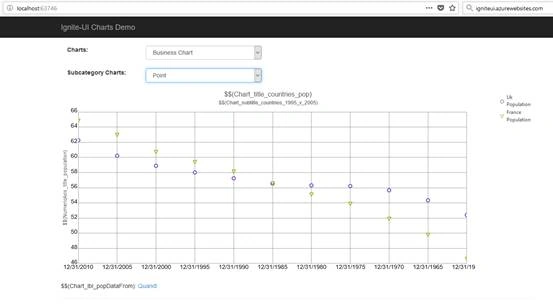
Figure 9.
Scatter Chart
To render the bar chart we have added a partial view “~/views/shared/BusinessCharts/_Scatter.cshtml” so add the following HTML in it as shown in Listing 27.
- <style type="text/css">
- h4 {
- width: 100%;
- text-align: center;
- }
- .chart {
- position: relative;
- float: left;
- margin-right: 10px;
- display: inline-block;
- }
- </style>
- <script type="text/javascript" src="https://www.igniteui.com/data-files/us-fao-gross-production.js"></script>
- <script type="text/javascript" src="https://www.igniteui.com/data-files/surface-3d-scatter.js"></script>
- <div class="UNdata-attribution">
- Agricultural data from:<br />
- <a href="http://data.un.org/" target="_blank">UNdata</a>
- </div>
- <div>
- <div class="chart">
- <div id="chartScatter"></div>
- </div>
- <div class="chart">
- <div id="chartScatterLine"></div>
- </div>
- <div class="chart">
- <div id="chartScatterSpline"></div>
- </div>
- <div class="chart">
- <div id="chartBubble"></div>
- </div>
- <div class="chart">
- <div id="chartScatterArea"></div>
- </div>
- <div class="chart">
- <div id="chartScatterContour"></div>
- </div>
- </div>
- <script type="text/javascript">
- /*
- United States Food and Agriculture gross production.
- Data from: http://data.un.org/
- Original source: http://faostat.fao.org/
- */
- var agriculturalData = [{ "Country": "United States of America", "Element": "Gross Production 1999-2001 (1000 I$)", "Year": 2007, "Value_Unit": "1,000,000 Int. $", "Value": 184698, "Population_Unit": "1,000,000 People", "Population": 302 },
- { "Country": "United States of America", "Element": "Gross Production 1999-2001 (1000 I$)", "Year": 2006, "Value_Unit": "1,000,000 Int. $", "Value": 176803, "Population_Unit": "1,000,000 People", "Population": 299 },
- { "Country": "United States of America", "Element": "Gross Production 1999-2001 (1000 I$)", "Year": 2005, "Value_Unit": "1,000,000 Int. $", "Value": 181432, "Population_Unit": "1,000,000 People", "Population": 296 },
- { "Country": "United States of America", "Element": "Gross Production 1999-2001 (1000 I$)", "Year": 2004, "Value_Unit": "1,000,000 Int. $", "Value": 183519, "Population_Unit": "1,000,000 People", "Population": 294 },
- { "Country": "United States of America", "Element": "Gross Production 1999-2001 (1000 I$)", "Year": 2003, "Value_Unit": "1,000,000 Int. $", "Value": 172458, "Population_Unit": "1,000,000 People", "Population": 291 },
- { "Country": "United States of America", "Element": "Gross Production 1999-2001 (1000 I$)", "Year": 2002, "Value_Unit": "1,000,000 Int. $", "Value": 167494, "Population_Unit": "1,000,000 People", "Population": 288 },
- { "Country": "United States of America", "Element": "Gross Production 1999-2001 (1000 I$)", "Year": 2001, "Value_Unit": "1,000,000 Int. $", "Value": 170755, "Population_Unit": "1,000,000 People", "Population": 285 },
- { "Country": "United States of America", "Element": "Gross Production 1999-2001 (1000 I$)", "Year": 2000, "Value_Unit": "1,000,000 Int. $", "Value": 173640, "Population_Unit": "1,000,000 People", "Population": 282 },
- { "Country": "United States of America", "Element": "Gross Production 1999-2001 (1000 I$)", "Year": 1999, "Value_Unit": "1,000,000 Int. $", "Value": 170083, "Population_Unit": "1,000,000 People", "Population": 279 },
- { "Country": "United States of America", "Element": "Gross Production 1999-2001 (1000 I$)", "Year": 1998, "Value_Unit": "1,000,000 Int. $", "Value": 167311, "Population_Unit": "1,000,000 People", "Population": 275 },
- { "Country": "United States of America", "Element": "Gross Production 1999-2001 (1000 I$)", "Year": 1997, "Value_Unit": "1,000,000 Int. $", "Value": 167072, "Population_Unit": "1,000,000 People", "Population": 272 },
- { "Country": "United States of America", "Element": "Gross Production 1999-2001 (1000 I$)", "Year": 1996, "Value_Unit": "1,000,000 Int. $", "Value": 162066, "Population_Unit": "1,000,000 People", "Population": 269 },
- { "Country": "United States of America", "Element": "Gross Production 1999-2001 (1000 I$)", "Year": 1995, "Value_Unit": "1,000,000 Int. $", "Value": 152325, "Population_Unit": "1,000,000 People", "Population": 266 },
- { "Country": "United States of America", "Element": "Gross Production 1999-2001 (1000 I$)", "Year": 1994, "Value_Unit": "1,000,000 Int. $", "Value": 164433, "Population_Unit": "1,000,000 People", "Population": 263 },
- { "Country": "United States of America", "Element": "Gross Production 1999-2001 (1000 I$)", "Year": 1993, "Value_Unit": "1,000,000 Int. $", "Value": 142796, "Population_Unit": "1,000,000 People", "Population": 260 },
- { "Country": "United States of America", "Element": "Gross Production 1999-2001 (1000 I$)", "Year": 1992, "Value_Unit": "1,000,000 Int. $", "Value": 155467, "Population_Unit": "1,000,000 People", "Population": 258 },
- { "Country": "United States of America", "Element": "Gross Production 1999-2001 (1000 I$)", "Year": 1991, "Value_Unit": "1,000,000 Int. $", "Value": 143249, "Population_Unit": "1,000,000 People", "Population": 255 },
- { "Country": "United States of America", "Element": "Gross Production 1999-2001 (1000 I$)", "Year": 1990, "Value_Unit": "1,000,000 Int. $", "Value": 144644, "Population_Unit": "1,000,000 People", "Population": 253 },
- ];
- $(function () {
- function createScatterChart(selector, dataSource) {
- $(selector).igDataChart({
- width: "320px",
- height: "320px",
- dataSource: dataSource,
- title: "Scatter",
- subtitle: "U.S. Agricultural Production Per Year",
- axes: [{
- name: "xAxis",
- type: "numericX",
- interval: 10,
- title: "Year",
- }, {
- name: "yAxis",
- type: "numericY",
- title: "Billions of USD",
- maximumValue: 200000,
- formatLabel: function (val) {
- var bVal = (val / 1000),
- rounded = Math.round(bVal * 100) / 100;
- return "$" + rounded;
- }
- }],
- series: [{
- name: "scatter",
- type: "scatter",
- xAxis: "xAxis",
- yAxis: "yAxis",
- xMemberPath: "Year",
- yMemberPath: "Value",
- markerType: "circle",
- title: "Scatter",
- showTooltip: true
- }],
- horizontalZoomable: true,
- verticalZoomable: true,
- windowResponse: "immediate"
- });
- }
- function createScatterLineChart(selector, dataSource) {
- $(selector).igDataChart({
- width: "320px",
- height: "320px",
- dataSource: dataSource,
- title: "Scatter Line",
- subtitle: "U.S. Agricultural Production Per Year",
- axes: [{
- name: "xAxis",
- type: "numericX",
- interval: 10,
- title: "Year",
- }, {
- name: "yAxis",
- type: "numericY",
- title: "Billions of USD",
- maximumValue: 200000,
- formatLabel: function (val) {
- var bVal = (val / 1000),
- rounded = Math.round(bVal * 100) / 100;
- return "$" + rounded;
- }
- }],
- series: [{
- name: "scatter",
- type: "scatterLine",
- xAxis: "xAxis",
- yAxis: "yAxis",
- xMemberPath: "Year",
- yMemberPath: "Value",
- markerType: "circle",
- title: "Scatter Line",
- showTooltip: true
- }],
- horizontalZoomable: true,
- verticalZoomable: true,
- windowResponse: "immediate"
- });
- }
- function createScatterSplineChart(selector, dataSource) {
- $(selector).igDataChart({
- width: "320px",
- height: "320px",
- dataSource: dataSource,
- title: "Scatter Spline",
- subtitle: "U.S. Agricultural Production Per Year",
- axes: [{
- name: "xAxis",
- type: "numericX",
- interval: 10,
- title: "Year",
- }, {
- name: "yAxis",
- type: "numericY",
- title: "Billions of USD",
- maximumValue: 200000,
- formatLabel: function (val) {
- var bVal = (val / 1000),
- rounded = Math.round(bVal * 100) / 100;
- return "$" + rounded;
- }
- }],
- series: [{
- name: "scatterSpline",
- type: "scatterSpline",
- xAxis: "xAxis",
- yAxis: "yAxis",
- xMemberPath: "Year",
- yMemberPath: "Value",
- markerType: "circle",
- title: "Scatter Spline",
- showTooltip: true
- }],
- horizontalZoomable: true,
- verticalZoomable: true,
- windowResponse: "immediate"
- });
- }
- function createBubbleChart(selector, dataSource) {
- $(selector).igDataChart({
- width: "320px",
- height: "320px",
- dataSource: dataSource,
- title: "Bubble Chart",
- subtitle: "U.S. Agricultural Production Per Year",
- axes: [{
- name: "xAxis",
- type: "numericX",
- interval: 10,
- title: "Year",
- }, {
- name: "yAxis",
- type: "numericY",
- title: "Billions of USD",
- maximumValue: 200000,
- formatLabel: function (val) {
- var bVal = (val / 1000),
- rounded = Math.round(bVal * 100) / 100;
- return "$" + rounded;
- }
- }],
- series: [{
- name: "bubble",
- type: "bubble",
- xAxis: "xAxis",
- yAxis: "yAxis",
- xMemberPath: "Year",
- yMemberPath: "Value",
- radiusMemberPath: "Population",
- fillMemberPath: "Population",
- labelMemberPath: "Population",
- markerType: "circle",
- title: "Bubble Chart",
- showTooltip: true,
- radiusScale: {
- minimumValue: 2,
- maximumValue: 12,
- isLogarithmic: true
- },
- fillScale: {
- type: "value",
- brushes: ["red", "orange", "yellow"],
- minimumValue: 150,
- maximumValue: 400
- }
- }],
- horizontalZoomable: true,
- verticalZoomable: true,
- windowResponse: "immediate"
- });
- }
- function createScatterAreaChart(selector, dataSource) {
- $(selector).igDataChart({
- width: "320px",
- height: "320px",
- dataSource: dataSource,
- title: "$$(Chart_sel_scatterArea)",
- subtitle: "$$(Chart_subtitle_scatter)",
- axes: [{
- name: "xAxis",
- type: "numericX",
- interval: 40,
- }, {
- name: "yAxis",
- type: "numericY",
- interval: 40,
- }],
- series: [{
- name: "area",
- type: "scatterArea",
- xAxis: "xAxis",
- yAxis: "yAxis",
- xMemberPath: "X",
- yMemberPath: "Y",
- colorMemberPath: "Z",
- title: "$$(Chart_sel_scatterArea)",
- showTooltip: true,
- colorScale: {
- palette: ["red", "orange", "yellow"],
- interpolationMode: "interpolateRGB",
- }
- }],
- horizontalZoomable: true,
- verticalZoomable: true,
- windowResponse: "immediate"
- });
- }
- function createScatterContourChart(selector, dataSource) {
- $(selector).igDataChart({
- width: "320px",
- height: "320px",
- dataSource: dataSource,
- title: "$$(Chart_sel_scatterContour)",
- subtitle: "$$(Chart_subtitle_scatter)",
- axes: [{
- name: "xAxis",
- type: "numericX",
- interval: 40,
- }, {
- name: "yAxis",
- type: "numericY",
- interval: 40,
- }],
- series: [{
- name: "contour",
- type: "scatterContour",
- xAxis: "xAxis",
- yAxis: "yAxis",
- xMemberPath: "X",
- yMemberPath: "Y",
- valueMemberPath: "Z",
- title: "$$(Chart_sel_scatterContour)",
- showTooltip: true,
- fillScale: {
- type: "value",
- brushes: ["red", "orange", "yellow"],
- }
- }],
- horizontalZoomable: true,
- verticalZoomable: true,
- windowResponse: "immediate"
- });
- }
- var dataSource = agriculturalData;
- createScatterChart("#chartScatter", dataSource);
- createScatterLineChart("#chartScatterLine", dataSource);
- createBubbleChart("#chartBubble", dataSource);
- createScatterSplineChart("#chartScatterSpline", dataSource);
- createScatterAreaChart("#chartScatterArea", dataSource);
- createScatterContourChart("#chartScatterContour", dataSource);
- });
- </script>
Listing 27
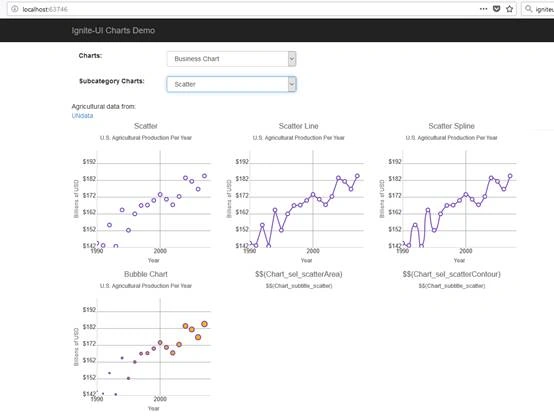
Figure 10.
Sparkline Chart
To render the bar chart we have added a partial view “~/views/shared/BusinessCharts/_Sparkline.cshtml” so add the following HTML in it as shown in Listing 28.
- <!-- Target element for the igSparkline -->
- <div id="sparkline"></div>
- <!-- File supplying the northwindInvoices object for the igSparkline data source -->
- <script src="https://www.igniteui.com/data-files/nw-invoices.js"></script>
- <script>
- var northwindInvoices = [{
- "ShipName": "Alfred's Futterkiste",
- "ShipAddress": "Obere Str. 57",
- "ShipCity": "Berlin",
- "ShipRegion": null,
- "ShipPostalCode": "12209",
- "ShipCountry": "Germany",
- "CustomerID": "ALFKI",
- "CustomerName": "Alfreds Futterkiste",
- "Address": "Obere Str. 57",
- "City": "Berlin",
- "Region": null,
- "PostalCode": "12209",
- "Country": "Germany",
- "Salesperson": "Margaret Peacock",
- "OrderID": 10692,
- "OrderDate": "1997-10-03T00:00:00Z",
- "RequiredDate": "1997-10-31T00:00:00Z",
- "ShippedDate": "1997-10-13T00:00:00Z",
- "ShipperName": "United Package",
- "ProductID": 63,
- "ProductName": "Vegie-spread",
- "UnitPrice": 43.9000,
- "Quantity": 20,
- "Discount": 0,
- "ExtendedPrice": 878.0000,
- "Freight": 61.0200
- }, {
- "ShipName": "Alfred's Futterkiste",
- "ShipAddress": "Obere Str. 57",
- "ShipCity": "Berlin",
- "ShipRegion": null,
- "ShipPostalCode": "12209",
- "ShipCountry": "Germany",
- "CustomerID": "ALFKI",
- "CustomerName": "Alfreds Futterkiste",
- "Address": "Obere Str. 57",
- "City": "Berlin",
- "Region": null,
- "PostalCode": "12209",
- "Country": "Germany",
- "Salesperson": "Margaret Peacock",
- "OrderID": 10702,
- "OrderDate": "1997-10-13T00:00:00Z",
- "RequiredDate": "1997-11-24T00:00:00Z",
- "ShippedDate": "1997-10-21T00:00:00Z",
- "ShipperName": "Speedy Express",
- "ProductID": 3,
- "ProductName": "Aniseed Syrup",
- "UnitPrice": 10.0000,
- "Quantity": 6,
- "Discount": 0,
- "ExtendedPrice": 60.0000,
- "Freight": 23.9400
- }, {
- "ShipName": "Alfred's Futterkiste",
- "ShipAddress": "Obere Str. 57",
- "ShipCity": "Berlin",
- "ShipRegion": null,
- "ShipPostalCode": "12209",
- "ShipCountry": "Germany",
- "CustomerID": "ALFKI",
- "CustomerName": "Alfreds Futterkiste",
- "Address": "Obere Str. 57",
- "City": "Berlin",
- "Region": null,
- "PostalCode": "12209",
- "Country": "Germany",
- "Salesperson": "Margaret Peacock",
- "OrderID": 10702,
- "OrderDate": "1997-10-13T00:00:00Z",
- "RequiredDate": "1997-11-24T00:00:00Z",
- "ShippedDate": "1997-10-21T00:00:00Z",
- "ShipperName": "Speedy Express",
- "ProductID": 76,
- "ProductName": "Lakkalik\u00f6\u00f6ri",
- "UnitPrice": 18.0000,
- "Quantity": 15,
- "Discount": 0,
- "ExtendedPrice": 270.0000,
- "Freight": 23.9400
- }, {
- "ShipName": "Alfred's Futterkiste",
- "ShipAddress": "Obere Str. 57",
- "ShipCity": "Berlin",
- "ShipRegion": null,
- "ShipPostalCode": "12209",
- "ShipCountry": "Germany",
- "CustomerID": "ALFKI",
- "CustomerName": "Alfreds Futterkiste",
- "Address": "Obere Str. 57",
- "City": "Berlin",
- "Region": null,
- "PostalCode": "12209",
- "Country": "Germany",
- "Salesperson": "Nancy Davolio",
- "OrderID": 10835,
- "OrderDate": "1998-01-15T00:00:00Z",
- "RequiredDate": "1998-02-12T00:00:00Z",
- "ShippedDate": "1998-01-21T00:00:00Z",
- "ShipperName": "Federal Shipping",
- "ProductID": 59,
- "ProductName": "Raclette Courdavault",
- "UnitPrice": 55.0000,
- "Quantity": 15,
- "Discount": 0,
- "ExtendedPrice": 825.0000,
- "Freight": 69.5300
- }, {
- "ShipName": "Alfred's Futterkiste",
- "ShipAddress": "Obere Str. 57",
- "ShipCity": "Berlin",
- "ShipRegion": null,
- "ShipPostalCode": "12209",
- "ShipCountry": "Germany",
- "CustomerID": "ALFKI",
- "CustomerName": "Alfreds Futterkiste",
- "Address": "Obere Str. 57",
- "City": "Berlin",
- "Region": null,
- "PostalCode": "12209",
- "Country": "Germany",
- "Salesperson": "Nancy Davolio",
- "OrderID": 10952,
- "OrderDate": "1998-03-16T00:00:00Z",
- "RequiredDate": "1998-04-27T00:00:00Z",
- "ShippedDate": "1998-03-24T00:00:00Z",
- "ShipperName": "Speedy Express",
- "ProductID": 28,
- "ProductName": "R\u00f6ssle Sauerkraut",
- "UnitPrice": 45.6000,
- "Quantity": 2,
- "Discount": 0,
- "ExtendedPrice": 91.2000,
- "Freight": 40.4200
- }]
- $(function () {
- $("#sparkline").igSparkline({
- dataSource: northwindInvoices,
- height: "100px",
- width: "100%",
- valueMemberPath: 'ExtendedPrice',
- tooltipTemplate: "Low:${Low}<br>High:${High}"
- });
- });
- </script>
Listing 28.
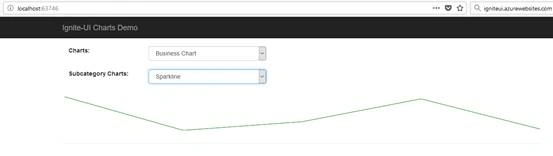
Figure 11.
Polar Charts
Let’s render the polar charts category.
Polar Area
To render the bar chart we have added a partial view “~/views/shared/PolarCharts/_PolarArea.cshtml” so add the following HTML in it as shown in Listing 29
- @model charts_demo_ignite_ui.Models.Chart
- <script type="text/javascript" src="https://www.igniteui.com/data-files/wind.js"></script>
- <script type="text/javascript">
- /*
- Raw Data from NOAA.
- Wind information from Los Angeles weather station.
- */
- var data = @Html.Raw(Model.Data);
- $(function () {
- function createChart(selector, seriesType, data) {
- $(selector).igDataChart({
- width: "400px",
- height: "400px",
- dataSource: data,
- title: "Wind Speed vs. Wind Direction",
- subtitle: "Los Angeles wind data over twelve hours",
- axes: [{
- name: "angleAxis",
- type: "numericAngle"
- },
- {
- name: "radiusAxis",
- type: "numericRadius",
- minimumValue: 0,
- maximumValue: 10,
- interval: 2
- }],
- series: [{
- name: "series1",
- //title: "$$(Chart_lbl_seriesTitle)",
- type: seriesType,
- angleAxis: "angleAxis",
- radiusAxis: "radiusAxis",
- angleMemberPath: "WindDirection",
- radiusMemberPath: "WindSpeed"
- }],
- horizontalZoomable: true,
- verticalZoomable: true,
- windowResponse: "immediate"
- });
- }
- createChart("#chartScatterArea", "polarArea", data);
- });
- </script>
- <style type="text/css">
- h4 {
- width: 100%;
- text-align: center;
- }
- .chart {
- position: relative;
- float: left;
- margin-right: 10px;
- }
- </style>
- <div class="chartContainer">
- <div class="chart">
- <h2 align="center">Polar Area</h2>
- <div id="chartScatterArea"></div>
- </div>
- </div>
- <div class="NOAAdata-attribution">
- Weather data from:<br />
- <a href="http://www.noaa.gov/" target="_blank">NOAA</a>
- </div>
Listing 29
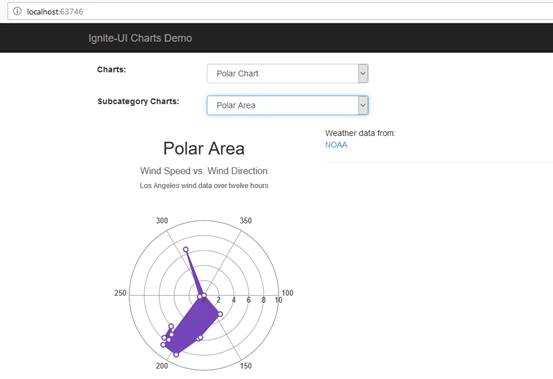
Figure 12.
Polar Line
To render the bar chart we have added a partial view “~/views/shared/PolarCharts/_PolarLine.cshtml” so add the following HTML in it as shown in Listing 30.
- @model charts_demo_ignite_ui.Models.Chart
- <script type="text/javascript" src="https://www.igniteui.com/data-files/wind.js"></script>
- <script type="text/javascript">
- var data = @Html.Raw(Model.Data);
- $(function () {
- function createChart(selector, seriesType, data) {
- $(selector).igDataChart({
- width: "400px",
- height: "400px",
- dataSource: data,
- title: "Wind Speed vs. Wind Direction",
- subtitle: "Los Angeles wind data over twelve hours",
- axes: [{
- name: "angleAxis",
- type: "numericAngle"
- },
- {
- name: "radiusAxis",
- type: "numericRadius",
- minimumValue: 0,
- maximumValue: 10,
- interval: 2
- }],
- series: [{
- name: "series1",
- //title: "$$(Chart_lbl_seriesTitle)",
- type: seriesType,
- angleAxis: "angleAxis",
- radiusAxis: "radiusAxis",
- angleMemberPath: "WindDirection",
- radiusMemberPath: "WindSpeed"
- }],
- horizontalZoomable: true,
- verticalZoomable: true,
- windowResponse: "immediate"
- });
- }
- createChart("#chartScatterLine", "polarLine", data);
- });
- </script>
- <style type="text/css">
- h4 {
- width: 100%;
- text-align: center;
- }
- .chart {
- position: relative;
- float: left;
- margin-right: 10px;
- }
- </style>
- <div class="chartContainer">
- <div class="chart">
- <h2 align="center">Polar Line</h2>
- <div id="chartScatterLine"></div>
- </div>
- </div>
- <div class="NOAAdata-attribution">
- Weather data from:<br />
- <a href="http://www.noaa.gov/" target="_blank">NOAA</a>
- </div>
Listing 30.
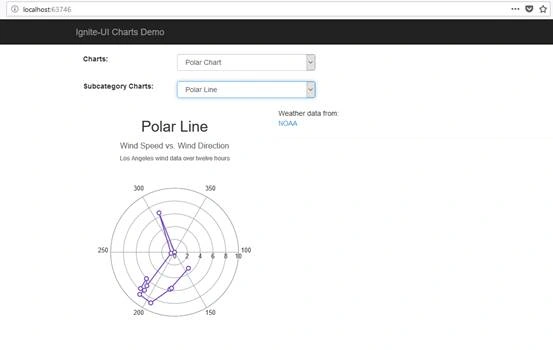
Figure 13.
Polar Point
To render the bar chart we have added a partial view “~/views/shared/PolarCharts/_PolarPoint.cshtml” so add the following HTML in it as shown in Listing 31.
- @model charts_demo_ignite_ui.Models.Chart
- <script type="text/javascript" src="https://www.igniteui.com/data-files/wind.js"></script>
- <script type="text/javascript">
- var data = @Html.Raw(Model.Data);
- $(function () {
- function createChart(selector, seriesType, data) {
- $(selector).igDataChart({
- width: "400px",
- height: "400px",
- dataSource: data,
- title: "Wind Speed vs. Wind Direction",
- subtitle: "Los Angeles wind data over twelve hours",
- axes: [{
- name: "angleAxis",
- type: "numericAngle"
- },
- {
- name: "radiusAxis",
- type: "numericRadius",
- minimumValue: 0,
- maximumValue: 10,
- interval: 2
- }],
- series: [{
- name: "series1",
- //title: "$$(Chart_lbl_seriesTitle)",
- type: seriesType,
- angleAxis: "angleAxis",
- radiusAxis: "radiusAxis",
- angleMemberPath: "WindDirection",
- radiusMemberPath: "WindSpeed"
- }],
- horizontalZoomable: true,
- verticalZoomable: true,
- windowResponse: "immediate"
- });
- }
- createChart("#chartScatter", "polarScatter", data);
- });
- </script>
- <style type="text/css">
- h4 {
- width: 100%;
- text-align: center;
- }
- .chart {
- position: relative;
- float: left;
- margin-right: 10px;
- }
- </style>
- <div class="chartContainer">
- <div class="chart">
- <h2 align="center">Polar Scatter</h2>
- <div id="chartScatter"></div>
- </div>
- </div>
- <div class="NOAAdata-attribution">
- Weather data from:<br />
- <a href="http://www.noaa.gov/" target="_blank">NOAA</a>
- </div>
Listing 31.
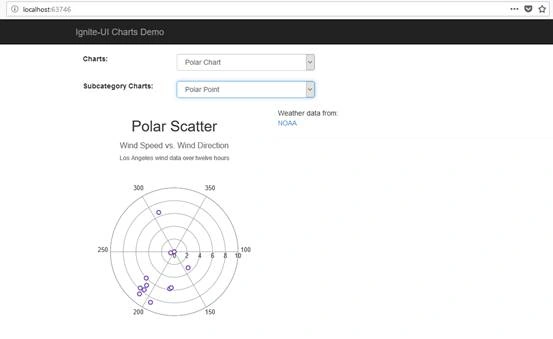
Figure 14.
Polar Spline
To render the bar chart we have added a partial view “~/views/shared/PolarCharts/_PolarSpline.cshtml” so add the following HTML in it as shown in Listing 32.
- @model charts_demo_ignite_ui.Models.Chart
- <script type="text/javascript" src="https://www.igniteui.com/data-files/wind.js"></script>
- <script type="text/javascript">
- var data = @Html.Raw(Model.Data);
- $(function () {
- function createChart(selector, seriesType, data) {
- $(selector).igDataChart({
- width: "400px",
- height: "400px",
- dataSource: data,
- title: "Wind Speed vs. Wind Direction",
- subtitle: "Los Angeles wind data over twelve hours",
- axes: [{
- name: "angleAxis",
- type: "numericAngle"
- },
- {
- name: "radiusAxis",
- type: "numericRadius",
- minimumValue: 0,
- maximumValue: 10,
- interval: 2
- }],
- series: [{
- name: "series1",
- //title: "$$(Chart_lbl_seriesTitle)",
- type: seriesType,
- angleAxis: "angleAxis",
- radiusAxis: "radiusAxis",
- angleMemberPath: "WindDirection",
- radiusMemberPath: "WindSpeed"
- }],
- horizontalZoomable: true,
- verticalZoomable: true,
- windowResponse: "immediate"
- });
- }
- createChart("#chartPolarSpline", "polarSpline", data);
- });
- </script>
- <style type="text/css">
- h4 {
- width: 100%;
- text-align: center;
- }
- .chart {
- position: relative;
- float: left;
- margin-right: 10px;
- }
- </style>
- <div class="chartContainer">
- <div class="chart">
- <h2 align="center">Polar Spline</h2>
- <div id="chartPolarSpline"></div>
- </div>
- </div>
- <div class="NOAAdata-attribution">
- Weather data from:<br />
- <a href="http://www.noaa.gov/" target="_blank">NOAA</a>
- </div>
Listing 32
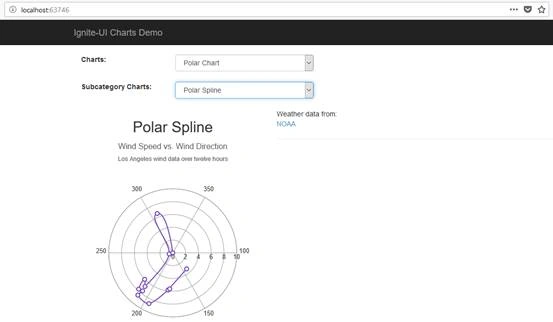
Figure 15.
Polar Spline Area
To render the bar chart we have added a partial view “~/views/shared/PolarCharts/_PolarSplineArea.cshtml” so add the following HTML in it as shown in Listing 33.
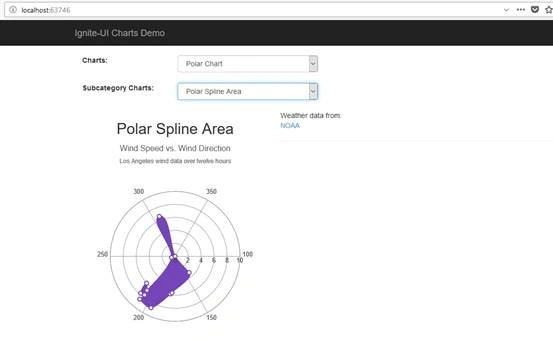
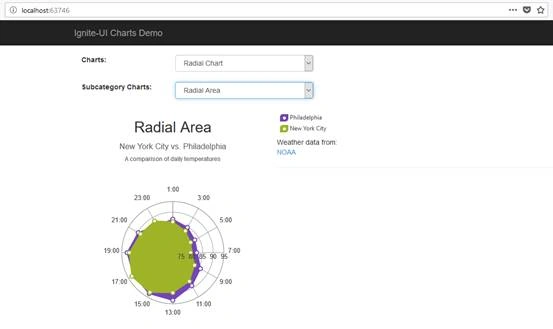
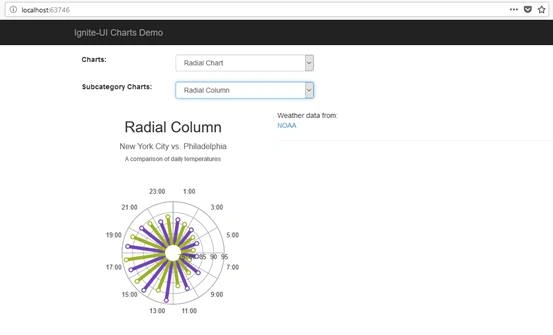
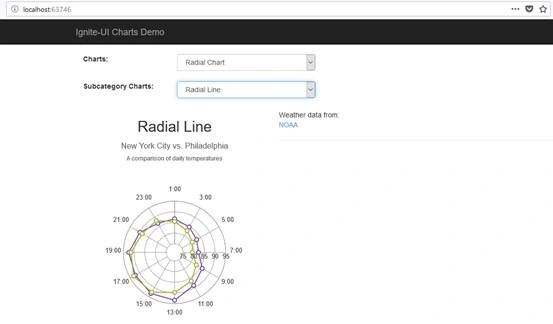
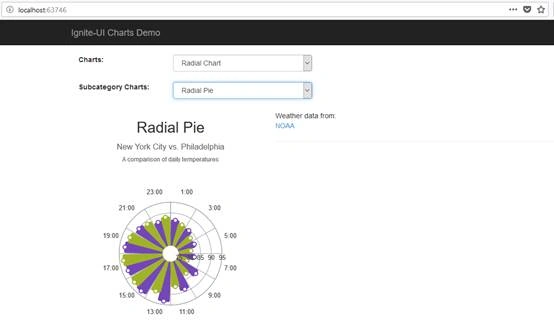
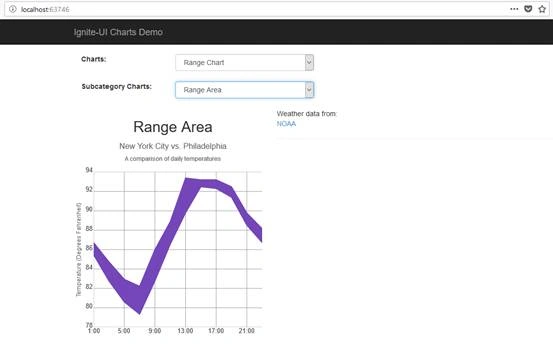
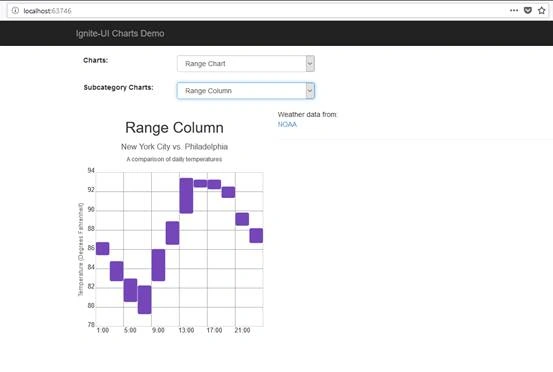
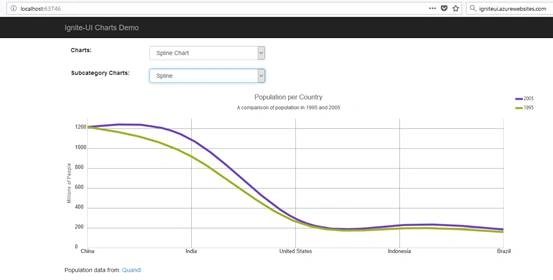
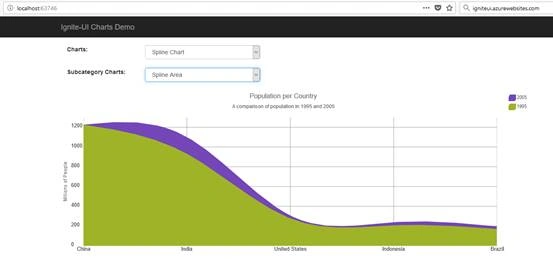
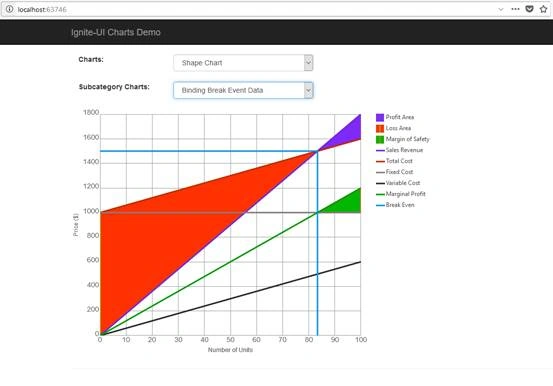
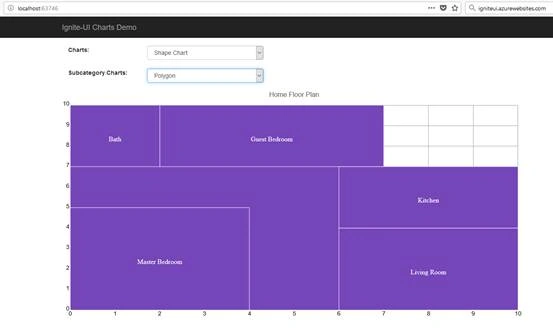
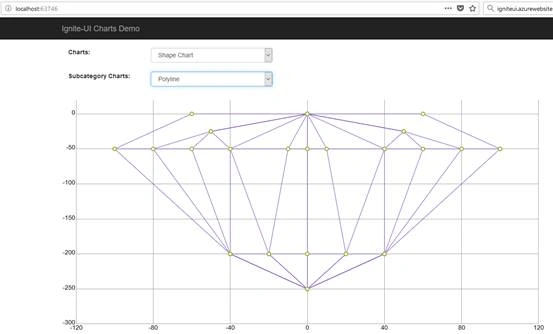
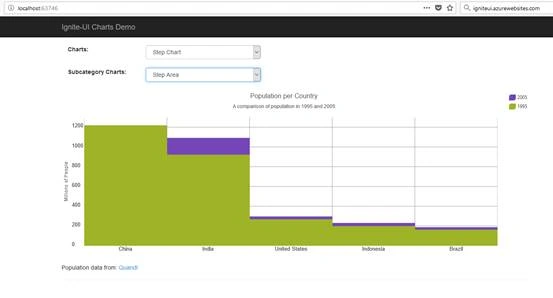
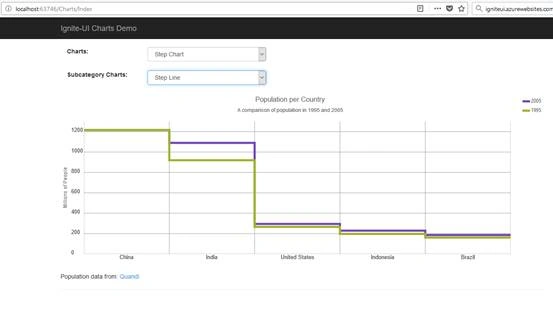
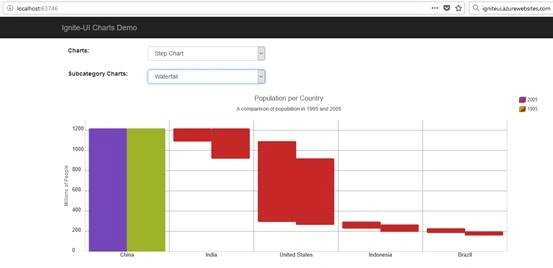
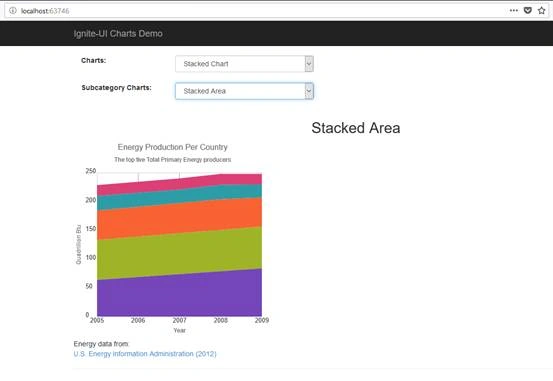
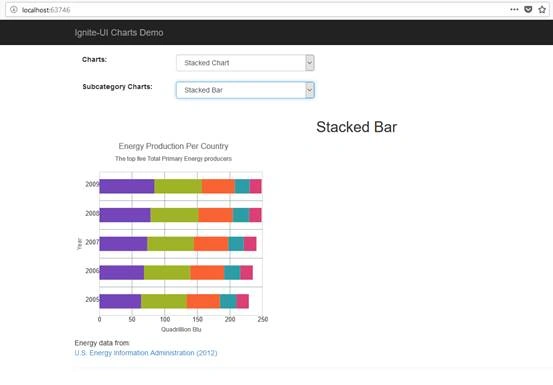
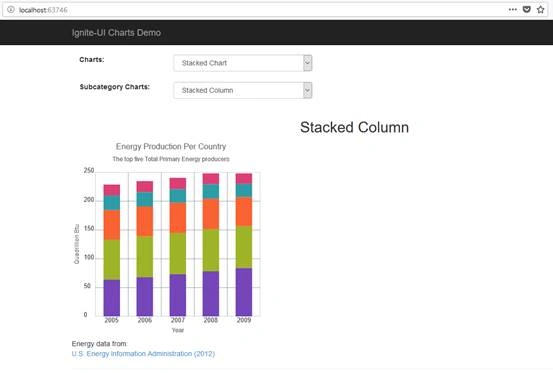
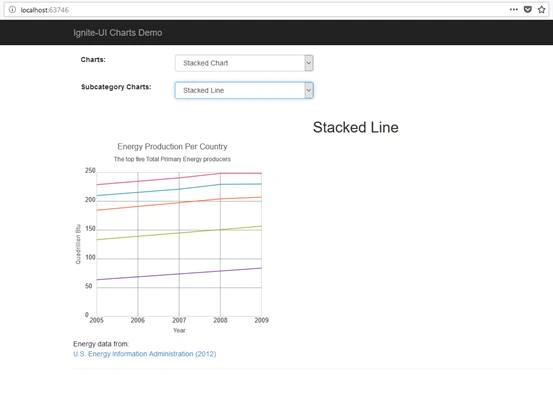
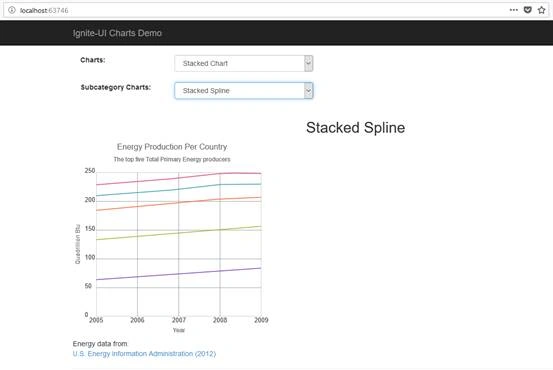
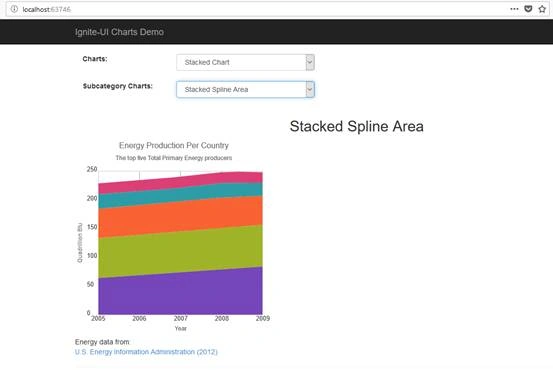
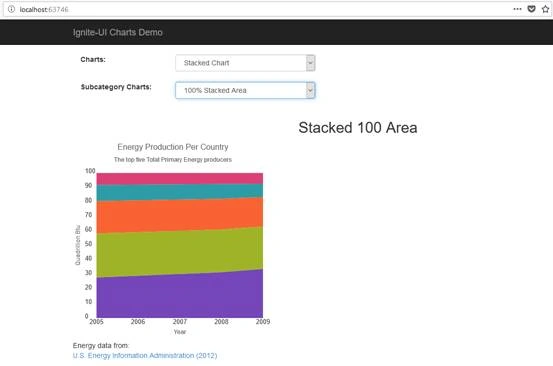
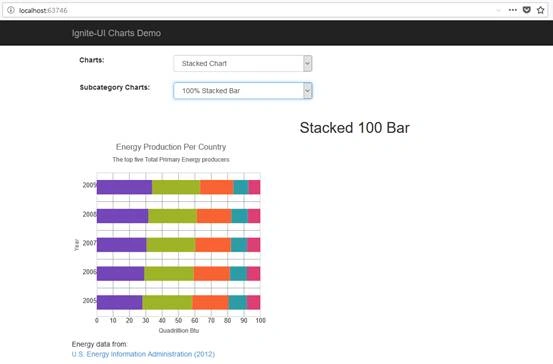
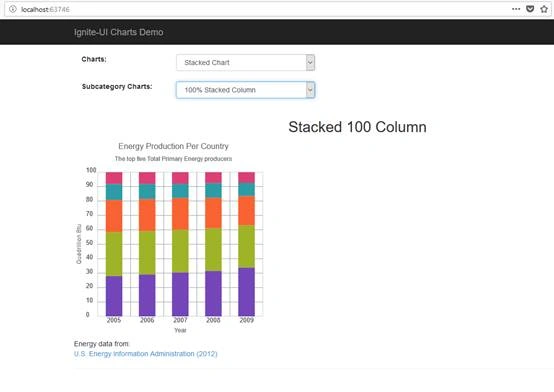
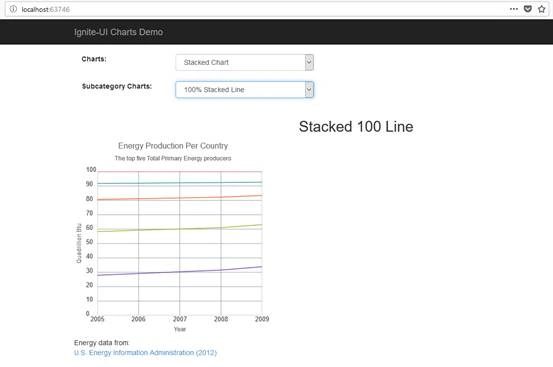
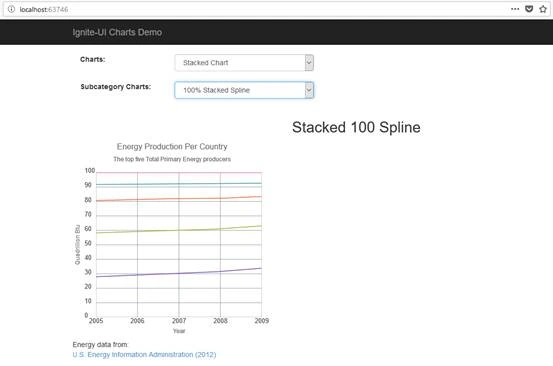
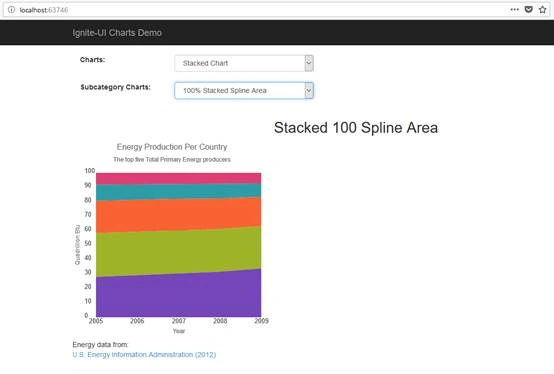
Gajendra JangidPosted Mar 28, 2018, 6:53 AM
Nice blog..................
Vishal PrajapatiPosted Mar 26, 2018, 11:37 AM
Informative one..Thanks for sharing
Jaiprakash BarnwalPosted Mar 23, 2018, 12:08 PM
Ignite, looks good, is it free?