
Most of the time due to some security problem we are unable to continue with the application. So using this piece of code you can easily find out the permission level of the current assembly.
For that first we need to include the following Namespaces in our Application
//For Application
using System;
using System.Reflection;
using System.Security;
using System.Security.Policy;
using System.Security.Permissions;
using System.Collections;
namespace permissionsAssigntoCurrentAssembly
{
public partial class Form1 : Form
{
public Form1()
{
InitializeComponent();
}
// name of buildin namedpermissionset for fulltrust
const string sFullTrust = "FullTrust";
static PermissionSet finalSet = new NamedPermissionSet("FinalAssemblySet");
static PermissionSet permSet = null;
// is it assembly with fulltrust permissions?
static bool fullTrust = true;
private void Form1_Load(object sender, EventArgs e)
{
listBox1.Items.Add("List of permissions assign to current assembly");
IEnumerator policy = SecurityManager.PolicyHierarchy();
while (policy.MoveNext())
{
PolicyLevel currentLevel = (PolicyLevel)policy.Current;
CodeGroup group = currentLevel.ResolveMatchingCodeGroups
(Assembly.GetExecutingAssembly().Evidence);
fullTrust &= ResGroups(group, currentLevel);
if (!fullTrust)
{
if (finalSet == null) finalSet = permSet;
else finalSet = finalSet.Intersect(permSet);
permSet = null;
}
else
{
listBox1.Items.Add("Current Level-" + currentLevel.Label + " || " +
"Group--" + group.Name + " || " + "Group Policy--" +
group.PermissionSetName);
}
}
if (fullTrust) MessageBox.Show("Assembly is running in full-trust mode.");
else Output(finalSet,listBox1);
}
static bool ResGroups(CodeGroup parent, PolicyLevel pl)
{
NamedPermissionSet nps = pl.GetNamedPermissionSet(parent.PermissionSetName);
if (isFullTrust(nps)) return true;
if (permSet == null) permSet = (PermissionSet)nps
else permSet = permSet.Union(nps);
if (parent.Children.Count > 0)
{
foreach (CodeGroup cp in parent.Children)
{
if (cp.Children.Count > 0) ResGroups(cp, pl);
else
{
NamedPermissionSet nps2 = pl.GetNamedPermissionSet
cp.PermissionSetName);
if (isFullTrust(nps2)) return true;
permSet = permSet.Union(nps2);
}
}
}
// fulltrust code group not found
return false;
}
static bool isFullTrust(NamedPermissionSet nps)
{
if (nps.Name.Equals("FullTrust"))
{
return true;
}
return false;
}
static void Output(PermissionSet ps,ListBox lst)
{
Enumerator psEnumerator = ps.GetEnumerator();
while (psEnumerator.MoveNext())
{
lst.Items.Add(psEnumerator.Current);
}
}
}
}
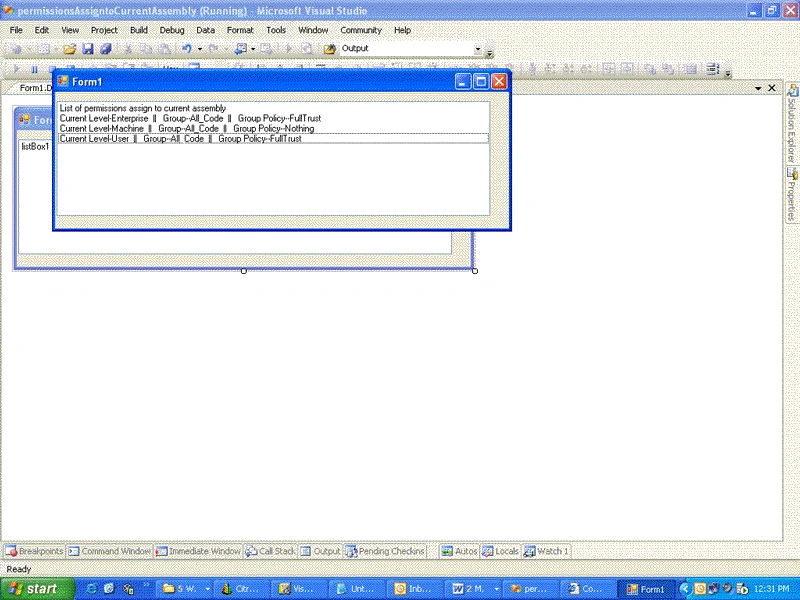
OutPut:--
derryPosted Jul 19, 2006, 3:39 PM
There's a fair bit more than spelling errors.. The code won't work if simply copy and pasted.. You need a using System.Windows.Forms.Forms; And you need a semicolon after the line: if (permSet == null) permSet = (PermissionSet)nps (and I think the PermissionsSet cast is redundant(?)) And you need a left bracket somewhere either at the end of the line: NamedPermissionSet nps2 = pl.GetNamedPermissionSet ...Or at the beginning of the following line: cp.PermissionSetName); Or somewhere in between... ;) And the Enumerator in the line: Enumerator psEnumerator = ps.GetEnumerator(); Needs to be an IEnumerator Then, of course you need to add a listbox to your form... and make sure all your namespaces match up.. I think that about covers it...? Well.. Except for the fact that at this point, it will finally actually compile.. But if you run it, all you get is a blank listbox. Hmm.. Hmm... Cheers - N
Anand NarayanaswamyPosted Feb 24, 2006, 11:25 PM
I noticed minor spelling errors So using this peace of code you can It should be piece - Anand N, MVP